Tileset Base Generator
Build base reference sheets for top-down autotiles or 2:1 isometric tiles. Pick a tile size, choose a 15-piece or 17-piece layout, and export a pixel-perfect PNG you can drop straight into a game or hand to an AI as a reference.
Geometry
Color
Colors in the base to edge ramp
Output
One sheet, every connection
Top-down terrain tilesets share the same 4x4 layout. Sixteen tiles cover every way the ground can meet its edge at the four corners, and one tile is empty, so you get 15 usable pieces. Lay them next to each other and the terrain flows seamlessly in any direction.
The generator draws that exact structure. Edges bleed to the tile border so neighbors connect, rounding and roughness only appear where the shape faces empty space, and diagonal tiles bridge through the center instead of pinching at a point.
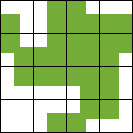

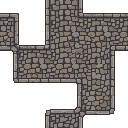
Turn the base into a finished tileset
The base sets the resolution and the silhouette. Feed it to SpriteCook and the AI fills in real texture at the same size and layout, so the tiles still connect.
Common questions
What is a tileset base?
A flat reference sheet that lays out every tile shape in a 15-piece or 17-piece top-down autotile set, or a 2:1 isometric grid. It defines the geometry, so edges and corners line up before any texture is added.
What can I use it for?
Two things. Drop it into your game as placeholder terrain while you prototype, or hand it to an AI image model as a reference so the finished tiles keep the same size and layout.
Is it free?
Yes. The tool is free and open source under the MIT license. It runs in your browser, needs no account, and you can use the exported PNGs in commercial games.
What is it not?
It does not produce finished art. The export is a flat base with the right shapes and connections. Grass, stone, water, and other materials still need to be painted on top, by you or by an AI.
How do I make it look better?
Upload the base to SpriteCook and describe the material you want, like mossy cobblestone or cracked desert ground. The AI paints detail over the base while keeping the tile size and layout, so the tiles still connect in your game.
Try the AI tileset generatorHow do I make other terrains?
Reuse the same base. Each generation in SpriteCook can turn it into a different material, such as grass, sand, snow, or lava, so all your terrains share one layout and stay consistent with each other.
Generate a terrainMIT licensed and provided as is.Source on GitHub