Nano Banana 2 Lite, Google's Fast Image Model for Pixel Art
Google shipped Nano Banana 2 Lite, a faster and cheaper version of Nano Banana 2. Here's what changed and how it holds up for game sprites and pixel art.
Google just added a new model to the Nano Banana 2 family: Nano Banana 2 Lite. Short version, it's the same family, tuned to be faster and cheaper to run.
If you've used Nano Banana 2 for game art, this is the one you reach for when you want a lot of attempts without waiting around.
What's actually different
It's the speed-and-cost variant. Google calls it their fastest and most economical model in the Nano Banana line. A couple of numbers from their post:
- Text-to-image in about 4 seconds
- Built for high-volume, near-real-time generation
The trade is quality. The full Nano Banana 2 is still the higher-fidelity option, and Lite gives up a bit of that to go fast. What it keeps is the stuff that usually breaks on smaller models:
- Prompt adherence stays reliable
- Character consistency holds across generations
- In-image text stays legible
That matters when you're making sprites, since you'll run a result a dozen times before you keep one.
How it does on pixel art
I ran a few game-asset prompts through it. Here's what came back.

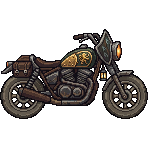
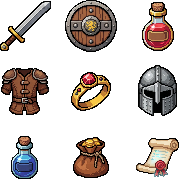
These are usable. The shapes read well, the palettes are clean, and the inventory set came out consistent across all nine slots.
The verdict
Lite is good for fast first passes and throwaway iterations. It's quick and it's cheap to run, so it's nice for blocking things out.
But when I want consistency and pixel art that's reliable shot to shot, Nano Banana 2 and Nano Banana 2 Pro are still the go-to. They hold style and detail better, especially across a batch where everything needs to match. So I'd reach for Lite while you're exploring, then switch to 2 or Pro for the final assets.
One thing that's true for every Nano Banana model, Lite included. The output looks like pixel art, but the pixels aren't snapped to a clean grid. It's high-res with soft edges, so you'll want to fix the grid before it goes in an engine. We wrote that up in turning Nano Banana images into actual pixel art, and the Pixel Grid Detector handles the cleanup for free.
Prompting tips carry over
Nothing about prompting changes with Lite. The same things that work on Nano Banana 2 work here:
- Ask for "side view" or "front view" so it doesn't default to a 3/4 angle
- Say "2d game sprite" or "game asset" to keep it grounded
- "Limited color palette" pushes toward cleaner pixel clusters
- Fix the grid in post, don't fight the model for it in the prompt
Using it in SpriteCook
Nano Banana 2 Lite is live in SpriteCook. Open the model picker and pick it from the list, then generate like you normally would.
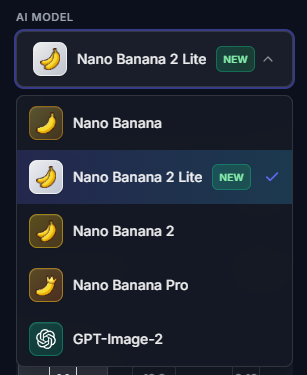
It's a nice fit for SpriteCook's flow, since the whole point is running a lot of generations to land a look. If you want to keep a style consistent across a batch, the consistent game art guide still applies the same way.
Want to poke at it yourself? Try Nano Banana 2 Lite in SpriteCook.