Comparison · 2026
SpriteCookvsScenario
SpriteCook is built by game developers for 2D game art, with a dedicated pixel mode, sprite sheets, and tilesets. Scenario is a broad creative-AI platform that makes sprites by prompting general image and video models.
SpriteCook
Purpose-built for game art, by game devs
- Dedicated pixel mode, sprite sheets, tilesets
- One consistent style, no training
- Engine-ready, saved to your account
- Free tier you can ship with
Best for: 2D game devs and pixel artists
Scenario
General creative-AI platform
- Sprites via general image and video models
- No dedicated pixel or tileset tool
- Custom model training for consistency
- Broad: images, video, 3D
Best for: General creative work across media
Side by side
| Feature | SpriteCook | Scenario |
|---|---|---|
| How sprites are made | Purpose-built game-art models | General image and video models |
| Pixel art | Dedicated pixel mode | General models, prompt-based |
| Sprite sheets | Yes, game-ready | Prompted, slice it yourself |
| Tilesets | Yes | No dedicated tool |
| Seamless textures | Yes | General models |
| Animation | Real pixel-art animation | Video model, pixels drift |
| Character creator | Yes | General models |
| Style consistency | Saved theme, no training | Train a custom model |
| Detailed / HD 2D | Yes | Yes |
| Engine-ready export | Unity, Godot, Phaser, GameMaker | Unity plugin, slice yourself |
| Saved asset library | Yes | Yes |
| API / agent access | API and MCP | API and Unity plugin |
| Made for game dev | Built by game developers | General creative platform |
| Free tier commercial use | Yes | Personal / eval only |
| Commercial use | Yes, including free | Paid plans |
| Paid from | $8 / month | $15 / month |
Pricing and features as of June 2026. Scenario details from scenario.com.
What “game-ready” means
A checkbox can't show the difference that actually matters: usable output. SpriteCook gives you transparent PNGs, a consistent palette and grid, sprite sheets already sliced into frames, and animations that loop, with no cutting up a big image or cleaning edges.

Animated sprite sheet
Frames sliced and looping
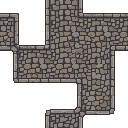
Tileset
Tiles that line up

Animate anything
Effects and props, not just characters
Built by game developers, for game art
SpriteCook is a game-art tool first, not a general image platform pointed at games. It is built around sprites, pixel grids, sprite sheets, tilesets, and the way game engines expect assets, so what you generate drops into your project and works.
Pixel art and tilesets that are game-ready
A dedicated pixel mode, sprite sheets, tileset generation, and sprite animation are built in. Scenario makes sprites by prompting general image and video models, then you slice and assemble the results yourself, and it has no dedicated tileset tool.
A free tier you can ship with
SpriteCook's free plan lets you use what you make in commercial games, no card required, and paid plans start at $8 a month. Scenario's free plan is for personal and evaluation use, so shipping with it needs a paid plan.
Where Scenario is strong
Scenario is a powerful, broad creative-AI platform. For general image, video, and 3D work across many kinds of projects, and for training custom models on your own art, it covers far more than games. For 2D game art specifically, SpriteCook is the purpose-built option.
Common questions
Is SpriteCook a good Scenario alternative for game art?
Yes. SpriteCook is purpose-built for 2D game art, with a dedicated pixel mode, sprite sheets, tilesets, and engine-ready export. Scenario is a broad creative-AI platform that makes sprites by prompting general image and video models.
Does Scenario have dedicated pixel art and tileset tools?
Not as dedicated tools. Scenario generates sprites by prompting general image models (such as GPT Image and Gemini) and video models, and you slice the result yourself. SpriteCook has a dedicated pixel mode and tileset generation built in.
Can I use free-tier output commercially?
On SpriteCook, yes, the free plan allows commercial use. Scenario’s free plan is for personal and evaluation use only, so shipping with it requires a paid plan.
Does SpriteCook keep my art style consistent?
Yes. You set a theme once and it carries palette, mood, and direction across everything you make, with no model training. Scenario recommends training a custom model to keep a character consistent.
Which is built for game developers?
SpriteCook is built by game developers for 2D game art, with sprite sheets, tilesets, engine-ready exports, and a saved asset library. Scenario is a general creative-AI platform used across images, video, and 3D.
Try SpriteCook free
Generate your first sprites in under a minute. No credit card, free output is commercial, and everything you make stays in your account.
Start creating free