Game art, generated

Pixel Art Portrait Generator

Dialogue-box busts with actual personality, in a style that holds across your whole cast.
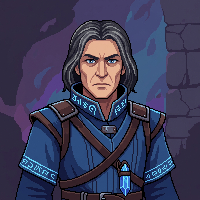
Pixel art portrait of a stern human battlemage in deep blue robes
"A middle-aged human battlemage, glowing arcane sigils..."
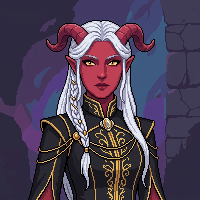
Pixel art portrait of a tiefling noblewoman with swept-back horns
"A young tiefling noblewoman, black-and-gold court outfit..."
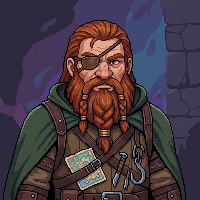
Pixel art portrait of a dwarven explorer with an eye patch
"A rugged dwarven explorer, beard braided with bronze rings..."
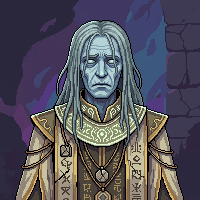
Pixel art portrait of an undead priest with faintly glowing eyes
"A mysterious undead priest, robes of dark ivory and faded gold..."
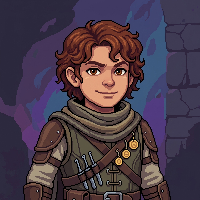
Pixel art portrait of a halfling rogue with a sly half-smile
"A confident halfling rogue, clearly always up to something..."

Full characters at dialogue-box size

A dialogue portrait has a couple hundred pixels to tell the player who is talking. Expression and silhouette do all the work, which is exactly what falls apart when portraits come from different sources or sessions.

These five came from one-paragraph prompts in a single style. The dwarf keeps his eye patch and bronze rings, the rogue keeps her smirk. Same wall texture behind every one, so the set reads as one game.

How it works

1

Describe the character

A paragraph with face, expression, and outfit details. The captions under the portraits are the actual prompts, trimmed.

2

Generate the bust

Pixel art mode, portrait framing. Regenerate or adjust the paragraph until the expression lands.

3

Match the rest of the cast

Keep the same theme active for every character, and each new portrait joins the set instead of starting a new style.

Keep going

Frequently asked questions

What size are the portraits?+
These examples are 200px squares, a comfortable size for dialogue boxes that still scales down cleanly. You control the output size per generation.
How do I keep every portrait in the same style?+
Use one theme for the whole cast, or pass a finished portrait as a style reference. The five on this page share a style and background that way.
Can I match portraits to my existing game art?+
Yes. Upload a sprite or screenshot from your game as a style reference and the portraits pick up its palette and rendering.
Can it do emotion variants of the same character?+
Yes. Reuse the character description and change the expression line, or edit the finished portrait and describe the new emotion.
Can I use the portraits commercially?+
Yes. Everything you generate is yours to use commercially, including in games you sell.