Game art, generated
Isometric Pixel Art Generator
2:1 diamond tiles, terrain sets, and animated buildings that all sit on the same grid.

Why isometric art is unforgiving
Iso art only works when everything agrees: the same 2:1 angle, the same tile footprint, the same light direction. One off-angle building and the whole scene tilts.
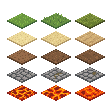
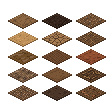


Tiles come from tileset mode, which generates pixel-perfect 2:1 diamonds at 32px or 64px. The buildings come from community presets: prompt setups shared by SpriteCook users who worked out how to get consistent isometric results. A whole block of buildings is one generation and one animation prompt, then the slicer splits it into individual animated assets.
How it works
Generate the ground
Pick the Isometric perspective in tileset mode for pixel-perfect 2:1 tiles. Variants like the grass and dirt sets above give your ground texture without repetition.
Add buildings from community presets
Start from a community preset. Other users have already dialed in the prompting for consistent isometric buildings, so a whole block comes out of a single generation, all on the same angle.
Animate once, slice into assets
One animation prompt brings the whole block to life: chimney smoke, glowing windows, flags. The slicer then cuts it into individual animated buildings, each with its own sprite sheet.