Use as Reference
Create consistent art styles and character variations using reference images.
What is Reference?
The Reference feature helps the AI understand your desired art style or character design. By providing a reference image, you can generate new sprites that maintain visual consistency with your existing assets.
This is essential for creating cohesive game art. Whether you're making character variations, different poses, or entirely new characters in the same art style, reference images ensure everything looks like it belongs together.
Example
Here are different characters created using the same art style reference:
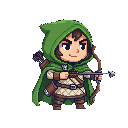
Archer

Druid

Jester
All three characters share the same art style and visual consistency
When to Use Reference
How to Use
Click the "Use as Reference" button on any image in your library
Describe the new asset you want to create, and the AI will maintain the style from your reference
Generate multiple variations to find the perfect match for your project