Edit an Image
Make alterations to existing images with AI-powered editing.
What is Edit?
The Edit feature allows you to modify existing images using text prompts. This is perfect for making specific changes to your sprites without starting from scratch.
Use Edit when you want to alter specific aspects of an image, such as changing colors, adding or removing elements, modifying expressions, or adjusting details.
Example
Here's an example of editing an existing sprite to change the character's appearance:
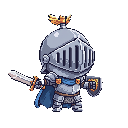
Before: Original knight sprite
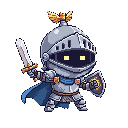
After: Edited with color and detail changes
Common Use Cases
Remove elements: "Remove the hat" or "Remove the sword"
Change colors: "Make the armor blue" or "Change to red cape"
Modify expressions: "Make her look angry" or "Add a smile"
Add details: "Add a crown" or "Give him a shield"
How to Use
1
Click the "Edit" button on any image in your library
2
Describe what changes you want to make in the prompt field
3
Generate and compare the edited version with the original