Pixel Engine v1.5, a New Model for Sprite Animation
A new animation model with cleaner frames and better prompt adherence, any frame count from 3 to 16, and pixel canvases up to 320px.

There's a new animation model in the picker. Pixel Engine v1.5 is built for motion that has to happen in a specific way, the kind of thing a walk-cycle model tends to smooth over.

Here's a hamster with a battle hammer, seven animations, all v1.5.

Same character, one run, about three minutes. Four of those are presets and three came from typed prompts.
Cleaner frames, closer to the prompt
Fewer artifacts between frames, and a better read on what the action you asked for actually involves. These three came from prompts I typed into the Character Creator.


Same prompt, both models
I asked for two things at once, one that has to change and one that has to stay put.
the knight raises the round shield up in front of his face and keeps the sword pointed down at his side the whole time
8 frames each, prompt enhancement off, so the model is the only thing that changed.


v1.5 gets both halves. The shield climbs to head height and the sword stays where it was. v1.1 shuffles his weight and leaves the shield at his hip, and the white cross on it smears apart around the middle of the loop.
Is it always better?
No. Here's the same sprite through both, 8 frames each, "the chef tosses a pancake out of the pan, it flips in the air, and he catches it back in the pan". Prompt enhancement off, so the model is the only thing that changed.


v1.1 animates the whole character. He looks up to follow the toss, the arm rises and drops, the body leans into it. v1.5 keeps him planted and moves the pancake instead, and he barely shifts through the middle of the clip. Steadier, and stiffer.
Neither one is wrong. Pick the trade you want.
Any frame count, odd ones included
v1.1 only takes even frame counts. v1.5 takes anything from 3 to 16, so you can give a hit reaction 5 frames and a spell wind-up 9 without padding it out to fit.
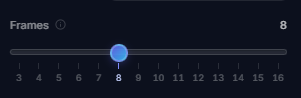
Pixel canvases go a bit bigger too, up to 320x320 instead of 256x256. Detailed art still goes up to 2048.
What you give up
v1.5 is slower, and it costs 26 credits per animation instead of 20. In the Character Creator it also skips the batch discount, so a set of six costs the same per animation as a set of one.
Negative prompts are off. v1.1 lets you list things to leave out, v1.5 doesn't take them. Your draft is kept if you switch back, so nothing is lost by trying.
On detailed art, v1.1 still goes to 24 frames where v1.5 stops at 16.
Which one to pick
v1.1 is still the default, and I'd leave it there for the bread and butter. Walk cycles, idles, anything that has to loop cleanly, and anything where you want the whole character moving.
Reach for v1.5 when the motion is specific. A weapon swap, a two-step action, a move that only makes sense from one angle, anything you've prompted before and had come back generic.
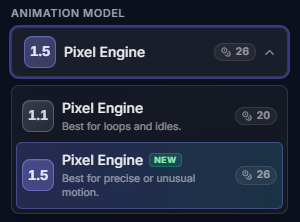
You'll find the picker in the Animate sidebar, and in the Character Creator under the advanced animation settings. Pick it once and it's remembered next time.
Go break it
Open the pixel art animation generator and drop a sprite in, or start a character from scratch in the Character Creator. If you're animating higher-res art, the detailed sprite guide still applies the same way.
If something comes out well, I want to see it. Especially the prompts that never worked before.