Comparison · 2026
SpriteCookvsSpritesheets.ai
Two AI sprite sheet generators. SpriteCook is built by game developers and turns a prompt into true pixel-perfect, engine-ready sheets, with tilesets and a full 2D kit. Spritesheets.ai animates a character image into a sprite sheet.
SpriteCook
AI sprite sheets, by game devs
- True grid pixel art with palette control
- Characters, animation, tilesets, textures
- Engine-ready, shipped export and MCP
- Built by game developers
Best for: A full 2D pipeline, game-ready
Spritesheets.ai
Animate a character into a sheet
- Image-to-animation sprite sheets
- Atlas export and background removal
- No tilesets
- Engine plugins in early access
Best for: Animating a single character
Side by side
| Feature | SpriteCook | Spritesheets.ai |
|---|---|---|
| How sheets are made | Prompt to game-art models | Animate an uploaded character |
| Pixel art | True grid mode + palette lock | Pixel style via prompt |
| Sprite sheets | Yes, pre-sliced | Yes, with atlas |
| Animation | Real pixel-art animation | Image-to-animation |
| Characters | Character creator | Animate one you upload |
| Tilesets | Yes | No |
| Seamless textures | Yes | No |
| Detailed / HD art | Yes | Stylized AI |
| Engine export | Unity, Godot, Phaser, GameMaker | Atlas; plugins in early access |
| Agent access (MCP) | API and MCP | No MCP |
| Made for game dev | Built by game developers | No public team listed |
| Free tier | 40 credits / 30 days | Free, watermark-free |
| Paid from | $8 / month | $3.50 / month |
Pricing and features as of June 2026. Spritesheets.ai details from spritesheets.ai.
What “game-ready” means
A checkbox can't show the difference that actually matters: usable output. SpriteCook gives you transparent PNGs, a consistent palette and grid, sprite sheets already sliced into frames, and animations that loop, with no cutting up a big image or cleaning edges.

Animated sprite sheet
Frames sliced and looping
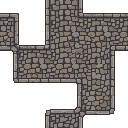
Tileset
Tiles that line up

Animate anything
Effects and props, not just characters
True pixel art, not a pixel filter
SpriteCook processes output into real grid-aligned pixel art with palette control, the way a game artist would. It is a dedicated pixel pipeline you can see in the art it ships, not a keyword you add to a prompt.
A full 2D kit, including tilesets
Beyond character sheets, SpriteCook makes tilesets, seamless textures, items, UI, and detailed art, so your whole game shares one style. Spritesheets.ai focuses on animating a single character and has no tileset tool.
Built by game developers, engine-ready today
SpriteCook is made by game developers, with shipped exports for Unity, Godot, Phaser, and GameMaker, plus an MCP so coding agents can generate art in your editor. Spritesheets.ai lists its engine plugins as early access.
Where Spritesheets.ai is strong
Spritesheets.ai has a generous, watermark-free free tier and low entry pricing, and it does the core job well: turn a character image into an animated sprite sheet with a clean atlas. If you mainly need to animate one character on a budget, it is worth a look.
Common questions
Is SpriteCook a good Spritesheets.ai alternative?
Yes, especially if you want true pixel art, tilesets, and engine-ready output from a sprite sheet generator built by game developers. Both turn AI into sprite sheets; SpriteCook covers more of the 2D pipeline.
Does SpriteCook make true pixel art sprite sheets?
Yes. A dedicated pixel mode snaps output to a real grid with palette control, then exports pre-sliced sheets, the way a game artist would set them up.
Does Spritesheets.ai make tilesets?
No. It focuses on animating a character image into a sprite sheet. SpriteCook also makes tilesets and seamless textures, so your whole game shares one style.
Which is cheaper?
Spritesheets.ai starts lower, around $3.50 a month, and has a watermark-free free tier. SpriteCook gives 40 credits every 30 days free, paid starts at $8 a month, and commercial use is included on every tier.
Can I generate from my code editor?
With SpriteCook, yes, through an MCP and API for Claude Code, Cursor, VS Code, and Codex. Spritesheets.ai lists engine plugins as early access.
Generate your sprite sheet
Make a pixel-perfect, engine-ready sprite sheet in under a minute. No credit card, free output is commercial, and everything you make stays in your account.
Start creating free