How to make a pixel art inventory UI with 9-slice and rarity effects
How a small pixel art loot window was made. 20 generated pieces at exact sizes, a 9-sliced frame, rarity slots drawn in code, a staggered reveal with an effect per rarity, a glow behind the window and cartoony sound effects. With the prompts and Python code.
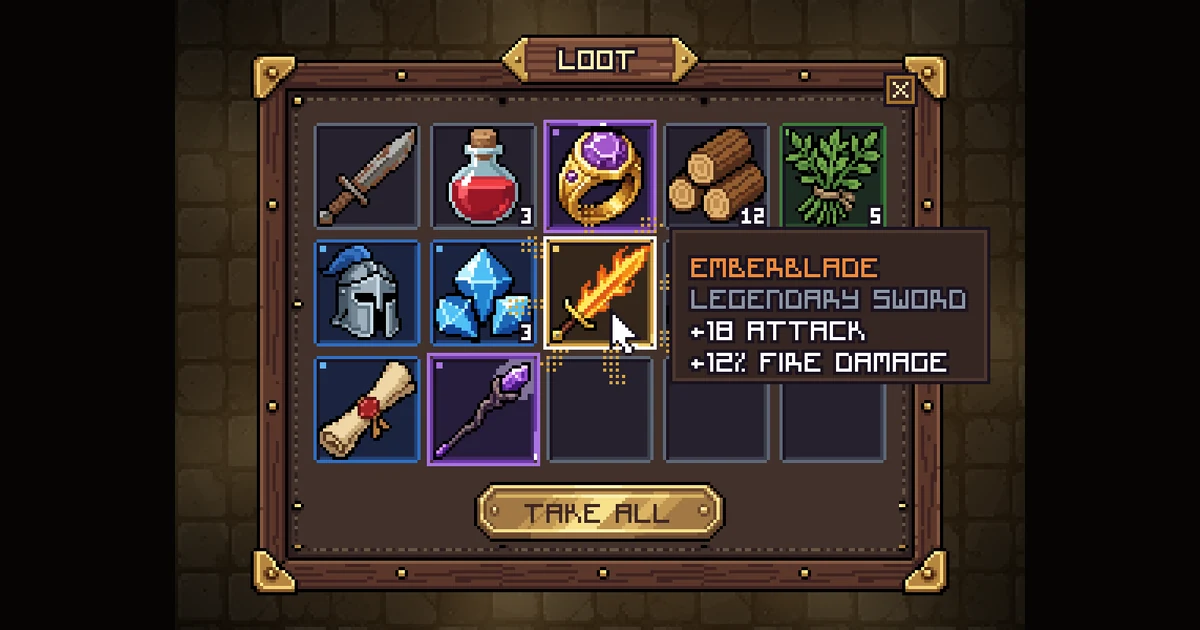
A chest shakes, pops open, and a loot window fills up one item at a time. Each item lands in the colour of its rarity, the epic ones shimmer, and the legendary sword gets a little show of its own.
The art is 20 small pieces. The slots, rarity colours, effects, glow and timing are all code. Here's how each part was made.
The art is 20 pieces at their exact size
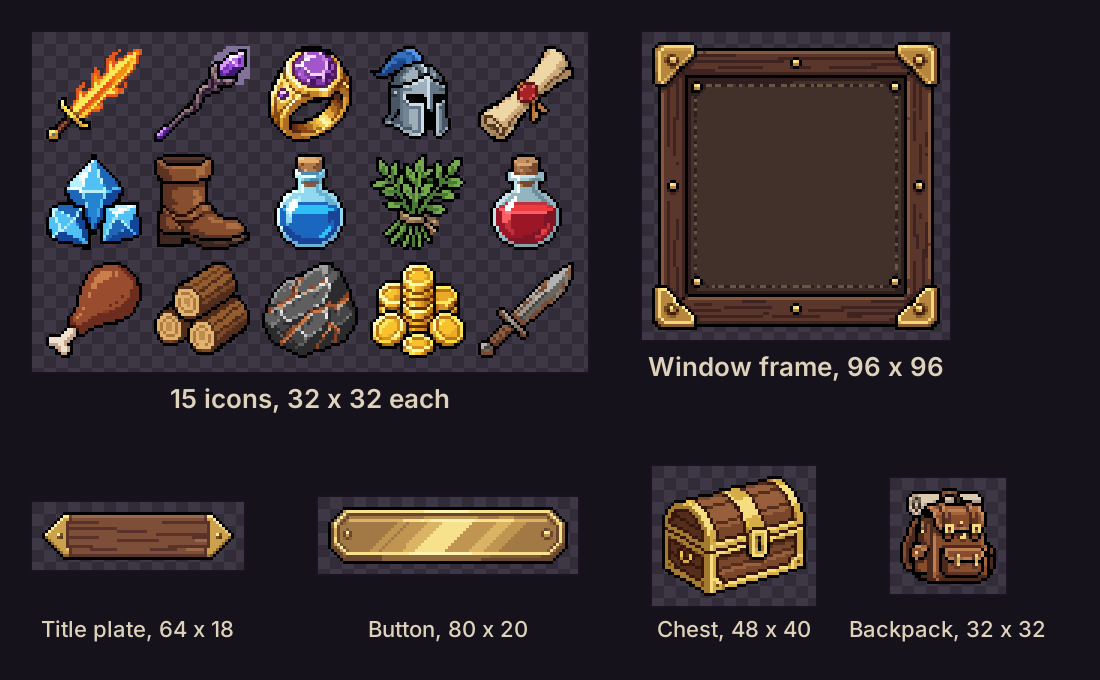
Every piece came from Pixel Engine Image, which draws pixel art at the exact width and height you ask for, with the background already removed. Each call used the same wording around the item (pixel art, crisp 1 px dark outline, top-left light), so the frame, the chest and the icons read as one set.
- Window frame, 96 x 96
- Title plate, 64 x 18
- Button, 80 x 20
- Chest, 48 x 40, plus an 8-frame opening animation
- Backpack, 32 x 32
- 15 icons, 32 x 32 each (12 in the loot, 3 spares)
Make the icons one at a time
The first try was one image with all 15 icons in a grid, in a smoother style before I switched to pixel art. They look like a set, but the sword fills its whole cell and the ring is tiny. In a slot grid that's the first thing you notice.
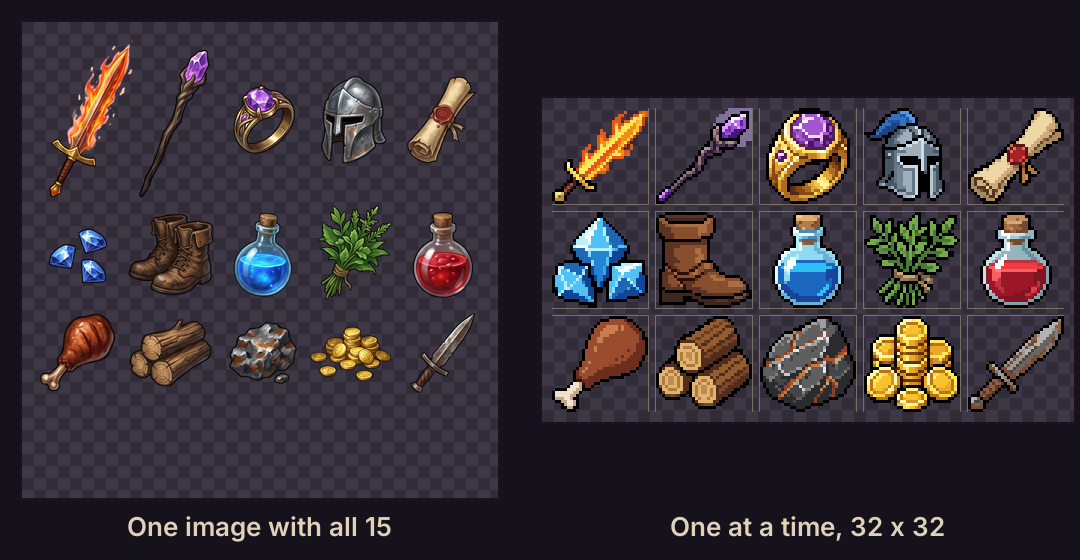
So each icon got its own generation at exactly 32 x 32, with the same wording around the item. The fill rule keeps the sizes even. Long items go corner to corner, round items fill the canvas with a 1 or 2 px margin.
A legendary flaming longsword RPG inventory icon: gold crossguard, ember-orange glowing blade, drawn diagonally from the bottom-left corner to the top-right corner, filling the canvas with a 1 px margin. Pixel art, crisp 1 px dark outline, top-left light, no background.
A rare steel knight helmet RPG inventory icon, front three-quarter view with a dark visor slit and a small blue plume, large and centered, filling the canvas with a 1 px margin. Pixel art, crisp 1 px dark outline, top-left light, no background.
Ask for two variations and keep the cleaner one. The rarity word in the prompt (a rare helmet, an epic ring) nudges how fancy the item looks. The rarity colour comes from the slot, so one icon works at any rarity.
9-slice the frame
The frame is one 96 x 96 piece. Cut it 16 px in from each edge and you get 9 parts: 4 corners, 4 edges and the middle. The corners stay as drawn, and the edges and middle repeat until the window is the size you need.
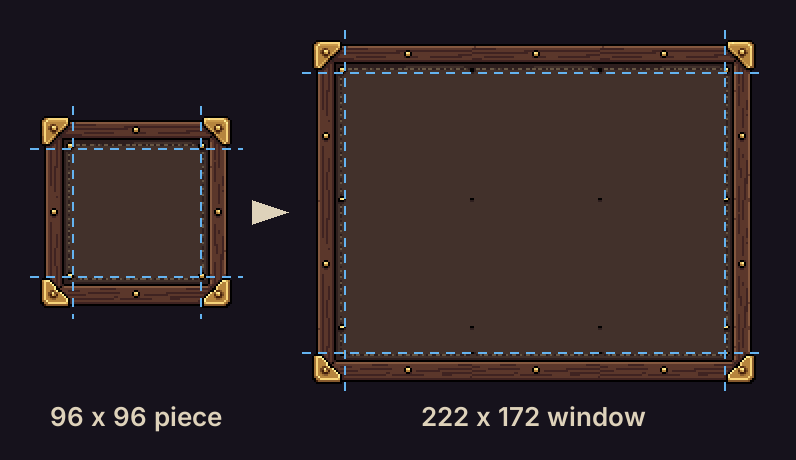
Repeat the edges, don't stretch them. On pixel art a stretched edge turns rivets into bars and smears the wood grain.
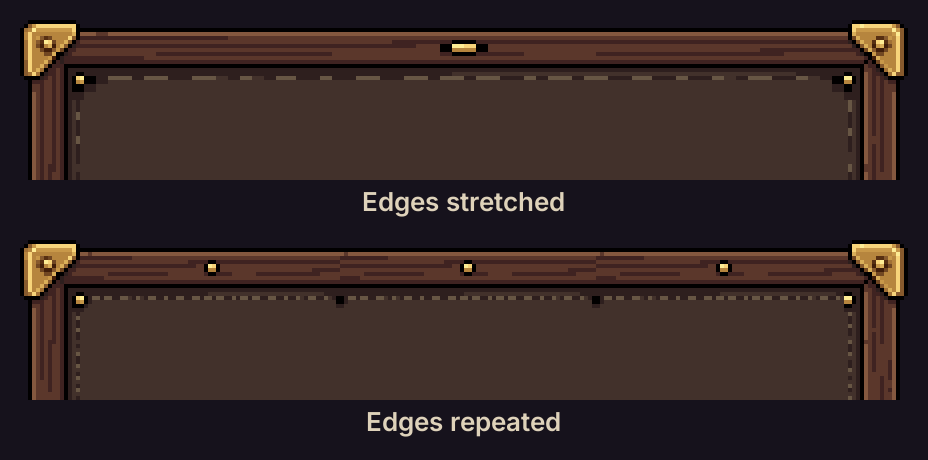
In Godot, that's a NinePatchRect with all four patch margins at 16 and both axis stretch modes on Tile. In Unity, set a 16 px border on the sprite in the Sprite Editor and use the Image type Tiled. Drawing it yourself looks like this:
def nine_slice(src, w, h, b=16):
    """Corners as drawn, edges and middle repeated (never stretched), so every pixel stays the same size."""
    sw, sh = src.size
    src_cols, src_rows = [(0, b), (b, sw - b), (sw - b, sw)], [(0, b), (b, sh - b), (sh - b, sh)]
    out_cols, out_rows = [(0, b), (b, w - b), (w - b, w)], [(0, b), (b, h - b), (h - b, h)]
    out = Image.new("RGBA", (w, h))
    for (sy0, sy1), (y0, y1) in zip(src_rows, out_rows):
        for (sx0, sx1), (x0, x1) in zip(src_cols, out_cols):
            piece = src.crop((sx0, sy0, sx1, sy1))
            for y in range(y0, y1, piece.height):
                for x in range(x0, x1, piece.width):
                    part = piece.crop((0, 0, min(piece.width, x1 - x), min(piece.height, y1 - y)))
                    out.alpha_composite(part, (x, y))
    return out
Draw the whole UI at its real pixel size, then scale it up by a whole number with nearest neighbour (4x here). That way every pixel stays a clean square.
Slots and rarity, drawn in code
Each slot is a 34 x 34 box. It has a border in the rarity colour, a dark fill, a dark inner line along the top and left, a lighter one along the bottom and right, and a small notch in the corner for anything above common.
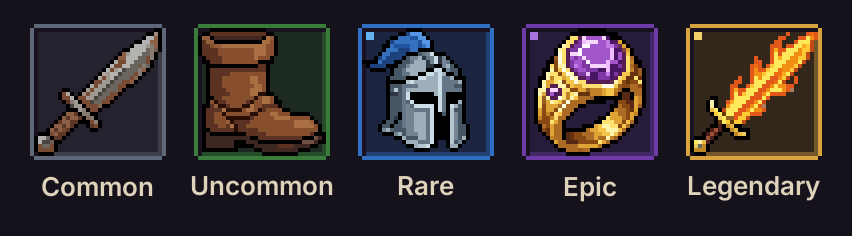
| Rarity | Border | Light | Fill |
|---|---|---|---|
| Common | #5e6878 | #8b96a6 | #26212e |
| Uncommon | #3a7d3a | #6cbf4a | #1c2a22 |
| Rare | #2f6fc4 | #64b3f0 | #1b2440 |
| Epic | #6d3aa8 | #a974e0 | #261c3a |
| Legendary | #d9a440 | #f2d16b | #33261a |
The light colour is for the effects: rings, sparkles and the light running round the border. Stack counts sit in the bottom right corner as tiny 3 x 5 pixel digits with a dark outline.
The reveal
- The window appears at its real size, with a fade and a 6 px rise over 0.22 s. Stretching the finished window open makes the wooden frame look like rubber.
- Every slot starts grey. One item lands every 0.15 s. Its slot takes the rarity colour on the same frame, and the icon drops in from 3 px above with a tiny bounce.
- Each rarity plays its own effect the moment it lands:
- Common, nothing extra
- Uncommon, 4 small sparkles
- Rare, a ring that grows 3 px out from the slot and 6 sparkles
- Epic, a ring that grows 5 px and 8 sparkles, then a short streak of light running round the border every 1.4 s and a soft glow that breathes
- Legendary, a 2-frame white flash, light rays and a beam behind the slot, 14 sparkles, a shine sweeping across the blade every 1.4 s and a gold light running round its border
- Only the legendary flashes white. With 12 items landing, a flash on every item was too much going on.
The sparkles are 4-point pixel stars that shrink from 7 px to a single pixel. The rays are dithered, so they stay pixel art. They're drawn on top of the neighbouring slots for about half a second, then calm down to a sparse dot pattern.
The glow behind the window
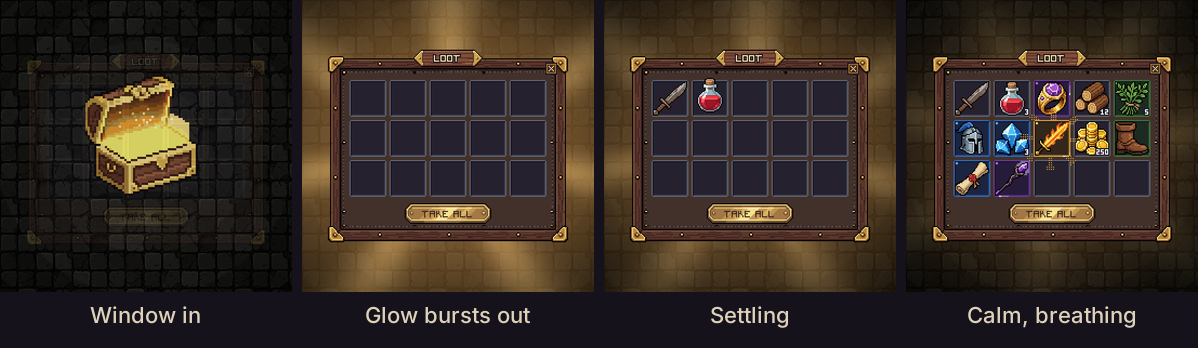
The glow starts 0.1 s after the window. It bursts out past the frame in under 0.2 s, settles back to about half that strength by 0.8 s, and then breathes slowly. Seven soft light shafts turn on top of it, so it never sits completely still.
A blurred copy of the window's rectangle looked boxy, so the glow is round. It's based on the distance from the window's centre, measured on an ellipse through the frame.
def glow_shape(tau, t):
    """(reach, strength, shafts) tau seconds after the glow starts, t = clock time for the slow breathing."""
    breathe = math.sin(2 * math.pi * t / 2.6)
    calm = (0.6 * (1 + 0.06 * breathe), 0.5 * (1 + 0.12 * breathe), 0.35)
    peak = (0.95, 0.9, 0.85)
    if tau <= 0:
        return 0.0, 0.0, 0.0
    if tau < 0.18:                                        # burst out past the frame
        e = 1 - (1 - tau / 0.18) ** 3
        return tuple(p * e for p in peak)
    e = smoothstep((tau - 0.18) / 0.62)                   # settle back
    return tuple(p + (c - p) * e for p, c in zip(peak, calm))


def add_glow(floor, r, a, tau, t):
    """floor: HxWx3 float array behind the window. r: distance from the window's centre, 1 on an ellipse through the
    frame. a: angle around that centre. Adds a round warm glow plus 7 soft light shafts turning slowly on top."""
    reach, k, ks = glow_shape(tau, t)
    d = np.maximum(r - 0.55, 0)
    glow = np.exp(-d * d / (2 * reach * reach))
    wide = np.exp(-d * d / (2 * (1.45 * reach) ** 2))     # the shafts reach a bit further than the glow
    shafts = (0.5 + 0.5 * np.cos(7 * (a - 0.18 * t))) ** 3
    light = glow[..., None] * np.array([255, 178, 84]) * (0.5 * k) \
        + (wide * shafts)[..., None] * np.array([255, 218, 140]) * (0.32 * ks)
    return floor + np.minimum(light, 255) * (1 - floor / 255)   # screen blend: no flat, clipped yellow
Adding the light straight onto the floor clipped to flat yellow at the peak. The screen blend on the last line keeps the stone texture showing through.
The chest shakes once, then opens
The chest rattles once for 0.6 s and builds as it goes, from 1 px to 3 px side to side with small bounces. It stops for a beat, then the lid opens with a 4 px hop and gold specks fly out and fall back. Three short shakes in a row felt like stalling.
The lid is an 8-frame animation of the chest sprite, made with Pixel Engine v1.5 from one prompt:
The treasure chest's domed lid swings open upward on its back hinges in one smooth motion and a warm golden glow shines up from inside. The chest body stays still. It ends fully open.
Sound effects
The sounds come from ElevenLabs' sound effects model. Two things made them a lot better.
Describe the sound itself. A prompt like "inventory open" names an event, so you get something generic. Write what you'd hear, like a wooden lid creaking and then slamming open.
Say cartoony. It keeps the sounds in the same world as the pixel art.
| Moment | Prompt |
|---|---|
| Chest shakes | cartoony treasure chest shaking hard, wooden lid clattering, metal latch rattling and coins jingling inside, building up |
| Lid opens | heavy cartoony wooden treasure chest lid creaking then slamming wide open with a deep solid wooden thunk |
| Under the reveal, 3.5 s | cartoony RPG treasure chest opening chime, long magical harp glissando with twinkling bells and a warm shimmering pad, rising and sparkling |
| Metal item lands | cartoony RPG item pickup, short metallic armor and blade clink |
| Potion lands | cartoony RPG potion pickup, short glass bottle clink with a little slosh |
| Coins land | cartoony RPG coins pickup, short bright coin jingle |
| Rare drop | cartoony RPG rare item drop, crisp crystal bell ding with a shimmering magic tail |
| Epic drop | cartoony RPG epic item drop, magical rising chord of glassy bells with a soft whoosh and bright sparkles |
| Legendary drop | cartoony RPG legendary item drop, powerful golden choir hit with bright ringing bells, shimmering magic and a deep soft boom |
| Tooltip | soft video game menu hover sound, a gentle warm blip |
Each item plays the pickup sound of what it's made of (metal, glass, wood, leaves, coins, gems, leather or paper), with its rarity's drop sound on top. Every item gets a slightly different pitch, so 12 landings in a row don't sound copy-pasted. The long chime starts with the lid and runs under the whole reveal.
Make 3 takes of each sound and listen. A few takes came back almost silent, so check the level before you use one.
Where to next
- Pixel Engine Image, for sprites and UI pieces at the exact size you need
- Generate game UI with AI, for a whole screen as concept art first, then its components
- Pixel Engine v1.5, for animating a sprite you already have, like the chest lid