Free download, runs in your browser
Dual Grid Tileset Template
A blank 15-piece dual grid template in four tile sizes, and a tester. Paint terrain with any dual grid tileset to check its edges and corners before you import it.
Download the template
Transparent PNGs, free for any project. Draw your terrain over the filled shapes and leave the bottom-left cell empty. The layout is the same one SpriteCook tilesets use, so the tester and your engine code work with both.




Which piece goes where
Every tile in a dual grid sits on the corner where four map cells meet. It only needs to know which of those four cells are filled. Each filled corner adds a bit: top-left 1, top-right 2, bottom-left 4, bottom-right 8. That gives 16 combinations, and the all-empty one draws nothing, so 15 pieces cover every shape a map can make.
The number in each cell of the guide is that piece's mask. Turn on Tile edges in the tester to see the tiles sitting between the cells.
Dual grid tilesets, explained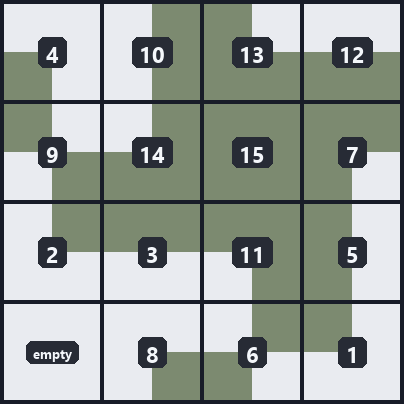
Use it in your game
Keep your map as filled or empty cells. For each corner between cells, build the mask from the four cells around it and draw the matching piece there.
In Godot, a tileset made in SpriteCook exports (on paid plans) with a .tres TileSet that already has the terrain set up, so you paint in the Terrains tab. It also includes a SpriteCookDualGrid scene that draws the dual grid for you. Here's how.
Coding with an AI agent? The SpriteCook plugin includes a dual grid skill with this renderer, so your agent can wire it up for you. Agent setup.
// Corner bits: top-left 1, top-right 2, bottom-left 4, bottom-right 8let mask = 0if (filled(x - 1, y - 1)) mask |= 1if (filled(x, y - 1)) mask |= 2if (filled(x - 1, y )) mask |= 4if (filled(x, y )) mask |= 8// Mask 0 is the bottom-left cell: empty in the template,// the base terrain (like open water) in two-terrain sets.const frameByMask = [12, 15, 8, 9, 0, 11, 14, 7, 13, 4, 1, 10, 3, 2, 5, 6]const frame = frameByMask[mask]// Draw sheet cell (frame % 4, floor(frame / 4)) on the corner (x, y),// shifted half a tile up and left so it sits between the four cells.
Skip the drawing
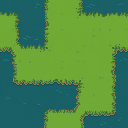
Drawing 15 pieces that line up is slow work. SpriteCook's tileset generator draws all of them from a description, in this layout. The grass and water set shown here came from this prompt:
Emerald meadow grass and deep teal water. Plain softly textured grass, tiny low-contrast blades, clean grassy shoreline with a thin earth bank, subtle calm water ripples.
More tileset tools
Tileset base generator
Build a 15-piece base with rounded or rough edges, then detail it.
AI tileset generator
Every piece drawn from a prompt, exported for Godot, Unity and Tiled.
The 15-piece autotile, explained
The short version of why 15 tiles are enough.
Godot autotile tileset
Load a SpriteCook tileset into Godot and paint a map.