How to make pixel art trees move in the wind
Wind for pixel art trees without animation frames. Keep the trunk still, move leaf clumps one pixel at a time in a wave, add gusts. Tested Python and Godot code.
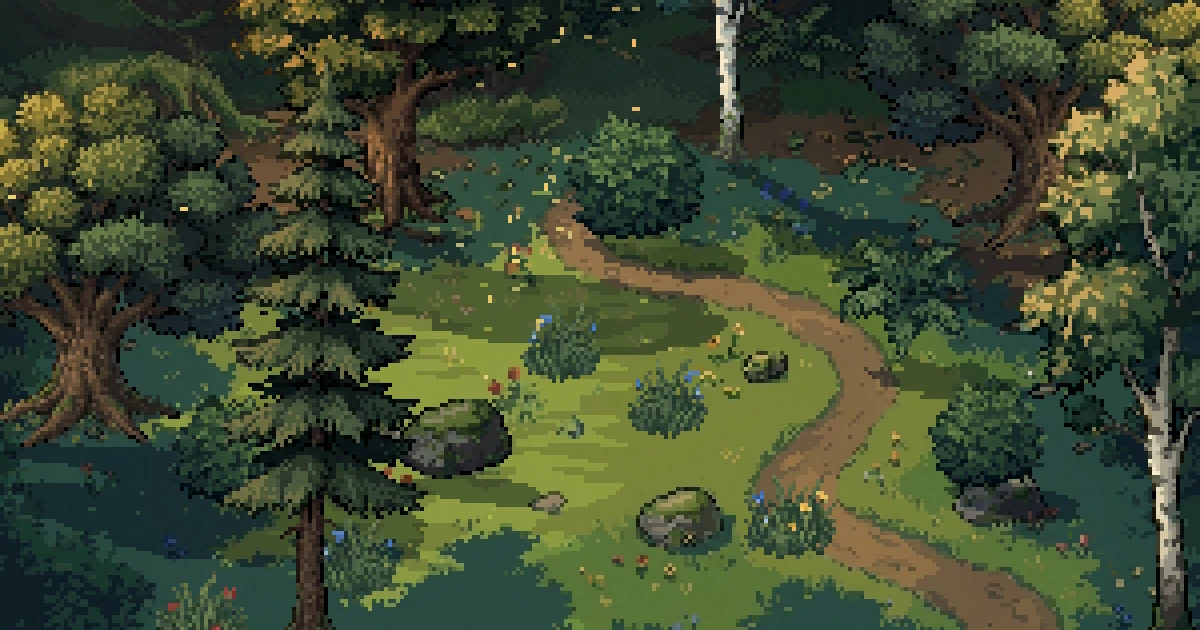
Most 2D wind bends the whole sprite. That's fine for grass, but a thick oak that leans over like a blade of grass looks wrong. Here's a way to do it that keeps every pixel whole. The trunk stays put, the leaves move in clumps one pixel at a time, and gusts roll through with still air between them. It needs no animation frames.
Every tree here is one still sprite. The trees, bushes and ground are generated with SpriteCook, with one scene as the style reference so they match. Everything that moves is code.
Keep the trunk still
The usual sway shader slides each row of the sprite sideways, a bit further per row toward the top. The whole tree leans, trunk included. Real trees don't move like that. The trunk and the big branches barely move, and the leaves do the moving.
Same oak, same wind. On the left every row slides, so the trunk bends. On the right the trunk is fixed and only the leaves move.
Split the canopy into leaf clumps
A pixel artist would animate this tree by moving its balls of leaves, so those are what you cut out.
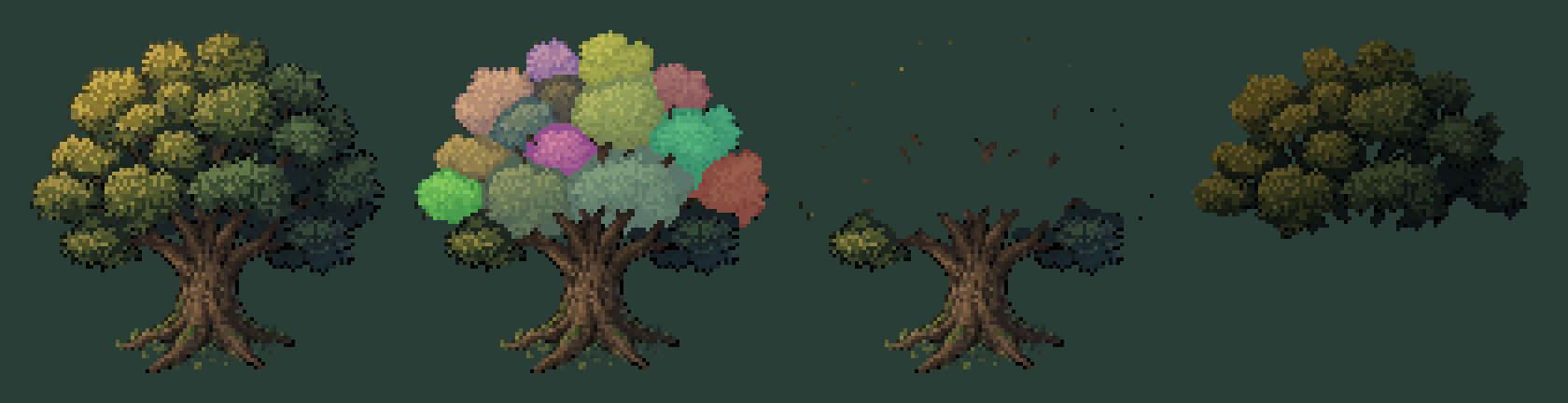
From left to right: the sprite, its leaf clumps, the trunk layer and the inside layer.
- The leaf clumps are one sprite per bright mass of leaves. This oak has 14.
- The trunk is the wood, the roots and anything else that shouldn't move.
- The inside is a darker copy of the canopy that sits under the clumps. When two clumps drift apart you see the shadowed inside of the tree, never the ground behind it.
You can cut the clumps by hand or let a script do it. The script is in the code section below. It takes every bright spot as the middle of a clump and the darker lines between them as the borders.
Each clump walks a one pixel loop
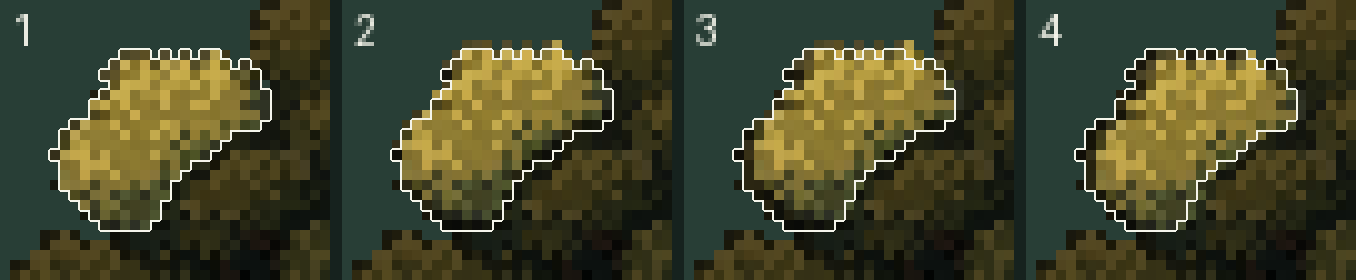
Up, right, down, back. One pixel each way, and only whole pixels, so nothing blurs. This is how pixel artists animate foliage by hand. Raymond Schlitter describes the same loop in his wind effects guide.
Two more habits from hand animation:
- Few poses a second. The leaves change pose 10 times a second, even when the game runs at 60.
- Stiff inside, loose outside. A clump at the centre of the canopy moves about a third as far as one at the edge. In a light breeze only the outer clumps move at all.
Time the clumps along the wind
If every clump runs its loop on its own timing, the tree jitters. Delay each clump by how far downwind it sits, and the same motion becomes a wave that runs through the canopy.
Both trees use the same loop at the same speed. The left one has random timing, the right one is timed by position. Clumps that are away from rest are drawn a little lighter here so you can follow the order.
In the clip at the top a clump takes 1.54 seconds per loop and the crests are 69 px apart, so the wave travels at about 45 px a second. Take the clump's position in the world, and the wave carries on from one tree to the next.
Gusts, with still air between them
A steady breeze gets boring fast, and leaves that never stop read as noise. So the wind is a handful of gust patches that cross the map, each with its own size, speed and strength.
The light patches are the gusts. When one reaches a tree:
- The loop gets wider, 2 to 3 px where it was 1.
- The canopy gets pushed downwind. Each tree is a spring. The gust pushes it, and once the gust has passed it swings back a little past upright and settles. An oak is slow, 2.2 seconds per swing. A bush takes 1 second.
- Then it stops. Away from a gust the loop shrinks to nothing and the leaves come to rest.
In the big gust the outer clumps end up 6 px from where they started. A tree that has stood still for a few seconds also makes the next gust look stronger.
Put two gusts close together somewhere. The second one catches the trees while they are still swinging back from the first.
A pine moves by its branch layers
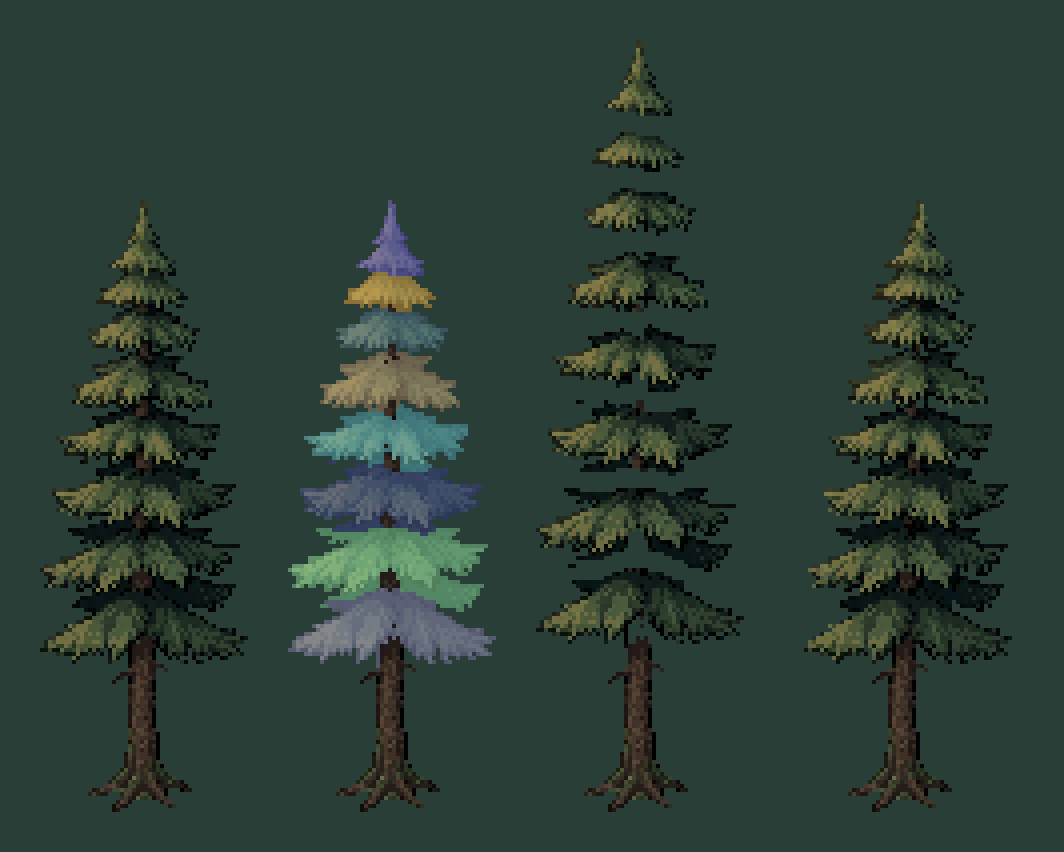
A conifer is easier, because it already comes in layers. Each tier of branches is one piece, 8 for this pine. Its thin trunk does bend, by sliding its rows, up to 5.5 px at the tip in the big gust. Every tier rides the trunk at its own height and bobs up to 2 px on top of that. A tier hangs over the one below it, so draw them from the bottom up.
To find the tiers in code, count the leaf pixels in every row. The rows where the tree is narrowest are the gaps between tiers.
The code
Split the tree
Python with numpy, scipy, scikit-image and Pillow. It writes trunk.png, inside.png and one clump_NN.png per leaf clump, all on the tree's own canvas, so they line up when you stack them.
"""Split a pixel art tree into a trunk, a dark "inside" and one PNG per leaf clump, all on the tree's own canvas,
so the layers line up when you stack them at the same position.
Run: python split_tree.py oak.png oak_layers
     python split_tree.py bush.png bush_layers 3 10 0     (min_dist, min_size, trunk_part)"""
import sys
from pathlib import Path

import numpy as np
from PIL import Image
from scipy import ndimage
from skimage.feature import peak_local_max
from skimage.segmentation import watershed


def split_tree(path, out_dir, min_dist=5, min_size=25, trunk_part=0.4):
    img = Image.open(path).convert("RGBA")
    spr = np.asarray(img)
    solid = spr[..., 3] > 0
    hsv = np.asarray(img.convert("RGB").convert("HSV")).astype(float)
    hue, sat = hsv[..., 0] * 360 / 255, hsv[..., 1] / 255
    lum = spr[..., :3] @ np.array([0.3, 0.59, 0.11])

    # leaves: everything that isn't brown wood or pale bark, above the roots
    wood = (hue >= 5) & (hue < 40) & (sat > 0.22) & (lum < 125)
    bark = (sat < 0.16) & (lum > 95)
    rows = np.nonzero(solid.any(1))[0]
    above_roots = np.arange(spr.shape[0])[:, None] < rows[0] + (rows[-1] - rows[0]) * 0.78
    leaves = solid & ~wood & ~bark & above_roots

    # one clump per bright leaf mass: the bright spots are the seeds, the darker lines between them the borders
    smooth = ndimage.gaussian_filter(np.where(solid, lum, 0), 1.6)
    peaks = peak_local_max(smooth, min_distance=int(min_dist), labels=leaves.astype(int), exclude_border=False)
    seeds = np.zeros(solid.shape, int)
    seeds[tuple(peaks.T)] = np.arange(1, len(peaks) + 1)
    clump = watershed(-smooth, seeds, mask=leaves)
    low = rows[-1] - (rows[-1] - rows[0]) * trunk_part     # clumps centred below this line don't move
    for k in range(1, clump.max() + 1):
        ys = np.nonzero(clump == k)[0]
        if len(ys) < min_size or ys.mean() > low:
            clump[clump == k] = 0                 # crumbs and moss on the trunk stay on the trunk layer

    out = Path(out_dir)
    out.mkdir(parents=True, exist_ok=True)

    def save(mask, name, shade=1.0):
        layer = spr.copy()
        layer[..., :3] = (layer[..., :3] * shade).astype(np.uint8)
        layer[~mask] = 0
        Image.fromarray(layer).save(out / name)

    save(solid & (clump == 0), "trunk.png")
    # what you see through a gap between two clumps: the same leaves, darker, pulled in 2 px from the outline
    save((clump > 0) & ndimage.binary_erosion(solid, iterations=2), "inside.png", shade=0.55)
    ids = [k for k in range(1, clump.max() + 1) if (clump == k).any()]
    for n, k in enumerate(ids):
        save(clump == k, f"clump_{n:02d}.png")
    return len(ids)


if __name__ == "__main__":
    print(split_tree(sys.argv[1], sys.argv[2], *[float(v) for v in sys.argv[3:]]), "clumps")
min_dist is the smallest distance between two clump centres. 5 suits a tree around 100 px tall. trunk_part is the share of the sprite's height, from the ground up, where nothing moves. A bush has no trunk, so the second command sets it to 0 and uses smaller clumps.
The wind
One autoload that every plant asks about the wind at its own spot.
# wind.gd: add it as an autoload named "Wind".
# Gusts are patches of stronger wind that cross the map, each on its own schedule. Between them the air is still.
extends Node

const LOOP := 20.0          # the gust pattern repeats after this many seconds
const WAVE_PERIOD := 1.54   # seconds for a leaf clump to walk its loop once
const WAVE_LENGTH := 69.0   # px between two crests of the leaf wave, along the wind

# [second it enters at the left, speed px/s, centre y, half height (0 = the whole map), length px, strength]
var gusts := [
	[18.6, 65.0, 0.0, 0.0, 44.0, 1.25],   # the big one
	[19.8, 65.0, 0.0, 0.0, 26.0, 0.5],    # and its tail
	[1.5, 60.0, 95.0, 45.0, 30.0, 0.6],   # a quick one through the middle
	[6.0, 55.0, 150.0, 60.0, 34.0, 0.75], # a medium one along the front
	[7.3, 55.0, 145.0, 65.0, 30.0, 0.9],  # with a second hit right behind it
	[8.5, 50.0, 50.0, 55.0, 30.0, 0.55],  # a light puff at the back
]
var time := 0.0


func _process(delta: float) -> void:
	time += delta


# How far along the wind a point is. The wind blows right and a little toward the camera.
func along(p: Vector2) -> float:
	return p.x + 0.25 * p.y


func _field(p: Vector2, spread: float) -> float:
	var total := 0.0
	for g in gusts:
		var path: float = g[1] * LOOP
		var d := fposmod(along(p) - g[1] * (time - g[0]) + path / 2.0, path) - path / 2.0
		var a: float = g[5] * exp(-pow(d / (g[4] * spread), 2.0))
		if g[3] > 0.0:
			a *= exp(-pow((p.y - g[2]) / (g[3] * (1.6 if spread > 1.0 else 1.0)), 2.0))
		total += a
	return total


# 0 in still air, about 1 inside a big gust.
func gust(p: Vector2) -> float:
	return _field(p, 1.0)


# The wide, soft area around a gust, 0 to 1: leaves start moving before it arrives and stop soon after.
func breeze(p: Vector2) -> float:
	return minf(1.6 * _field(p, 2.2), 1.0)


# Where a leaf clump at p is in its loop. The phase travels with the wind, so the clumps go one after another.
func wave_phase(p: Vector2) -> float:
	return TAU * (time / WAVE_PERIOD - along(p) / WAVE_LENGTH)
The tree
# wind_tree.gd: put it on the tree's Node2D, with its origin at the foot of the trunk.
# Children: the trunk and inside sprites, and a node named "Clumps" with one Sprite2D per leaf clump.
# All layers are cut from the same canvas, so they share one position.
extends Node2D

@export var push := 2.2              ## px a full gust pushes the loosest clump
@export var spring_period := 2.2     ## seconds per swing: big trees slow, bushes quick
@export var damping := 0.35          ## higher settles sooner
@export var inner_stiffness := 0.35  ## how much a clump at the canopy's centre moves (1 = as much as the edge)
@export var trunk_bend := 0.0        ## 0 = the trunk stays put (oak), 1 = it bends and the layers ride it (pine)
@export var trunk: Sprite2D          ## only needed when trunk_bend is above 0 (it gets row_bend.gdshader)

const POSE_TIME := 0.1               # leaves change pose 10 times a second, like a hand-drawn loop

var lean := 0.0
var lean_speed := 0.0
var pose_clock := 0.0
var clumps: Array = []               # [sprite, rest position, centre, weight, height 0..1]


func _ready() -> void:
	var box := Rect2()
	for s: Sprite2D in $Clumps.get_children():
		var used := Rect2(s.texture.get_image().get_used_rect())
		var corner := s.position - (s.texture.get_size() / 2.0 if s.centered else Vector2.ZERO)
		var centre := corner + used.get_center()
		box = Rect2(centre, Vector2.ZERO) if clumps.is_empty() else box.expand(centre)
		clumps.append([s, s.position, centre, 1.0, 0.0])
	var height := maxf(-box.position.y, 1.0)
	for c in clumps:
		var d: Vector2 = (c[2] - box.get_center()) / (box.size / 2.0).max(Vector2.ONE)
		c[3] = lerpf(inner_stiffness, 1.0, minf(d.length(), 1.0))    # stiff in the middle, loose at the edge
		c[4] = clampf(-c[2].y / height, 0.0, 1.0)


func _process(delta: float) -> void:
	# The whole tree is one spring that the gust pushes: it leans, swings back a little past upright and settles.
	var w0 := TAU / spring_period
	var target := push * Wind.gust(global_position)
	lean_speed += (w0 * w0 * (target - lean) - 2.0 * damping * w0 * lean_speed) * delta
	lean += lean_speed * delta

	pose_clock += delta
	if pose_clock < POSE_TIME:
		return
	pose_clock -= POSE_TIME
	for c in clumps:
		var p: Vector2 = global_position + c[2]
		var gust := Wind.gust(p)
		var breeze := Wind.breeze(p)
		var a := Wind.wave_phase(p)
		var w: float = c[3]
		var ride: float = lean * lerpf(w, pow(c[4], 2.0), trunk_bend)
		# the loop: up, right, down, back. 1 px in a breeze, wider in a gust. Whole pixels only.
		var dx := ride + w * (0.9 * breeze + 1.3 * gust) * (0.5 - 0.5 * cos(a))
		var dy := -w * (0.75 * breeze + 0.5 * gust) * maxf(sin(a), 0.0)
		c[0].position = c[1] + Vector2(roundf(dx), roundf(dy))
	if trunk_bend > 0.0 and trunk:
		(trunk.material as ShaderMaterial).set_shader_parameter("lean", lean * trunk_bend)
To set it up:
- Add
wind.gdas an autoload namedWind. - Make a Node2D for the tree with its origin at the foot of the trunk, and put
wind_tree.gdon it. - Add
inside.pngandtrunk.pngas Sprite2D children, then a Node2D namedClumpswith one Sprite2D per clump. Give them all the same position. - Set the texture filter to Nearest.
These scripts running in Godot 4.6, with the oak's 14 clumps, a bush with 4 and the pine's 8 layers. The settings per plant:
| push | spring_period | damping | trunk_bend | |
|---|---|---|---|---|
| Oak | 2.2 | 2.2 | 0.35 | 0 |
| Pine | 3.6 | 2.8 | 0.22 | 1 |
| Bush | 1.4 | 1.0 | 0.35 | 0 |
Trunks that bend
For the pine's trunk, and for grass and reeds, slide the rows by whole pixels.
// row_bend.gdshader: bends a sprite by sliding its rows sideways by whole pixels, the top the most and the foot
// not at all. For thin things that really bend: a pine's trunk, tall grass, reeds.
shader_type canvas_item;

uniform float lean = 0.0;       // px the top row moves
uniform float power = 2.0;      // 1 = a straight slant, 2 = a curve that keeps the foot stiff

void fragment() {
	float up = 1.0 - UV.y;                                  // 0 at the foot, 1 at the top
	float shift = round(lean * pow(up, power));             // whole pixels only
	vec2 uv = UV - vec2(shift * TEXTURE_PIXEL_SIZE.x, 0.0);
	COLOR = texture(TEXTURE, uv);
	if (uv.x < 0.0 || uv.x > 1.0) {
		COLOR.a = 0.0;                                      // leave empty margin left and right of the art
	}
}
Put one material with this shader on the pine's trunk and inside sprites, set trunk_bend to 1 and assign the trunk in the inspector. The tree script feeds it the lean.
Other engines
None of this is tied to Godot. You need one sprite per clump, a function that gives the wind at a point, and a timer that moves each clump to a rounded offset 10 times a second.
What else moves in the clip
- Shadows. Each shadow is the tree's current pose laid onto the ground, so it sways with the tree.
- Falling leaves. They are 2 px each, shed only while a gust is on and carried by the same wind. They flip between flat and edge-on as they fall.
- The meadow. Where a gust passes, streaks of grass turn one flat shade lighter and travel with it.
Common pitfalls
A line of missing pixels. When a clump lifts 1 px, whatever is under it shows. If nothing is there you get a cut through the plant. The inside layer has to reach every spot where clumps meet the trunk, or the base of a bush.
Leaves that never stop. A small constant movement on every clump looks like jitter once the gust has gone. Let the loop shrink to zero in still air.
Random timing. Clumps that move at random moments also look like jitter. Time them by their position along the wind.
Offsets that aren't whole pixels. Round every offset. Half a pixel blurs the art or makes it shimmer, depending on your texture filter.
A new pose every frame. At 60 poses a second the clumps slide around like cut-out paper. At 10 it looks hand-animated.
One band of wind across the whole map. Everything moves at once and then nothing does. A few smaller gusts on different paths look more like weather.
Further reading
- Pixelblog 33: Wind Effects by Raymond Schlitter, the hand-animated version of this
- Fluffy Pixel Art Trees by Nekoto, which moves the leaves with a noise shader in Godot
- 2D Pixel perfect wind & sway effect on Godot Shaders, a row-sliding shader with noise
- How to keep your game art consistent with AI, for getting trees, props and ground that match
- Atmospheric perspective for 2D parallax backgrounds, for depth behind a scene like this
More game techniques
All guides

 How to make pixel art look like it's on a CRTWhat an old CRT TV does to pixel art, why 90s console artists dithered in checkerboards, and a one-pass CRT shader for WebGL and Godot, with notes for other engines.
 How to make a pixel art inventory UI with 9-slice and rarity effectsHow a small pixel art loot window was made. 20 generated pieces at exact sizes, a 9-sliced frame, rarity slots drawn in code, a staggered reveal with an effect per rarity, a glow behind the window and cartoony sound effects. With the prompts and Python code.
 Atmospheric perspective for 2D parallax backgroundsWhy stacked parallax layers look flat, and how to fix it by blending each layer toward the sky's color by distance. With the amount for each layer, a tested Godot shader and the pitfalls.