Hit stop, hit flash, knockback and 5 more ways to make hits feel heavy
Eight small effects that make a sword hit feel heavy in a 2D game, from hit stop to damage numbers, with the frame counts and pixel sizes for each, a tested Godot script and the pitfalls.
Paste it into Claude Code, Codex, Cursor or any coding agent.
# Add hit feedback to my game so hits feel heavy

Attacks in my 2D game take health off the enemy and nothing else happens, so hits feel like nothing. Add eight small reactions to every hit: hit stop, hit flash, knockback, screen shake, particles, an impact spark, a slash trail and damage numbers, plus a bigger version for the killing blow.

Before you write code, look at my project: the engine and language, where a hit is detected (the tick the weapon connects), how enemies move and die, the camera, and whether the game runs in a fixed physics step. Fit this into the existing combat code as one place that every hit calls. Keep my damage, speeds and animations. If the game has no melee or projectile hit yet, ask me before inventing one.

## How it works

- One function, called on the tick of contact with: attacker, target, the target's sprite, the contact point, the hit direction, the damage, and whether this hit kills.
- Each effect is a counter in fixed ticks, counted from the hit or from the end of the freeze.
- Hit stop freezes only the two fighters. The flash, spark and shake keep running through the freeze. That is what makes it read as impact and not as lag.
- Knockback and particles start on the first tick after the freeze.
- Every number is a setting. Setting one to 0 turns that effect off.

## Numbers that matter

At 60 ticks a second, for art around 320 x 180 px with 50 to 70 px sprites. Scale the pixel sizes with my art.

- Hit stop: 5 ticks. 9 on a killing blow.
- Hit flash: the target's sprite is pure white for 2 frames, the frame of the hit and the next one. Keep its alpha.
- Knockback: 12 px along the hit direction over 8 ticks, cubic ease-out, `1 - (1 - t)^3`.
- Screen shake: 3 px, 10 ticks, amplitude `3 * (1 - k / 10)^2`, rounded to whole pixels, x alternating sides each tick, y a random part of the amplitude between -0.6 and 0.6. That comes out as 3, -2, 2, -1, 1, -1, then 0.
- Particles: 10 in one burst at the contact point, thrown back toward the attacker and a little up, in a fan of about 140 degrees, 90 to 200 px/s, slowing fast, 2 to 3 px, gone in about 0.26 s. Killing blow: 28 in every direction.
- Impact spark: a four-ray star on the contact point for 4 frames, rays 5, 9, 7, 3 px, diagonals half that.
- Slash trail: an arc over the last 100 degrees of the swing, ending on the contact point. Full during the freeze, then it shrinks from the back over 6 ticks.
- Damage number: up for 46 ticks. Rises 8 px in the first 10 ticks, `8 * (1 - (1 - h)^2)` with h = k / 10, plus a hop of `2 * sin(PI * h)`, then drifts 0.08 px a tick. Hidden on every other tick for its last 6. Yellow on a killing blow.
- Killing blow: after the freeze, time scale 0.3 for 12 ticks, then back to 1. Treat those two as starting values.

## Pseudo code

```
hits = []                                    # every hit still playing

function hit(attacker, target, sprite, at, dir, damage, kill):
    h = {age: 0, stop: (9 if kill else 5), ...the arguments}
    hits.add(h)
    if h.stop > 0: freeze(attacker); freeze(target)
    sprite.flash = 1
    shake_age = 0; apply_shake()
    h.number = spawn_number(damage, at)

every fixed tick, before the fighters update:
    for h in hits:
        h.age += 1
        if h.age == FLASH_TICKS: h.sprite.flash = 0
        if h.age == h.stop + 1:                      # the freeze is over
            unfreeze(h.attacker); unfreeze(h.target)
            burst_particles(h.at, away from h.dir, 28 if h.kill else 10)
            if h.kill: time_scale = 0.3
        k = h.age - h.stop
        if 1 <= k <= KNOCK_TICKS:
            step = h.dir * KNOCK_PX * (ease(k / KNOCK_TICKS) - ease((k - 1) / KNOCK_TICKS))
            move h.target by step, with collision
        if h.kill and h.age == h.stop + 1 + SLOW_TICKS: time_scale = 1
        place or remove h.number from h.age
    drop hits whose effects have all ended
    if shake_age >= 0: shake_age += 1; apply_shake()

function apply_shake():
    if shake_age >= SHAKE_TICKS: camera.offset = (0, 0); shake_age = -1; return
    amp = SHAKE_PX * (1 - shake_age / SHAKE_TICKS)^2
    camera.offset = (round(amp) * (+1 if shake_age is even else -1), round(amp * random(-0.6, 0.6)))

draw, every frame: spark while h.age < 4; trail while h.age < h.stop + 6
```

`freeze(node)` is the engine-specific part. Godot: `process_mode = PROCESS_MODE_DISABLED`, back to `PROCESS_MODE_INHERIT` after, and give the manager a low `process_physics_priority` so it runs first. Unity: disable the fighter's scripts and set its Animator `speed` to 0. Custom engine: skip the update of those two objects. The flash is a sprite shader that mixes the color to white by a uniform and keeps alpha.

## Pitfalls

- Do not freeze with global time scale 0. That stops the effects too, and timers that should end the freeze.
- A color tint or `modulate` cannot make the flash. It multiplies, so dark pixels stay dark.
- Round the shake to whole pixels and set the camera offset back to exactly 0 at the end. Do not overwrite a camera offset the game already uses, add to it.
- Move the knockback with collision so enemies stop at walls. If enemies have their own movement code, make sure it does not fight the push for those 8 ticks.
- Do not scale the sprite for squash and stretch in a pixel art game. It breaks the pixel grid.
- If the target is deleted on death, delete it after the freeze, and guard every later tick against a freed target.
- Two hits on one fighter inside one freeze: keep a freeze counter per fighter so the first hit does not end the second one's freeze.
- Fast multi-hit attacks should use fewer freeze ticks than heavy ones. Ask me which attacks are which.

## Check that it works

Write an automated test that counts ticks if the engine allows it, otherwise a debug scene with a dummy enemy and a key that hits it. Expected at 60 ticks a second:

- After a hit, attacker and target each skip exactly 5 updates. 9 on a killing blow.
- The target's flash value is 1 on the hit's frame and the next, 0 on the third.
- During the freeze the target does not move. 8 ticks after the freeze ends it has moved 12.0 px, and 3.96 px of that on the first tick. With a wall 6 px behind it, it moves 6 px.
- Camera offset x per frame from the hit: 3, -2, 2, -1, 1, -1, 0, and (0, 0) from tick 10 on.
- 10 particles spawn on the first tick after the freeze, at the contact point. 28 on a killing blow.
- The damage number exists for 46 frames, is 9 px higher after 10 frames, and is hidden on frames 41, 43 and 45.
- Killing blow: time scale is 0.3 for 12 ticks after the freeze and 1 after.
- With every setting at 0, a hit changes nothing but the health.

Then tell me which values you used and where I can tweak them.

Full guide with video and a tested Godot 4 script: https://www.spritecook.ai/blog/hit-stop-hit-flash-knockback-screen-shake
A sword that passes through an enemy and takes 12 off its health works fine and feels like nothing. A hit feels heavy when the game reacts to it. Here are eight small reactions, each with the numbers used in the clip, and a Godot script that plays all of them from one call.
Ten hits on one slime. The first has no feedback and every hit after it adds one effect. The clip slows to about a third of the speed around each hit, so effects that last 2 frames can be seen. The game itself runs at 60 ticks a second. The knight, the slime and their animations were generated by a coding agent with SpriteCook.
Hit stop
On the tick the blade connects, both fighters freeze for 5 ticks. That's 0.08 s, and it's the one that matters most. If you only add one thing from this list, add this.
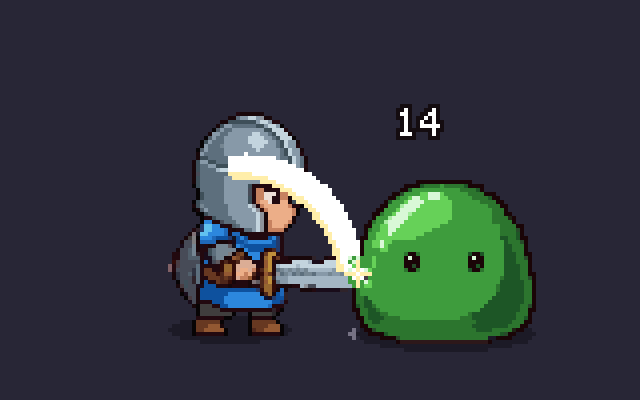
Only the two fighters stop. The flash, the spark and the screen shake keep running through the freeze, and that's what makes it read as impact. A freeze where nothing at all moves looks like the game dropped a few frames.
Hit flash
The enemy turns pure white for 2 frames, the frame of the hit and the one after. The white is the sprite's own shape with every pixel painted white, done with a small shader.
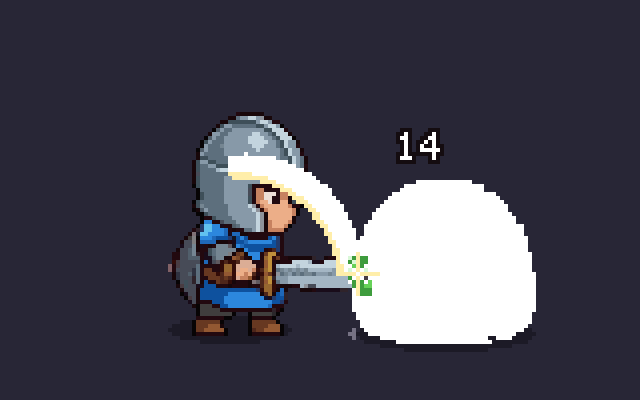
A color tint can't do this. Tints like Godot's modulate multiply the sprite's colors, and multiplying a dark pixel by anything leaves it dark.
Knockback
When the freeze ends, the enemy slides 12 px away from the hit over 8 ticks, fast at first and slowing down (a cubic ease-out). It covers a third of the distance on the first tick.
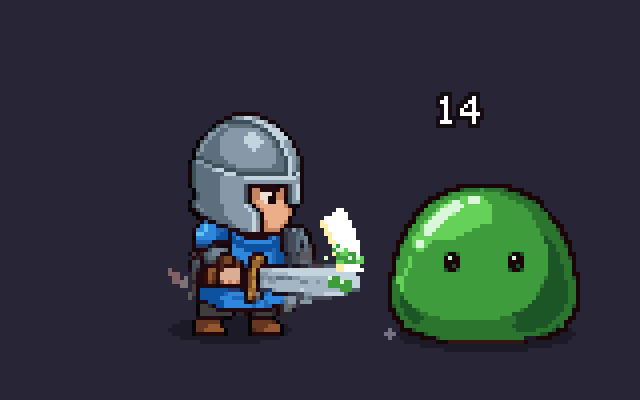
Move it with collision, so a slime with its back to a wall stops at the wall.
The other five
- Screen shake. The camera jumps 3 px and settles over 10 ticks, in whole pixels and from side to side: 3, -2, 2, -1, 1, -1, then still. It runs through the freeze.
- Particles. 10 drops burst out of the cut on the tick the freeze ends, back toward the attacker and a little up, at 90 to 200 px a second. They slow down fast and are gone in a quarter of a second.
- Impact spark. A four-ray star on the contact point for 4 frames, with rays of 5, 9, 7 and 3 px.
- Slash trail. An arc along the last 100 degrees of the swing that ends on the contact point. It holds through the freeze and then shrinks from the back over 6 ticks.
- Damage numbers. The number pops up 8 px in 10 ticks with a small hop, drifts up slowly, and blinks out over the last 6 of its 46 ticks.
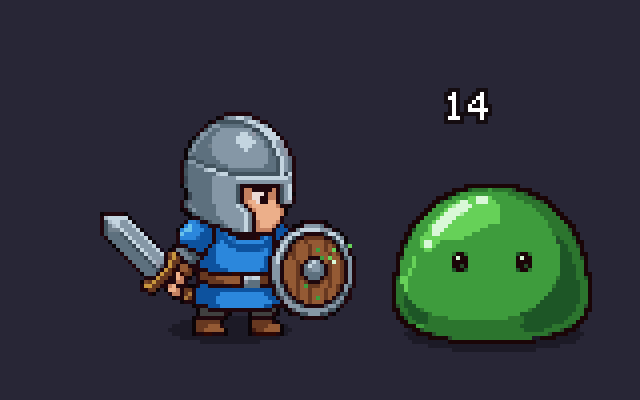
A hit sound and controller rumble belong on this list too. They're missing here because the clip is silent.
The killing blow
Make the last hit bigger than the others. Freeze for 9 ticks instead of 5, throw 28 drops in every direction instead of 10, and slow time down for a moment after the freeze.
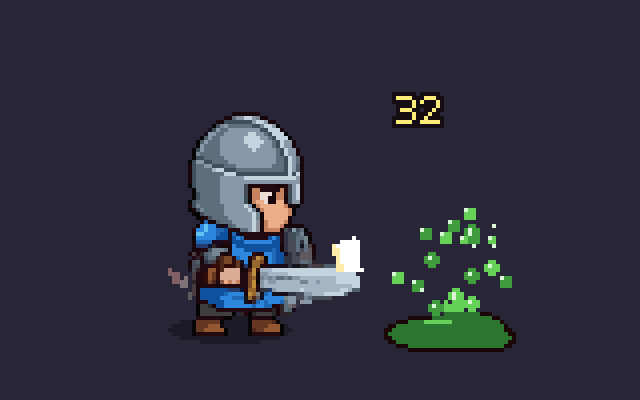
Here's the same four-hit combo at full speed, with nothing on the left and all eight on the right.
The code
One Godot 4 script that plays all eight. Add it to your scene once, or make it an autoload, and call hit() on the tick the weapon connects. Every number is an export, and setting one to 0 turns that effect off.
# hit_feel.gd: everything that makes a hit feel heavy, behind one call.
# Add one of these to your scene (or make it an autoload) and call, on the tick the weapon connects:
#   hit_feel.hit(attacker, target, target_sprite, contact_point, direction, damage, is_kill)
# Set any number below to 0 to turn that effect off.
extends Node2D

@export var stop_ticks := 5            # hit stop: both fighters freeze for this many ticks
@export var stop_ticks_kill := 9       # and for this many on the killing blow
@export var flash_ticks := 2           # hit flash: the target is pure white
@export var knock_px := 12.0           # knockback: how far the target is pushed
@export var knock_ticks := 8           # and how long the push takes (cubic ease-out)
@export var shake_px := 3.0            # screen shake: size of the first jolt
@export var shake_ticks := 10          # and how long it takes to settle
@export var drops := 10                # particles per hit
@export var drops_kill := 28           # and in the burst on the killing blow
@export var drop_color := Color("7bd66a")
@export var spark_ticks := 4           # impact spark: a star on the contact point
@export var trail_ticks := 6           # slash trail: how long the arc takes to fade after the freeze
@export var trail_degrees := 100.0     # and how much of the swing it covers
@export var number_ticks := 46         # damage numbers: how long one stays up
@export var kill_slow := 0.3           # killing blow: time scale after the freeze (1 = off)
@export var kill_slow_ticks := 12      # and for how many ticks

const FLASH := preload("res://hit_flash.gdshader")
const SPARK_RAYS := [5, 9, 7, 3]       # ray length in px on each tick of the spark
const WARM := Color(1.0, 0.93, 0.67)

var _hits: Array = []                  # every hit that is still playing
var _shake_age := -1                   # ticks since the last hit, -1 when the camera is at rest


func _ready() -> void:
	process_physics_priority = -100    # run before the fighters, so the freeze is the same length every time
	z_index = 100


func hit(attacker: Node2D, target: Node2D, sprite: CanvasItem, at: Vector2, direction: Vector2, damage: int,
		kill := false) -> void:
	var h := {"age": 0, "stop": stop_ticks_kill if kill else stop_ticks, "attacker": attacker, "target": target,
			"sprite": sprite, "at": at, "dir": direction.normalized(), "kill": kill, "label": null}
	_hits.append(h)
	if h.stop > 0:                     # 1. hit stop: only the two fighters freeze, the effects below keep running
		attacker.process_mode = Node.PROCESS_MODE_DISABLED
		target.process_mode = Node.PROCESS_MODE_DISABLED
	if flash_ticks > 0:                # 2. hit flash
		if not sprite.material is ShaderMaterial:
			sprite.material = ShaderMaterial.new()
			sprite.material.shader = FLASH
		sprite.material.set_shader_parameter("flash", 1.0)
	if shake_px > 0.0:                 # 4. screen shake
		_shake_age = 0
		_shake()
	if number_ticks > 0:               # 8. damage number
		var label := Label.new()
		label.text = str(damage)
		label.modulate = Color(1.0, 0.93, 0.47) if kill else Color.WHITE
		add_child(label)
		h.label = label
		_place_number(h)
	queue_redraw()


func _physics_process(_delta: float) -> void:
	for h in _hits:
		h.age += 1
		var live: bool = is_instance_valid(h.target) and is_instance_valid(h.attacker)
		if h.age == flash_ticks and is_instance_valid(h.sprite):
			h.sprite.material.set_shader_parameter("flash", 0.0)
		if h.age == h.stop + 1 and live:           # the freeze is over
			if h.stop > 0:
				h.attacker.process_mode = Node.PROCESS_MODE_INHERIT
				h.target.process_mode = Node.PROCESS_MODE_INHERIT
			_burst(h)                              # 5. particles
			if h.kill and kill_slow < 1.0:
				Engine.time_scale = kill_slow
		var k: int = h.age - h.stop                # 3. knockback, on the ticks after the freeze
		if k >= 1 and k <= knock_ticks and knock_px > 0.0 and live:
			var step: Vector2 = h.dir * knock_px * (_ease_out(float(k) / knock_ticks) - _ease_out(float(k - 1) / knock_ticks))
			if h.target is PhysicsBody2D:
				h.target.move_and_collide(step)    # stops at walls
			else:
				h.target.global_position += step
		if h.kill and h.age == h.stop + 1 + kill_slow_ticks:
			Engine.time_scale = 1.0
		if h.label:
			if h.age >= number_ticks:
				h.label.queue_free()
				h.label = null
			else:
				_place_number(h)
	var tail := maxi(maxi(knock_ticks, trail_ticks), maxi(number_ticks, kill_slow_ticks))
	_hits = _hits.filter(func(h): return h.age < h.stop + 1 + tail)   # forget hits that have played out
	if _shake_age >= 0:
		_shake_age += 1
		_shake()
	queue_redraw()


func _ease_out(t: float) -> float:
	return 1.0 - pow(1.0 - t, 3.0)


# Screen shake: whole pixels, left and right in turn, smaller every tick. It runs through the hit stop.
func _shake() -> void:
	var camera := get_viewport().get_camera_2d()
	if camera == null:
		return
	if _shake_age >= shake_ticks:
		camera.offset = Vector2.ZERO
		_shake_age = -1
		return
	var amp := shake_px * pow(1.0 - float(_shake_age) / shake_ticks, 2.0)
	camera.offset = Vector2(roundf(amp) * (1.0 if _shake_age % 2 == 0 else -1.0), roundf(amp * randf_range(-0.6, 0.6)))


# Particles: a one-shot burst out of the cut, back toward the attacker and a little up.
func _burst(h: Dictionary) -> void:
	var count: int = drops_kill if h.kill else drops
	if count <= 0:
		return
	var p := CPUParticles2D.new()
	p.amount = count
	p.one_shot = true
	p.explosiveness = 1.0
	p.lifetime = 0.26
	p.direction = Vector2(-h.dir.x, -h.dir.y - 0.27).normalized()
	p.spread = 180.0 if h.kill else 70.0
	p.initial_velocity_min = 90.0
	p.initial_velocity_max = 200.0
	p.damping_min = 600.0
	p.damping_max = 700.0
	p.gravity = Vector2(0, 150)
	p.scale_amount_min = 2.0
	p.scale_amount_max = 3.0
	p.color = drop_color
	p.texture_filter = CanvasItem.TEXTURE_FILTER_NEAREST
	p.position = to_local(h.at)
	p.finished.connect(p.queue_free)
	add_child(p)
	p.emitting = true


# Damage number: pops up 8 px in 10 ticks with a small hop, drifts, then blinks out over its last 6 ticks.
func _place_number(h: Dictionary) -> void:
	var k: int = h.age
	var hop := minf(k / 10.0, 1.0)
	var rise := 8.0 * (1.0 - pow(1.0 - hop, 2.0)) + (2.0 * sin(PI * hop) if hop < 1.0 else 0.0) + k * 0.08
	var label: Label = h.label
	label.position = to_local(h.at) + Vector2(-label.size.x / 2.0, -24.0 - roundf(rise))
	label.visible = k < number_ticks - 6 or k % 2 == 0


func _draw() -> void:
	for h in _hits:
		var at := to_local(h.at)
		if h.age < spark_ticks:                    # 6. impact spark: a four-ray star that grows, then shrinks
			var n: int = SPARK_RAYS[mini(h.age * SPARK_RAYS.size() / spark_ticks, SPARK_RAYS.size() - 1)]
			for d in [Vector2.RIGHT, Vector2.LEFT, Vector2.UP, Vector2.DOWN]:
				draw_line(at, at + d * n, WARM, 1.0)
			for d in [Vector2(1, 1), Vector2(-1, 1), Vector2(1, -1), Vector2(-1, -1)]:
				draw_line(at, at + d * (n * 0.5), Color.WHITE, 1.0)
			draw_rect(Rect2(at - Vector2(1, 1), Vector2(3, 3)), Color.WHITE)
		var fade: float = float(maxi(h.age - h.stop, 0)) / maxi(trail_ticks, 1)
		if trail_ticks > 0 and fade < 1.0 and is_instance_valid(h.attacker):   # 7. slash trail
			var center := to_local(h.attacker.global_position)
			var end := (at - center).angle()       # the arc ends on the contact point
			var start := end - deg_to_rad(trail_degrees) * (1.0 if h.dir.x >= 0.0 else -1.0)
			draw_arc(center, center.distance_to(at), lerpf(start, end, fade), end, 16, Color.WHITE, 2.0)
The flash shader it loads:
// hit_flash.gdshader: turns a sprite pure white while keeping its shape. flash 0 = normal, 1 = white.
shader_type canvas_item;

uniform float flash : hint_range(0.0, 1.0) = 0.0;

void fragment() {
	vec4 c = texture(TEXTURE, UV) * COLOR;
	COLOR = vec4(mix(c.rgb, vec3(1.0), flash), c.a);
}
Tested in Godot 4.6, frame by frame:
- Both fighters miss exactly 5 ticks, and 9 on a killing blow.
- The target is white on 2 frames.
- The push is 12 px over the 8 ticks after the freeze, along a cubic ease-out, and stops at a wall.
- The camera goes 3, -2, 2, -1, 1, -1 px and ends at rest.
- 10 particles start at the contact point on the first tick after the freeze, 28 on a killing blow.
- The damage number is up for 46 frames and blinks on its last 6.
- With everything at 0, a hit changes nothing.
The clip's slow motion on the kill is 0.18x and part of the edit. The script's kill_slow of 0.3 for 12 ticks is a starting point for a game.
Other engines
Hit stop is the part that differs. You need a way to pause two objects while everything else runs. In Unity, disable the two fighters' scripts and set their Animator speed to 0 for the duration, then put both back. Setting Time.timeScale to 0 freezes the effects too, unless they run on unscaled time. In your own engine, skip the update of the two fighters while a hit stop counter is above 0.
The rest is counters. Each effect is "do this for N ticks after the hit" or "for N ticks after the freeze".
Common pitfalls
Freezing the whole game. Time scale 0 stops the flash, the spark and the shake along with the fighters, so the freeze reads as lag. Freeze the fighters and let the effects run.
Shaking by fractions of a pixel. A camera offset of 1.4 px makes pixel art shimmer. Round the offset to whole pixels, and set it back to exactly 0 when the shake ends.
Knockback as a jump. Moving the enemy 12 px in one tick looks like a glitch. Spread it over a few ticks and start fast.
Squashing the enemy. Squash and stretch means scaling the sprite, which breaks the pixel grid. It was left out of the clip for that reason. If you want it, draw it as animation frames.
The same freeze on every hit. 5 ticks on each hit of a fast three-hit combo adds up to a quarter of a second of standing still. Use fewer ticks on light attacks and keep the long freeze for heavy ones.
Two hits inside one freeze. In this script the first hit's timer ends the freeze, even if a second hit on the same fighter started later. If your attacks can overlap like that, keep a freeze counter per fighter and add to it.
None of these are rules. Pick the ones that fit your game and tweak them until it feels right.
Where to next
- Coyote time, jump buffering and corner correction, the same kind of small fixes for platformer jumps
- Let your AI agent generate sprites and animations, the way the knight and the slime were made
- How to animate a custom pixel art sprite, for the attack animation the hit is timed on
- 2D shadowcasting for torchlight, fog of war and line of sight, for the dungeon this fight belongs in
Add this to your game with your coding agent
The prompt has the numbers, pseudo code, pitfalls and checks from this guide, written so your agent can fit it into your own project.
# Add hit feedback to my game so hits feel heavy

Attacks in my 2D game take health off the enemy and nothing else happens, so hits feel like nothing. Add eight small reactions to every hit: hit stop, hit flash, knockback, screen shake, particles, an impact spark, a slash trail and damage numbers, plus a bigger version for the killing blow.

Before you write code, look at my project: the engine and language, where a hit is detected (the tick the weapon connects), how enemies move and die, the camera, and whether the game runs in a fixed physics step. Fit this into the existing combat code as one place that every hit calls. Keep my damage, speeds and animations. If the game has no melee or projectile hit yet, ask me before inventing one.

## How it works

- One function, called on the tick of contact with: attacker, target, the target's sprite, the contact point, the hit direction, the damage, and whether this hit kills.
- Each effect is a counter in fixed ticks, counted from the hit or from the end of the freeze.
- Hit stop freezes only the two fighters. The flash, spark and shake keep running through the freeze. That is what makes it read as impact and not as lag.
- Knockback and particles start on the first tick after the freeze.
- Every number is a setting. Setting one to 0 turns that effect off.

## Numbers that matter

At 60 ticks a second, for art around 320 x 180 px with 50 to 70 px sprites. Scale the pixel sizes with my art.

- Hit stop: 5 ticks. 9 on a killing blow.
- Hit flash: the target's sprite is pure white for 2 frames, the frame of the hit and the next one. Keep its alpha.
- Knockback: 12 px along the hit direction over 8 ticks, cubic ease-out, `1 - (1 - t)^3`.
- Screen shake: 3 px, 10 ticks, amplitude `3 * (1 - k / 10)^2`, rounded to whole pixels, x alternating sides each tick, y a random part of the amplitude between -0.6 and 0.6. That comes out as 3, -2, 2, -1, 1, -1, then 0.
- Particles: 10 in one burst at the contact point, thrown back toward the attacker and a little up, in a fan of about 140 degrees, 90 to 200 px/s, slowing fast, 2 to 3 px, gone in about 0.26 s. Killing blow: 28 in every direction.
- Impact spark: a four-ray star on the contact point for 4 frames, rays 5, 9, 7, 3 px, diagonals half that.
- Slash trail: an arc over the last 100 degrees of the swing, ending on the contact point. Full during the freeze, then it shrinks from the back over 6 ticks.
- Damage number: up for 46 ticks. Rises 8 px in the first 10 ticks, `8 * (1 - (1 - h)^2)` with h = k / 10, plus a hop of `2 * sin(PI * h)`, then drifts 0.08 px a tick. Hidden on every other tick for its last 6. Yellow on a killing blow.
- Killing blow: after the freeze, time scale 0.3 for 12 ticks, then back to 1. Treat those two as starting values.

## Pseudo code

```
hits = []                                    # every hit still playing

function hit(attacker, target, sprite, at, dir, damage, kill):
    h = {age: 0, stop: (9 if kill else 5), ...the arguments}
    hits.add(h)
    if h.stop > 0: freeze(attacker); freeze(target)
    sprite.flash = 1
    shake_age = 0; apply_shake()
    h.number = spawn_number(damage, at)

every fixed tick, before the fighters update:
    for h in hits:
        h.age += 1
        if h.age == FLASH_TICKS: h.sprite.flash = 0
        if h.age == h.stop + 1:                      # the freeze is over
            unfreeze(h.attacker); unfreeze(h.target)
            burst_particles(h.at, away from h.dir, 28 if h.kill else 10)
            if h.kill: time_scale = 0.3
        k = h.age - h.stop
        if 1 <= k <= KNOCK_TICKS:
            step = h.dir * KNOCK_PX * (ease(k / KNOCK_TICKS) - ease((k - 1) / KNOCK_TICKS))
            move h.target by step, with collision
        if h.kill and h.age == h.stop + 1 + SLOW_TICKS: time_scale = 1
        place or remove h.number from h.age
    drop hits whose effects have all ended
    if shake_age >= 0: shake_age += 1; apply_shake()

function apply_shake():
    if shake_age >= SHAKE_TICKS: camera.offset = (0, 0); shake_age = -1; return
    amp = SHAKE_PX * (1 - shake_age / SHAKE_TICKS)^2
    camera.offset = (round(amp) * (+1 if shake_age is even else -1), round(amp * random(-0.6, 0.6)))

draw, every frame: spark while h.age < 4; trail while h.age < h.stop + 6
```

`freeze(node)` is the engine-specific part. Godot: `process_mode = PROCESS_MODE_DISABLED`, back to `PROCESS_MODE_INHERIT` after, and give the manager a low `process_physics_priority` so it runs first. Unity: disable the fighter's scripts and set its Animator `speed` to 0. Custom engine: skip the update of those two objects. The flash is a sprite shader that mixes the color to white by a uniform and keeps alpha.

## Pitfalls

- Do not freeze with global time scale 0. That stops the effects too, and timers that should end the freeze.
- A color tint or `modulate` cannot make the flash. It multiplies, so dark pixels stay dark.
- Round the shake to whole pixels and set the camera offset back to exactly 0 at the end. Do not overwrite a camera offset the game already uses, add to it.
- Move the knockback with collision so enemies stop at walls. If enemies have their own movement code, make sure it does not fight the push for those 8 ticks.
- Do not scale the sprite for squash and stretch in a pixel art game. It breaks the pixel grid.
- If the target is deleted on death, delete it after the freeze, and guard every later tick against a freed target.
- Two hits on one fighter inside one freeze: keep a freeze counter per fighter so the first hit does not end the second one's freeze.
- Fast multi-hit attacks should use fewer freeze ticks than heavy ones. Ask me which attacks are which.

## Check that it works

Write an automated test that counts ticks if the engine allows it, otherwise a debug scene with a dummy enemy and a key that hits it. Expected at 60 ticks a second:

- After a hit, attacker and target each skip exactly 5 updates. 9 on a killing blow.
- The target's flash value is 1 on the hit's frame and the next, 0 on the third.
- During the freeze the target does not move. 8 ticks after the freeze ends it has moved 12.0 px, and 3.96 px of that on the first tick. With a wall 6 px behind it, it moves 6 px.
- Camera offset x per frame from the hit: 3, -2, 2, -1, 1, -1, 0, and (0, 0) from tick 10 on.
- 10 particles spawn on the first tick after the freeze, at the contact point. 28 on a killing blow.
- The damage number exists for 46 frames, is 9 px higher after 10 frames, and is hidden on frames 41, 43 and 45.
- Killing blow: time scale is 0.3 for 12 ticks after the freeze and 1 after.
- With every setting at 0, a hit changes nothing but the health.

Then tell me which values you used and where I can tweak them.

Full guide with video and a tested Godot 4 script: https://www.spritecook.ai/blog/hit-stop-hit-flash-knockback-screen-shake
More game techniques
All techniques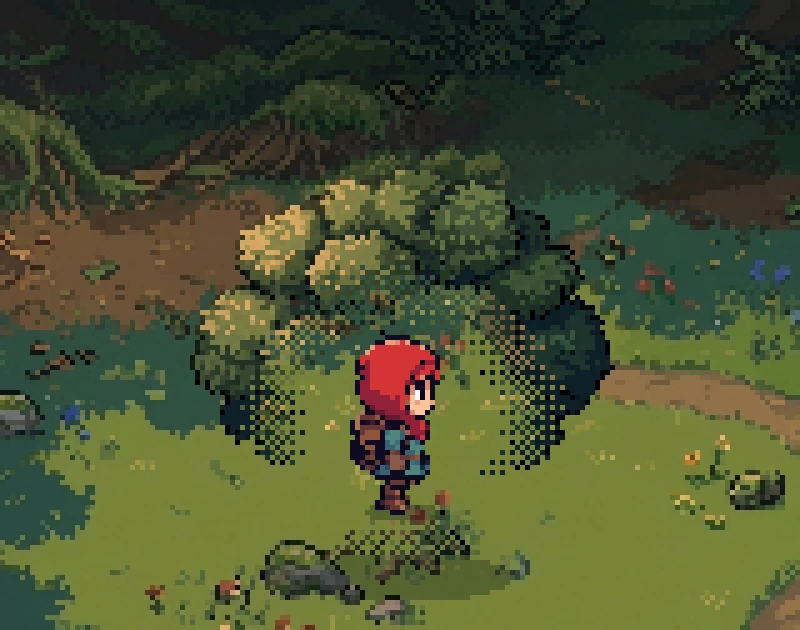
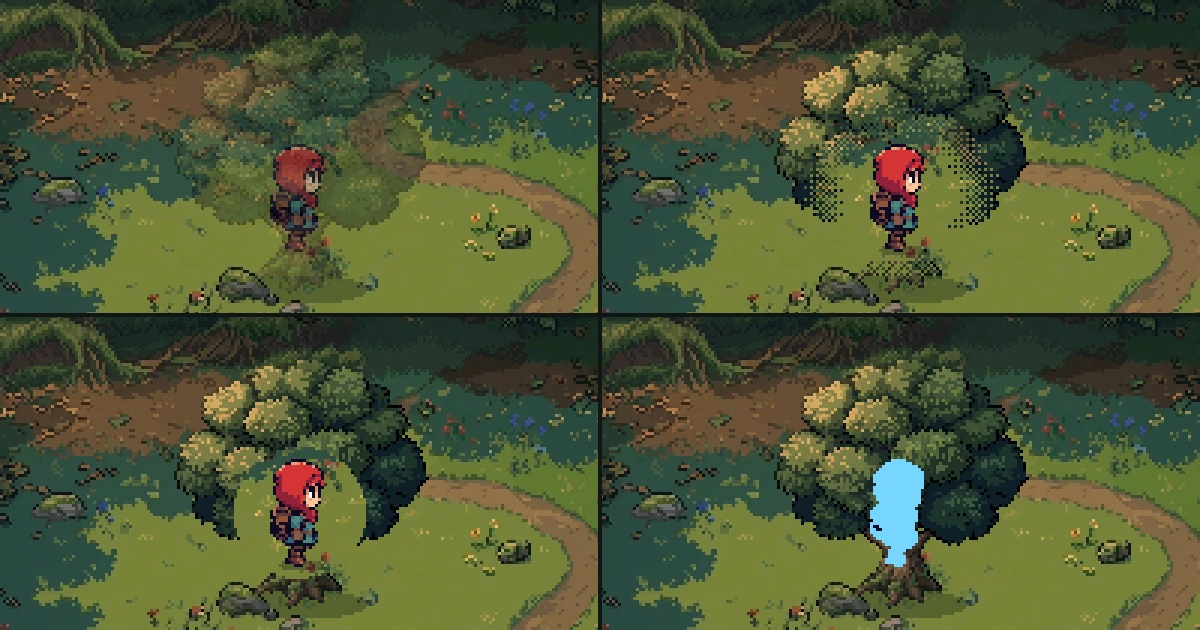 4 ways to keep the player visible behind trees and walls in a 2D gameFade, dither, cutout and silhouette, the four standard ways to show a character who walks behind a tree or a wall. What each one does to pixel art, when to switch it on, the numbers, a tested Godot script with its shader, and the pitfalls.
 Coyote time, jump buffering and corner correction for 2D platformersThree small bits of forgiveness that make a platformer feel fair. A late jump off a ledge, an early jump before landing and a nudge past a corner, with the numbers, tested Godot code and the pitfalls.
 How to set up a pixel art game so it renders pixel perfectWhy pixel art looks blurry, lumpy or pasted together in a game, and the eight rules that fix it. With the Godot and Unity settings, a tested script that audits a scene and the pitfalls.