13 ways to show invincibility frames in a 2D game
After a hit, the player can't be hurt for a moment, and the game has to show it. Thirteen ways to do that, from blink and flash red to jitter, sparkles and a shield bubble, with the timing numbers, tested Godot code and a Unity version.
Paste it into Claude Code, Codex, Cursor or any coding agent.
# Add invincibility frames to my game

When my player gets hit, I want them to be safe for a short moment and to show it clearly, so one enemy can't drain my
health bar in a second and players always know when they can be hurt again. Build the timer, then the look I pick.

Before you write code, look at my project: the engine, how the player takes damage, whether it runs on a fixed tick, and how the player's sprite is drawn and animated. Hook this into my existing damage code, and keep my damage amounts and any i-frame window I already have. Ask me which look I want before building more than one. The options are below.

## How it works

- After a hit the player can't be hurt for 90 ticks (1.5 s at 60 ticks a second), counted from the hit tick k = 0.
- A hit inside the window does nothing and does not restart the timer. A hit on tick 90 lands and starts a new window.
- Keep the hurtbox on and ignore the damage while safe, instead of switching the collider off and on (that misses or
  double-counts an enemy already inside it). An enemy still touching on tick 90 hits again on tick 90, as it should.
- In each tick, advance the timer before checking damage, so a hit on tick 90 lands.
- Optional 4 tick hit stop at the hit: the game freezes, the i-frame timer keeps counting.
- Save the sprite properties the look changes (visibility, alpha, offset, scale, material) at the hit. Each tick, put
  them back, then apply the look for tick k. On tick 90 they are restored for good. A look changes colour, alpha,
  offset, size or draws something extra, never the animation frame.
- Pixels are art pixels (texels), not screen pixels. Opaque means alpha above 0.

## Numbers that matter

Outline pixels below mean brightness 0.3 R + 0.59 G + 0.11 B at or below 60 (of 255); tints leave them alone.

- Blink: hidden when (k // 4) % 2 == 1.
- See-through: alpha x 0.45. Fade in and out: alpha x 0.25 + 0.75 * (0.5 + 0.5 * cos(2 pi k / 15)).
- Flash red: when (k // 5) % 2 == 0, non-outline rgb * 0.4 + (240, 46, 46) * 0.6.
- Flash white: when (k // 5) % 2 == 0, every opaque pixel (255, 255, 250). Dark flicker: the same with (28, 22, 44).
- Rainbow: non-outline tint 60% toward (255,70,70), (255,170,50), (250,230,60), (90,220,90), (70,170,255),
  (190,110,255), 3 ticks each.
- Jitter: x offset (-1, 1, 0, 1, -1, 0)[(k // 2) % 6] px.
- Squash pulse: s = round(2 sin(2 pi k / 20)), width + s, height - s, feet in place.
- Outline: 1 px ring outside the opaque pixels, (236, 52, 52) when (k // 5) % 2 == 0, else (255, 210, 64).
- Echo ring: age a = k % 12, ring at 1 + a // 2 px out, (255, 255, 240), alpha 255 (1 - a / 12) ^ 0.7.
- Shield bubble: radius max(w, h) // 2 + 3, grows from 60% over 7 ticks, blinks every 4 ticks in the last 24.
- Sparkles: 4 stars on a 25 x 9 px ellipse, one lap per 48 ticks, in front when sin(angle) > 0.

## Pseudo code

```
on_hit():
    if k >= 0: return false          # still safe: ignore, don't restart
    saved = sprite.state(); k = 0
    apply_look(0)                    # the look shows on the hit tick itself
    return true                      # caller subtracts health

tick():                               # once per physics tick
    if k < 0: return
    sprite.restore(saved)
    k += 1
    if k >= 90: k = -1; return
    apply_look(k)

apply_look(k):
    match look:
        blink:       sprite.visible = saved.visible and (k // 4) % 2 == 0
        see_through: sprite.alpha = saved.alpha * 0.45
        flash_red:   shader.mode = TINT if (k // 5) % 2 == 0 else OFF; shader.color = (240, 46, 46)
        jitter:      sprite.offset.x = saved.offset.x + [-1, 1, 0, 1, -1, 0][(k // 2) % 6]
        ...          # the rest from the numbers above
```

Godot: tick in `_physics_process`, tints in a canvas_item shader. Unity: `FixedUpdate` at 60 Hz and a sprite shader;
move a child object for jitter and squash, since a SpriteRenderer has no offset. Outline and echo draw outside the
sprite: grow the quad in the vertex shader, or pad the art.

## Pitfalls

- Turning the hurtbox off for the window: an enemy inside it hits the player the tick it comes back on.
- Restarting the timer on every touch: a touching enemy keeps the player safe forever.
- Blinking by swapping animation frames: the walk cycle restarts and stutters.
- Not restoring the sprite's own alpha, material, offset or scale at the end.
- Flipping every tick: at 60 a second it's too fast to read. Steps of 4 or 5 ticks read as flicker.

## Check that it works

- A hit on tick 0 lands, a hit on tick 30 does nothing, a hit on tick 90 lands again.
- The chosen look matches its rule on ticks 0 to 89 (write a small test that steps ticks if the engine allows it).
- On tick 90 the sprite is exactly as before, and the animation never skipped a frame.
- Look turned off: every hit lands and nothing on the sprite changes.

Source: SpriteCook (2D game assets made by your coding agent, for Claude, ChatGPT and Cursor)
Full guide with all thirteen looks, videos, tested Godot code and a Unity version: https://www.spritecook.ai/blog/invincibility-frames-2d-blink-flash
When a player gets hit, most games make them safe for a moment so one enemy can't drain the whole health bar in a second. Those are invincibility frames, or i-frames. The timer is the easy part. The player also has to see it, or they don't know why the next hit did nothing, or they walk into a spike thinking they're still safe. Here are thirteen ways to show it, all on the same sprite with the same timing.
The four most people pick, on one hit. The hedgehog's second charge lands inside the window and does nothing. The mushroom, his idle and hit animations, the hedgehog and the meadow were all generated by a coding agent with SpriteCook.
The timer
Every look on this page runs on the same small timer. Time is counted in physics ticks at 60 a second, from the tick of the hit.
- 90 ticks (1.5 s) of safety. The hit on tick 0 lands, then nothing can hurt the player until tick 90. Games pick anything from about 0.5 s to 2 s; Terraria's default is 0.67 s.
- A second hit inside the window does nothing, and it doesn't restart the timer. Otherwise an enemy that keeps touching the player keeps them safe forever.
- A 4 tick hit stop freezes the game at the hit so it reads. The i-frame timer keeps counting through it, so the window still ends on tick 90.
- The look is only the picture. It changes colour, alpha, offset or size, or draws something extra, and never touches the sprite's animation frame. When the window ends, the sprite is back exactly as it was.
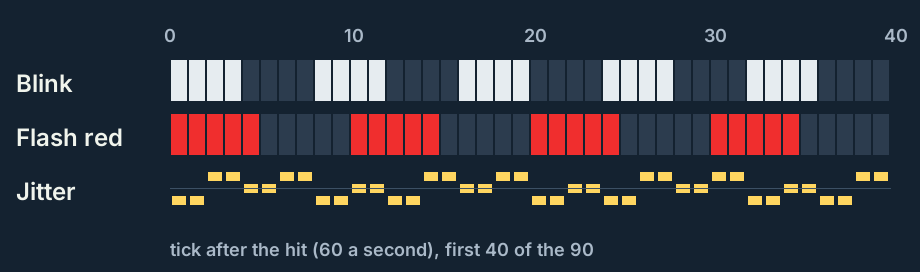
Each look has a rhythm. Blink switches every 4 ticks, the flashes every 5, so they read as flicker without strobing at the full 60.
Hide it
1. Blink
The sprite is shown for 4 ticks, hidden for 4, for the whole window. It's the classic, and every player knows it. The cost: half the time the player can't see their own character, which is hard in a busy fight.
2. See-through
The sprite drops to 45% opacity for the whole window. It's calm and always visible, but on a busy or dark background it can get lost.
3. Fade in and out
Like see-through, but the opacity pulses from 100% down to 25% and back, 4 times a second. The movement catches the eye better than a flat 45%, and the player never fully disappears.
Recolor it
4. Flash red
Every other 5 ticks the sprite is tinted 60% toward red (240, 46, 46). The dark outline is left alone (pixels with a brightness of 60 or less), so the character keeps its shape. Red says "you got hurt" in every game, so nobody needs it explained.
5. Flash white
Every other 5 ticks the whole sprite is filled with off-white (255, 255, 250), outline included. It's the strongest flash of all, and the same trick most games use for a single hit flash on enemies.
6. Dark flicker
The opposite of the white flash: every other 5 ticks the sprite becomes a dark silhouette (28, 22, 44). It works well in bright scenes, where a white flash washes out.
7. Rainbow
The tint cycles through six colours, 3 ticks each, the whole window. Players read it as "untouchable" from star power-ups, so it suits a game where getting hit is a big moment. It's the loudest of the thirteen.
Move it
8. Jitter
The sprite shakes sideways by 1 px, a step every 2 ticks, through -1, +1, 0, +1, -1, 0. The art stays fully visible and in its own colours, so it works with any palette. On a small screen it's the subtlest of the thirteen.
9. Squash pulse
The sprite gets s px wider and s px shorter, with s = round(2 sin(2 pi k / 20)), so it bounces 3 times a second with its feet on the ground. It's cute and cartoony, and it can look like part of the idle if the idle already bobs.
Draw something extra
10. Outline
A 1 px ring just outside the sprite's pixels, red (236, 52, 52) and gold (255, 210, 64) swapping every 5 ticks. The art itself doesn't change, which is nice when the character's colours matter for gameplay.
11. Echo ring
Every 12 ticks a 1 px ring in the sprite's shape starts at 1 px out, moves out 1 px every 2 ticks to 6 px, and fades as it goes. It looks like a shockwave around the character, and nobody mistakes it for the idle.
12. Shield bubble
A pixel art bubble around the character, radius half the sprite's size plus 3 px. It pops in from 60% size over 7 ticks and blinks in the last 24 ticks (0.4 s), so the player sees the safe time running out. Common in shooters after a respawn.
13. Sparkles
Four little stars circle the character on a flat 25 x 9 px ellipse, one lap every 48 ticks (0.8 s), each one swapping between a big and a small star every 6 ticks. They pass behind the sprite on the far side of the ellipse, so the ring reads as round.
The code
One node on the player does the timer and all thirteen looks. Point it at the sprite and call hit() when something hurts the player; it returns false during the window, so the damage code stays one line:
if $IFrames.hit():
	health -= 1
iframes.gd, the component:
# Invincibility frames: after a hit, the sprite can't be hurt for 1.5 s and shows it.
# Add this node to the player, point sprite_path at the Sprite2D or AnimatedSprite2D, and call hit():
#     if $IFrames.hit():
#         health -= 1
extends Node

enum Look { NONE, BLINK, FLASH_RED, FLASH_WHITE, DARK, SEE_THROUGH, FADE, JITTER, RAINBOW, OUTLINE, BUBBLE, SPARKLES, ECHO, SQUASH }

const SHADER = preload("res://iframes.gdshader")
const EXTRAS = preload("res://iframes_extras.gd")
const OFF := 0
const TINT := 1
const FILL := 2
const RING := 3
const RAINBOW := [Color8(255, 70, 70), Color8(255, 170, 50), Color8(250, 230, 60), Color8(90, 220, 90), Color8(70, 170, 255), Color8(190, 110, 255)]

@export var look := Look.BLINK           # NONE turns i-frames off: every hit lands
@export var duration_ticks := 90         # 1.5 s at 60 physics ticks a second
@export var hit_stop_ticks := 4          # the game freezes this long at the hit (0 = no freeze)
@export var sprite_path: NodePath

var k := -1                              # ticks since the hit, -1 when the player can be hurt
var sprite: Node2D
var _saved := {}
var _material := ShaderMaterial.new()
var _front: Node2D                       # draws the bubble and the stars in front of the sprite
var _back: Node2D                        # and the stars behind it


func _ready() -> void:
	process_physics_priority = -1000          # count first, so a hit later in the same tick sees the new count
	sprite = get_node(sprite_path)
	_material.shader = SHADER
	_back = EXTRAS.new()
	_back.show_behind_parent = true
	_front = EXTRAS.new()
	sprite.add_child(_back)
	sprite.add_child(_front)


func is_invincible() -> bool:
	return k >= 0


# Returns true when the hit counts. During the window it returns false and the timer keeps running.
func hit() -> bool:
	if is_invincible():
		return false
	if look == Look.NONE or duration_ticks <= 0:
		return true
	_saved = {"visible": sprite.visible, "modulate": sprite.modulate, "offset": sprite.offset,
			"scale": sprite.scale, "material": sprite.material}
	k = 0
	if hit_stop_ticks > 0:
		get_tree().paused = true
		process_mode = Node.PROCESS_MODE_ALWAYS     # keep counting while the game is frozen
	_show()
	return true


func _physics_process(_delta: float) -> void:
	if k < 0:
		return
	k += 1
	if k == hit_stop_ticks:
		get_tree().paused = false
		process_mode = Node.PROCESS_MODE_INHERIT
	if k >= duration_ticks:
		k = -1
	_show()


# Puts the sprite back as it was, then applies the look for tick k.
func _show() -> void:
	for key in _saved:
		sprite.set(key, _saved[key])
	_front.items = []
	_back.items = []
	if k >= 0:
		_apply()
	_front.queue_redraw()
	_back.queue_redraw()


func _apply() -> void:
	var rect := _rect()
	var w := int(rect.size.x)
	var h := int(rect.size.y)
	var flash := (k / 5) % 2 == 0
	match look:
		Look.BLINK:
			sprite.visible = _saved.visible and (k / 4) % 2 == 0
		Look.FLASH_RED:
			_shade(TINT if flash else OFF, Color8(240, 46, 46))
		Look.FLASH_WHITE:
			_shade(FILL if flash else OFF, Color8(255, 255, 250))
		Look.DARK:
			_shade(FILL if flash else OFF, Color8(28, 22, 44))
		Look.SEE_THROUGH:
			sprite.modulate.a *= 0.45
		Look.FADE:                               # 4 pulses a second, from 100% down to 25%
			sprite.modulate.a *= 0.25 + 0.75 * (0.5 + 0.5 * cos(TAU * k / 15.0))
		Look.JITTER:
			sprite.offset.x += [-1, 1, 0, 1, -1, 0][(k / 2) % 6]
		Look.RAINBOW:
			_shade(TINT, RAINBOW[(k / 3) % 6])
		Look.OUTLINE:
			_shade(RING, Color8(236, 52, 52) if flash else Color8(255, 210, 64))
		Look.ECHO:                               # a new ring every 12 ticks, moving out 1 px every 2 ticks
			var age := k % 12
			_shade(RING, Color(1, 1, 240 / 255.0, pow(1 - age / 12.0, 0.7)), 1 + age / 2)
		Look.SQUASH:                             # s px wider and s px shorter, 3 bounces a second
			var s := roundi(2 * sin(TAU * k / 20.0))
			var f := Vector2(float(w + s) / w, float(h - s) / h)
			sprite.scale *= f
			sprite.offset.y += rect.end.y / f.y - rect.end.y   # keep the feet on the ground
		Look.BUBBLE:
			var big := maxi(w, h) / 2 + 3
			var r := roundi(big * (0.6 + 0.4 * smoothstep(0.0, 7.0, k)))
			if k < duration_ticks - 24 or (k / 4) % 2 == 0:       # blinks in the last 0.4 s
				var center := rect.position + Vector2(w / 2, h + 1 - big)
				_front.items = [[EXTRAS.bubble(r), center - Vector2(r + 1, r + 1)]]
		Look.SPARKLES:                           # 4 stars on a 25 x 9 px ellipse, one lap per 0.8 s
			for j in 4:
				var ang := TAU * k / 48.0 + j * PI / 2.0
				var at := Vector2(floor(w / 2.0 + 25 * cos(ang)), floor(h / 2.0 + 9 * sin(ang)))
				var star: Texture2D = EXTRAS.star((k / 6 + j) % 2 == 0)
				var half := float(star.get_width() / 2)
				(_front if sin(ang) > 0 else _back).items.append([star, rect.position + at - Vector2(half, half)])


func _shade(mode: int, color: Color, ring := 1) -> void:
	_material.set_shader_parameter("mode", mode)
	_material.set_shader_parameter("color", color)
	_material.set_shader_parameter("ring", ring)
	_material.set_shader_parameter("center", _rect().get_center())
	_material.set_shader_parameter("flip", Vector2(-1 if sprite.flip_h else 1, -1 if sprite.flip_v else 1))
	sprite.material = _material


# The sprite's current frame, in its own pixels.
func _rect() -> Rect2:
	if sprite is Sprite2D:
		return sprite.get_rect()
	var size: Vector2 = sprite.sprite_frames.get_frame_texture(sprite.animation, sprite.frame).get_size()
	return Rect2(sprite.offset - (size / 2 if sprite.centered else Vector2.ZERO), size)
iframes.gdshader, the tints, fills and rings. The rings need pixels outside the sprite, so the vertex shader grows the quad instead of asking for padding in the art:
// The i-frame looks that change pixels. iframes.gd puts this on the sprite during the window and sets the uniforms.
shader_type canvas_item;

uniform int mode = 0;                 // 0 off, 1 tint, 2 fill, 3 ring outside the shape
uniform vec4 color = vec4(1.0);
uniform float amount = 0.6;           // how far the tint goes toward color
uniform float outline_level = 60.0;   // pixels this dark (of 255) are the outline and keep their colour
uniform int ring = 1;                 // ring distance in px
uniform vec2 center;                  // middle of the sprite, in its own pixels
uniform vec2 flip = vec2(1.0);        // -1 on a flipped axis

varying vec4 modulate;

void vertex() {
	modulate = COLOR;
	if (mode == 3) {                  // grow the quad so the ring has room outside the sprite
		vec2 dir = sign(VERTEX - center);
		VERTEX += dir * float(ring);
		UV += dir * flip * float(ring) * TEXTURE_PIXEL_SIZE;
	}
}

// True for UVs inside this frame of the texture (the grown quad reaches past it). Flipped frames have a negative size.
bool inside(vec2 uv, vec4 frame) {
	return all(greaterThanEqual(uv, frame.xy)) && all(lessThan(uv, frame.xy + abs(frame.zw)));
}

void fragment() {
	vec4 c = texture(TEXTURE, UV);
	c.a *= float(inside(UV, REGION_RECT));
	bool outline = dot(c.rgb, vec3(0.3, 0.59, 0.11)) * 255.0 <= outline_level + 0.01;
	if (mode == 1 && c.a > 0.0 && !outline) {
		c.rgb = mix(c.rgb, color.rgb, amount);
	} else if (mode == 2 && c.a > 0.0) {
		c.rgb = color.rgb;
	} else if (mode == 3 && c.a == 0.0) {
		// nearest opaque texel, counting steps left, right, up and down
		int nearest = ring + 1;
		for (int dy = -ring; dy <= ring; dy++) {
			int reach = ring - abs(dy);
			for (int dx = -reach; dx <= reach; dx++) {
				vec2 uv = UV + vec2(float(dx), float(dy)) * TEXTURE_PIXEL_SIZE;
				if (inside(uv, REGION_RECT) && texture(TEXTURE, uv).a > 0.0) {
					nearest = min(nearest, abs(dx) + abs(dy));
				}
			}
		}
		if (nearest == ring) {
			c = color;
		}
	}
	COLOR = c * modulate;
}
iframes_extras.gd, the bubble and the stars, painted once into small images and drawn at whole pixels:
# Draws the shield bubble and the sparkles for iframes.gd: small pixel-art images, painted once, drawn at whole pixels.
extends Node2D

const STAR_BIG := [[0, 0, 0, 1, 0, 0, 0], [0, 0, 0, 1, 0, 0, 0], [0, 0, 1, 2, 1, 0, 0], [1, 1, 2, 2, 2, 1, 1],
		[0, 0, 1, 2, 1, 0, 0], [0, 0, 0, 1, 0, 0, 0], [0, 0, 0, 1, 0, 0, 0]]
const STAR_SMALL := [[0, 0, 1, 0, 0], [0, 1, 2, 1, 0], [0, 0, 1, 0, 0]]

static var _cache := {}
var items := []                          # [texture, top-left] pairs, set by iframes.gd


func _draw() -> void:
	for item in items:
		draw_texture(item[0], item[1])


# The bubble of radius r: a (2r + 3) px square, centre pixel at (r + 1, r + 1).
static func bubble(r: int) -> Texture2D:
	if not _cache.has(r):
		var size := 2 * r + 3
		var img := Image.create(size, size, false, Image.FORMAT_RGBA8)
		for y in size:
			for x in size:
				var d := Vector2i(x - r - 1, y - r - 1)
				var dist := sqrt(d.x * d.x + d.y * d.y)
				var ang := fposmod(rad_to_deg(atan2(d.y, d.x)), 360.0)      # 180 to 270 is the top left
				var c := Color(0, 0, 0, 0)
				if dist < r - 1.5:
					c = Color8(170, 230, 255, 45)             # inside
				elif dist < r - 0.5:
					c = Color8(150, 220, 255, 150)            # inner ring
				elif dist < r + 0.5:
					c = Color8(240, 252, 255, 235)            # outer ring
				if absf(dist - (r - 4)) < 0.6 and ((ang > 200 and ang < 250) or (ang > 258 and ang < 266)):
					c = Color8(255, 255, 255, 220)            # highlight
				img.set_pixel(x, y, c)
		_cache[r] = ImageTexture.create_from_image(img)
	return _cache[r]


# A plus-shaped star, yellow with a white centre and a dark 1 px edge: 9 px square (big) or 7 px (small).
static func star(big: bool) -> Texture2D:
	var key := "big star" if big else "small star"
	if not _cache.has(key):
		var shape: Array = STAR_BIG if big else STAR_SMALL
		var size := 9 if big else 7
		var top := 1 if big else 2
		var img := Image.create(size, size, false, Image.FORMAT_RGBA8)
		for y in shape.size():
			for x in shape[y].size():
				if shape[y][x] == 0:
					continue
				for d: Vector2i in [Vector2i(-1, 0), Vector2i(1, 0), Vector2i(0, -1), Vector2i(0, 1)]:
					var p := Vector2i(x + 1, y + top) + d
					if img.get_pixelv(p).a == 0:
						img.set_pixelv(p, Color8(60, 40, 20))    # edge
		for y in shape.size():
			for x in shape[y].size():
				if shape[y][x] > 0:
					img.set_pixel(x + 1, y + top, Color8(255, 214, 64) if shape[y][x] == 1 else Color8(255, 255, 235))
		_cache[key] = ImageTexture.create_from_image(img)
	return _cache[key]
Tested in Godot 4.6.1, headless and in both the Forward+ and Compatibility renderers:
- Every look matches the rules above on every tick from 0 to 119 after a hit, and the drawn pixels match a Python version of the rules exactly in Forward+ and within 1 per channel in Compatibility. Outline and echo were also checked on flipped sprites.
- The hit on tick 0 lands, a second hit on tick 30 is ignored and doesn't restart the timer, the player is safe on ticks 0 to 89, and a hit on tick 90 lands and starts a new window.
- On tick 90 the sprite is exactly as before: visible, its own alpha, offset, scale and material, no extras.
- The 4 tick hit stop pauses the game on ticks 0 to 3; the timer counts through it.
- An AnimatedSprite2D keeps playing its animation frame for frame like an untouched copy, under every look.
- Look NONE or a duration of 0: every hit lands and nothing on the sprite changes.
Unity
The same component for Unity, on the GameObject with the SpriteRenderer, ticking in FixedUpdate. Call Hit() the same way.
IFrames.cs:
// Invincibility frames: after a hit, the sprite can't be hurt for 1.5 s and shows it.
// Put this on the object with the SpriteRenderer (a child of the player, so jitter and squash don't move the
// collider), set Fixed Timestep to 1/60 (Project Settings > Time), and call Hit() when something hurts the player:
//     if (iframes.Hit()) health -= 1;
using System;
using UnityEngine;

[DefaultExecutionOrder(-1000)]           // count first, so a hit later in the same tick sees the new count
[RequireComponent(typeof(SpriteRenderer))]
public class IFrames : MonoBehaviour
{
    public enum Look { None, Blink, FlashRed, FlashWhite, Dark, SeeThrough, Fade, Jitter, Rainbow, Outline, Bubble, Sparkles, Echo, Squash }

    public Look look = Look.Blink;       // None turns i-frames off: every hit lands
    public int durationTicks = 90;       // 1.5 s at 60 ticks a second
    public int hitStopTicks = 4;         // the game freezes this long at the hit (0 = no freeze)
    public Shader shader;                // IFrames.shader, used by the looks that change pixels

    public int K { get; private set; } = -1;   // ticks since the hit, -1 when the player can be hurt
    public bool IsInvincible => K >= 0;

    const int Off = 0, Tint = 1, Fill = 2, Ring = 3;
    static readonly int[] JitterPx = { -1, 1, 0, 1, -1, 0 };
    static readonly Color32[] Rainbow = { new(255, 70, 70, 255), new(255, 170, 50, 255), new(250, 230, 60, 255),
        new(90, 220, 90, 255), new(70, 170, 255, 255), new(190, 110, 255, 255) };

    SpriteRenderer sr;
    Material material;
    IFramesExtras extras;
    bool savedEnabled, frozen;
    Color savedColor;
    Vector3 savedPosition, savedScale;
    Material savedMaterial;
    float savedTimeScale, frozenClock;
    int hitFrame;

    void Awake()
    {
        sr = GetComponent<SpriteRenderer>();
        material = new Material(shader ? shader : Shader.Find("IFrames/Sprite"));
        extras = new IFramesExtras(sr);
    }

    // Returns true when the hit counts. During the window it returns false and the timer keeps running.
    public bool Hit()
    {
        if (IsInvincible) return false;
        if (look == Look.None || durationTicks <= 0) return true;
        savedEnabled = sr.enabled;
        savedColor = sr.color;
        savedPosition = transform.localPosition;
        savedScale = transform.localScale;
        savedMaterial = sr.sharedMaterial;
        K = 0;
        if (hitStopTicks > 0)
        {
            frozen = true;
            frozenClock = 0;
            hitFrame = Time.frameCount;
            savedTimeScale = Time.timeScale;
            Time.timeScale = 0;
        }
        Show();
        return true;
    }

    void FixedUpdate()
    {
        if (IsInvincible && !frozen) Step();
    }

    // FixedUpdate stops while the time scale is 0, so the ticks of the hit stop are counted here in real time.
    void Update()
    {
        if (!frozen || Time.frameCount == hitFrame) return;
        for (frozenClock += Time.unscaledDeltaTime; frozen && frozenClock > Time.fixedDeltaTime * 0.999f; frozenClock -= Time.fixedDeltaTime)
            Step();
    }

    void Step()
    {
        K++;
        if (frozen && K >= hitStopTicks)
        {
            frozen = false;
            Time.timeScale = savedTimeScale;
        }
        if (K >= durationTicks) K = -1;
        Show();
    }

    // Puts the sprite back as it was, then applies the look for tick K.
    void Show()
    {
        sr.enabled = savedEnabled;
        sr.color = savedColor;
        transform.localPosition = savedPosition;
        transform.localScale = savedScale;
        sr.sharedMaterial = savedMaterial;
        extras.Clear();
        if (IsInvincible) Apply();
    }

    void Apply()
    {
        Sprite sprite = sr.sprite;
        int w = (int)sprite.rect.width, h = (int)sprite.rect.height;
        float px = 1 / sprite.pixelsPerUnit;
        bool flash = K / 5 % 2 == 0;
        Color color = savedColor;
        switch (look)
        {
            case Look.Blink:
                sr.enabled = savedEnabled && K / 4 % 2 == 0;
                break;
            case Look.FlashRed:
                Shade(flash ? Tint : Off, new Color32(240, 46, 46, 255));
                break;
            case Look.FlashWhite:
                Shade(flash ? Fill : Off, new Color32(255, 255, 250, 255));
                break;
            case Look.Dark:
                Shade(flash ? Fill : Off, new Color32(28, 22, 44, 255));
                break;
            case Look.SeeThrough:
                color.a *= 0.45f;
                sr.color = color;
                break;
            case Look.Fade:                  // 4 pulses a second, from 100% down to 25%
                color.a *= 0.25f + 0.75f * (0.5f + 0.5f * Mathf.Cos(2 * Mathf.PI * K / 15f));
                sr.color = color;
                break;
            case Look.Jitter:
                transform.localPosition = savedPosition + Vector3.right * JitterPx[K / 2 % 6] * px * savedScale.x;
                break;
            case Look.Rainbow:
                Shade(Tint, Rainbow[K / 3 % 6]);
                break;
            case Look.Outline:
                Shade(Ring, flash ? new Color32(236, 52, 52, 255) : new Color32(255, 210, 64, 255));
                break;
            case Look.Echo:                  // a new ring every 12 ticks, moving out 1 px every 2 ticks
                int age = K % 12;
                Shade(Ring, new Color(1, 1, 240 / 255f, Mathf.Pow(1 - age / 12f, 0.7f)), 1 + age / 2);
                break;
            case Look.Squash:                // s px wider and s px shorter, 3 bounces a second
                int s = (int)Math.Round(2 * Math.Sin(2 * Math.PI * K / 20), MidpointRounding.AwayFromZero);
                transform.localScale = Vector3.Scale(savedScale, new Vector3((w + s) / (float)w, (h - s) / (float)h, 1));
                float feet = sprite.bounds.min.y;        // keep the feet on the ground
                transform.localPosition = savedPosition + Vector3.up * feet * (savedScale.y - transform.localScale.y);
                break;
            case Look.Bubble:
                int big = Mathf.Max(w, h) / 2 + 3;
                float grow = Mathf.SmoothStep(0, 1, K / 7f);
                int r = (int)Math.Round(big * (0.6 + 0.4 * grow), MidpointRounding.AwayFromZero);
                if (K < durationTicks - 24 || K / 4 % 2 == 0)              // blinks in the last 0.4 s
                    extras.Add(IFramesExtras.Bubble(r, sprite.pixelsPerUnit), w / 2 - r - 1, h + 1 - big - r - 1, true);
                break;
            case Look.Sparkles:              // 4 stars on a 25 x 9 px ellipse, one lap per 0.8 s
                for (int j = 0; j < 4; j++)
                {
                    double angle = 2 * Math.PI * K / 48 + j * Math.PI / 2;
                    int x = (int)Math.Floor(w / 2.0 + 25 * Math.Cos(angle));
                    int y = (int)Math.Floor(h / 2.0 + 9 * Math.Sin(angle));
                    Sprite star = IFramesExtras.Star((K / 6 + j) % 2 == 0, sprite.pixelsPerUnit);
                    int half = (int)star.rect.width / 2;
                    extras.Add(star, x - half, y - half, Math.Sin(angle) > 0);
                }
                break;
        }
    }

    void Shade(int mode, Color color, int ring = 1)
    {
        Sprite sprite = sr.sprite;
        Rect uv = sprite.textureRect;
        Vector2 size = new(sprite.texture.width, sprite.texture.height);
        material.SetFloat("_Mode", mode);
        material.SetColor("_IColor", color);
        material.SetFloat("_Ring", ring);
        material.SetVector("_Center", sprite.bounds.center);
        material.SetVector("_Frame", new Vector4(uv.x / size.x, uv.y / size.y, uv.width / size.x, uv.height / size.y));
        material.SetFloat("_PixelSize", 1 / sprite.pixelsPerUnit);
        material.SetVector("_Mirror", new Vector4(sr.flipX ? -1 : 1, sr.flipY ? -1 : 1));
        sr.sharedMaterial = material;
    }
}
IFramesExtras.cs, the bubble and the stars as child sprites:
// Draws the shield bubble and the sparkles for IFrames: small pixel-art sprites, painted once, placed on whole
// pixels as children of the sprite, one sorting order in front of it or behind it.
using System.Collections.Generic;
using UnityEngine;

public class IFramesExtras
{
    static readonly int[,] StarBig = { { 0, 0, 0, 1, 0, 0, 0 }, { 0, 0, 0, 1, 0, 0, 0 }, { 0, 0, 1, 2, 1, 0, 0 },
        { 1, 1, 2, 2, 2, 1, 1 }, { 0, 0, 1, 2, 1, 0, 0 }, { 0, 0, 0, 1, 0, 0, 0 }, { 0, 0, 0, 1, 0, 0, 0 } };
    static readonly int[,] StarSmall = { { 0, 0, 0, 0, 0 }, { 0, 0, 1, 0, 0 }, { 0, 1, 2, 1, 0 }, { 0, 0, 1, 0, 0 }, { 0, 0, 0, 0, 0 } };
    static readonly Dictionary<string, Sprite> Cache = new();

    readonly SpriteRenderer owner;
    readonly List<SpriteRenderer> pool = new();
    int used;

    public IFramesExtras(SpriteRenderer owner) => this.owner = owner;

    public void Clear()
    {
        foreach (var item in pool) item.enabled = false;
        used = 0;
    }

    // Shows a sprite with its top-left x, y px right of and below the owner sprite's top-left.
    public void Add(Sprite sprite, int x, int y, bool inFront)
    {
        if (used == pool.Count)
        {
            var go = new GameObject("IFrames extra");
            go.transform.SetParent(owner.transform, false);
            pool.Add(go.AddComponent<SpriteRenderer>());
        }
        var item = pool[used++];
        Bounds b = owner.sprite.bounds;
        float px = 1 / owner.sprite.pixelsPerUnit;
        item.sprite = sprite;
        item.transform.localPosition = new Vector3(b.min.x + x * px, b.max.y - y * px, 0);
        item.sortingLayerID = owner.sortingLayerID;
        item.sortingOrder = owner.sortingOrder + (inFront ? 1 : -1);
        item.enabled = true;
    }

    // The bubble of radius r: a (2r + 3) px square, centre pixel at (r + 1, r + 1).
    public static Sprite Bubble(int r, float pixelsPerUnit)
    {
        return Paint("bubble " + r, 2 * r + 3, pixelsPerUnit, (x, y) =>
        {
            int dx = x - r - 1, dy = y - r - 1;
            double d = System.Math.Sqrt(dx * dx + dy * dy);
            double angle = (System.Math.Atan2(dy, dx) * 180 / System.Math.PI + 360) % 360;   // 180 to 270 is the top left
            Color32 c = default;
            if (d < r - 1.5) c = new Color32(170, 230, 255, 45);              // inside
            else if (d < r - 0.5) c = new Color32(150, 220, 255, 150);        // inner ring
            else if (d < r + 0.5) c = new Color32(240, 252, 255, 235);        // outer ring
            if (System.Math.Abs(d - (r - 4)) < 0.6 && ((angle > 200 && angle < 250) || (angle > 258 && angle < 266)))
                c = new Color32(255, 255, 255, 220);                          // highlight
            return c;
        });
    }

    // A plus-shaped star, yellow with a white centre and a dark 1 px edge: 9 px square (big) or 7 px (small).
    public static Sprite Star(bool big, float pixelsPerUnit)
    {
        int[,] shape = big ? StarBig : StarSmall;
        int n = shape.GetLength(0);
        int At(int x, int y) => x >= 1 && y >= 1 && x <= n && y <= n ? shape[y - 1, x - 1] : 0;
        return Paint(big ? "big star" : "small star", n + 2, pixelsPerUnit, (x, y) =>
        {
            int v = At(x, y);
            if (v == 1) return new Color32(255, 214, 64, 255);
            if (v == 2) return new Color32(255, 255, 235, 255);
            bool edge = At(x - 1, y) > 0 || At(x + 1, y) > 0 || At(x, y - 1) > 0 || At(x, y + 1) > 0;
            return edge ? new Color32(60, 40, 20, 255) : default;
        });
    }

    // A size x size sprite from a pixel function (x right, y down), point filtered, pivot at the top-left.
    static Sprite Paint(string key, int size, float pixelsPerUnit, System.Func<int, int, Color32> pixel)
    {
        key += " " + pixelsPerUnit;
        if (Cache.TryGetValue(key, out var cached)) return cached;
        var tex = new Texture2D(size, size, TextureFormat.RGBA32, false) { filterMode = FilterMode.Point, wrapMode = TextureWrapMode.Clamp };
        var pixels = new Color32[size * size];
        for (int y = 0; y < size; y++)
            for (int x = 0; x < size; x++)
                pixels[(size - 1 - y) * size + x] = pixel(x, y);       // texture rows go up
        tex.SetPixels32(pixels);
        tex.Apply();
        return Cache[key] = Sprite.Create(tex, new Rect(0, 0, size, size), new Vector2(0, 1), pixelsPerUnit, 0, SpriteMeshType.FullRect);
    }
}
IFrames.shader:
// The i-frame looks that change pixels. IFrames.cs puts this on the SpriteRenderer during the window and sets the
// properties. A sprite shader on Unity's own sprite includes (flip, renderer colour); the sprite's Mesh Type should be
// Full Rect so Outline and Echo can grow the quad.
Shader "IFrames/Sprite"
{
    Properties
    {
        [PerRendererData] _MainTex ("Sprite", 2D) = "white" {}
        _Color ("Tint", Color) = (1, 1, 1, 1)
        [HideInInspector] _RendererColor ("Renderer colour", Color) = (1, 1, 1, 1)
        [HideInInspector] _Flip ("Flip", Vector) = (1, 1, 1, 1)
        _Mode ("Mode (0 off, 1 tint, 2 fill, 3 ring)", Float) = 0
        _IColor ("Colour", Color) = (1, 1, 1, 1)
        _Amount ("Tint amount", Float) = 0.6
        _OutlineLevel ("Outline level (of 255)", Float) = 60
        _Ring ("Ring distance (px)", Float) = 1
        _Center ("Sprite middle (local units)", Vector) = (0, 0, 0, 0)
        _Frame ("Sprite rect in the texture (UV)", Vector) = (0, 0, 1, 1)
        _PixelSize ("Units per px", Float) = 0.01
        _Mirror ("-1 on a flipped axis", Vector) = (1, 1, 0, 0)
    }
    SubShader
    {
        Tags { "Queue" = "Transparent" "RenderType" = "Transparent" "IgnoreProjector" = "True" "PreviewType" = "Plane" "CanUseSpriteAtlas" = "True" }
        Cull Off
        Lighting Off
        ZWrite Off
        Blend One OneMinusSrcAlpha

        Pass
        {
            CGPROGRAM
            #pragma vertex vert
            #pragma fragment frag
            #include "UnitySprites.cginc"

            float4 _MainTex_TexelSize;
            float _Mode, _Amount, _OutlineLevel, _Ring, _PixelSize;
            float4 _IColor, _Center, _Frame, _Mirror;

            v2f vert(appdata_t v)
            {
                v2f o;
                UNITY_SETUP_INSTANCE_ID(v);
                UNITY_INITIALIZE_VERTEX_OUTPUT_STEREO(o);
                float4 pos = UnityFlipSprite(v.vertex, _Flip);
                float2 uv = v.texcoord;
                if (_Mode == 3)                  // grow the quad so the ring has room outside the sprite
                {
                    float2 dir = sign(pos.xy - _Center.xy * _Mirror.xy);
                    pos.xy += dir * _Ring * _PixelSize;
                    uv += dir * _Mirror.xy * _Ring * _MainTex_TexelSize.xy;
                }
                o.vertex = UnityObjectToClipPos(pos);
                o.texcoord = uv;
                o.color = v.color * _Color * _RendererColor;
                return o;
            }

            // Alpha of a texel, 0 outside this sprite's rect in the texture (the grown quad reaches past it).
            float alphaAt(float2 uv)
            {
                bool inside = all(uv >= _Frame.xy) && all(uv < _Frame.xy + _Frame.zw);
                return inside ? tex2Dlod(_MainTex, float4(uv, 0, 0)).a : 0;
            }

            fixed4 frag(v2f i) : SV_Target
            {
                float4 c = tex2D(_MainTex, i.texcoord);
                c.a = alphaAt(i.texcoord);
                bool outline = dot(c.rgb, float3(0.3, 0.59, 0.11)) * 255 <= _OutlineLevel + 0.01;
                if (_Mode == 1 && c.a > 0 && !outline)
                    c.rgb = lerp(c.rgb, _IColor.rgb, _Amount);
                else if (_Mode == 2 && c.a > 0)
                    c.rgb = _IColor.rgb;
                else if (_Mode == 3 && c.a == 0)
                {
                    // nearest opaque texel, counting steps left, right, up and down
                    int ring = (int)round(_Ring);
                    int nearest = ring + 1;
                    for (int dy = -ring; dy <= ring; dy++)
                    {
                        int reach = ring - abs(dy);
                        for (int dx = -reach; dx <= reach; dx++)
                            if (alphaAt(i.texcoord + float2(dx, dy) * _MainTex_TexelSize.xy) > 0)
                                nearest = min(nearest, abs(dx) + abs(dy));
                    }
                    if (nearest == ring) c = _IColor;
                }
                c *= i.color;
                c.rgb *= c.a;
                return c;
            }
            ENDCG
        }
    }
}
Tested in Unity 6000.3.18f1 (built-in render pipeline) with 19 Play Mode tests at a fixed 60 ticks a second: every look's state on every tick, the second hit, the end on tick 90, look None and a duration of 0. The rendered frames match the Python rules too, apart from the two edge columns of the squash on odd sizes. Not tested: URP, Linear colour space and an Animator-driven sprite.
Three things differ from Godot:
- Jitter and squash move the transform, since a SpriteRenderer has no offset. Put the SpriteRenderer on a child of the player so the collider stays put.
- Outline and echo need the sprite's Mesh Type set to Full Rect in the import settings; the default, Tight, cuts the quad to the art.
- The hit stop sets
Time.timeScaleto 0 and counts in real time, so the game resumes one tick later than in Godot. Both freeze 4 ticks and end on tick 90.
Common pitfalls
Turning the hurtbox off. It's tempting to disable the collider for the window, but an enemy standing inside it hits the player the moment it comes back on. Keep the collider and ignore the damage, like hit() does here.
Restarting the timer on every touch. If a hit inside the window restarts the 90 ticks, an enemy that keeps touching the player keeps them safe forever. Ignore the hit and let the timer run out.
Fighting the animation. Blink by toggling the sprite or by alpha, never by swapping animation frames, or the walk cycle restarts and stutters. Every look here leaves the frame alone.
Forgetting to restore. A look that sets alpha or a material has to put the old value back on the last tick, including values the game set on its own. Saving the sprite's state at the hit and restoring it every tick avoids drift.
Strobing. Flipping every tick at 60 a second is too fast to read and can be hard on the eyes. Steps of 4 or 5 ticks read as a clear flicker.
Where to next
- Hit stop, hit flash, knockback and screen shake: the hit itself, on the enemy's side.
- Coyote time, jump buffering and corner correction: more small rules that make a platformer fair.
- Animate your own sprite: how the mushroom's idle and hit animations were made.
- Invincibility frames on the Terraria wiki: how one big game sets its windows per source.
- Mercy invincibility: the long list of games that do this, and how.
Add this to your game with your coding agent
The prompt has the numbers, pseudo code, pitfalls and checks from this guide, written so your agent can fit it into your own project.
# Add invincibility frames to my game

When my player gets hit, I want them to be safe for a short moment and to show it clearly, so one enemy can't drain my
health bar in a second and players always know when they can be hurt again. Build the timer, then the look I pick.

Before you write code, look at my project: the engine, how the player takes damage, whether it runs on a fixed tick, and how the player's sprite is drawn and animated. Hook this into my existing damage code, and keep my damage amounts and any i-frame window I already have. Ask me which look I want before building more than one. The options are below.

## How it works

- After a hit the player can't be hurt for 90 ticks (1.5 s at 60 ticks a second), counted from the hit tick k = 0.
- A hit inside the window does nothing and does not restart the timer. A hit on tick 90 lands and starts a new window.
- Keep the hurtbox on and ignore the damage while safe, instead of switching the collider off and on (that misses or
  double-counts an enemy already inside it). An enemy still touching on tick 90 hits again on tick 90, as it should.
- In each tick, advance the timer before checking damage, so a hit on tick 90 lands.
- Optional 4 tick hit stop at the hit: the game freezes, the i-frame timer keeps counting.
- Save the sprite properties the look changes (visibility, alpha, offset, scale, material) at the hit. Each tick, put
  them back, then apply the look for tick k. On tick 90 they are restored for good. A look changes colour, alpha,
  offset, size or draws something extra, never the animation frame.
- Pixels are art pixels (texels), not screen pixels. Opaque means alpha above 0.

## Numbers that matter

Outline pixels below mean brightness 0.3 R + 0.59 G + 0.11 B at or below 60 (of 255); tints leave them alone.

- Blink: hidden when (k // 4) % 2 == 1.
- See-through: alpha x 0.45. Fade in and out: alpha x 0.25 + 0.75 * (0.5 + 0.5 * cos(2 pi k / 15)).
- Flash red: when (k // 5) % 2 == 0, non-outline rgb * 0.4 + (240, 46, 46) * 0.6.
- Flash white: when (k // 5) % 2 == 0, every opaque pixel (255, 255, 250). Dark flicker: the same with (28, 22, 44).
- Rainbow: non-outline tint 60% toward (255,70,70), (255,170,50), (250,230,60), (90,220,90), (70,170,255),
  (190,110,255), 3 ticks each.
- Jitter: x offset (-1, 1, 0, 1, -1, 0)[(k // 2) % 6] px.
- Squash pulse: s = round(2 sin(2 pi k / 20)), width + s, height - s, feet in place.
- Outline: 1 px ring outside the opaque pixels, (236, 52, 52) when (k // 5) % 2 == 0, else (255, 210, 64).
- Echo ring: age a = k % 12, ring at 1 + a // 2 px out, (255, 255, 240), alpha 255 (1 - a / 12) ^ 0.7.
- Shield bubble: radius max(w, h) // 2 + 3, grows from 60% over 7 ticks, blinks every 4 ticks in the last 24.
- Sparkles: 4 stars on a 25 x 9 px ellipse, one lap per 48 ticks, in front when sin(angle) > 0.

## Pseudo code

```
on_hit():
    if k >= 0: return false          # still safe: ignore, don't restart
    saved = sprite.state(); k = 0
    apply_look(0)                    # the look shows on the hit tick itself
    return true                      # caller subtracts health

tick():                               # once per physics tick
    if k < 0: return
    sprite.restore(saved)
    k += 1
    if k >= 90: k = -1; return
    apply_look(k)

apply_look(k):
    match look:
        blink:       sprite.visible = saved.visible and (k // 4) % 2 == 0
        see_through: sprite.alpha = saved.alpha * 0.45
        flash_red:   shader.mode = TINT if (k // 5) % 2 == 0 else OFF; shader.color = (240, 46, 46)
        jitter:      sprite.offset.x = saved.offset.x + [-1, 1, 0, 1, -1, 0][(k // 2) % 6]
        ...          # the rest from the numbers above
```

Godot: tick in `_physics_process`, tints in a canvas_item shader. Unity: `FixedUpdate` at 60 Hz and a sprite shader;
move a child object for jitter and squash, since a SpriteRenderer has no offset. Outline and echo draw outside the
sprite: grow the quad in the vertex shader, or pad the art.

## Pitfalls

- Turning the hurtbox off for the window: an enemy inside it hits the player the tick it comes back on.
- Restarting the timer on every touch: a touching enemy keeps the player safe forever.
- Blinking by swapping animation frames: the walk cycle restarts and stutters.
- Not restoring the sprite's own alpha, material, offset or scale at the end.
- Flipping every tick: at 60 a second it's too fast to read. Steps of 4 or 5 ticks read as flicker.

## Check that it works

- A hit on tick 0 lands, a hit on tick 30 does nothing, a hit on tick 90 lands again.
- The chosen look matches its rule on ticks 0 to 89 (write a small test that steps ticks if the engine allows it).
- On tick 90 the sprite is exactly as before, and the animation never skipped a frame.
- Look turned off: every hit lands and nothing on the sprite changes.

Source: SpriteCook (2D game assets made by your coding agent, for Claude, ChatGPT and Cursor)
Full guide with all thirteen looks, videos, tested Godot code and a Unity version: https://www.spritecook.ai/blog/invincibility-frames-2d-blink-flash
More game techniques
All techniques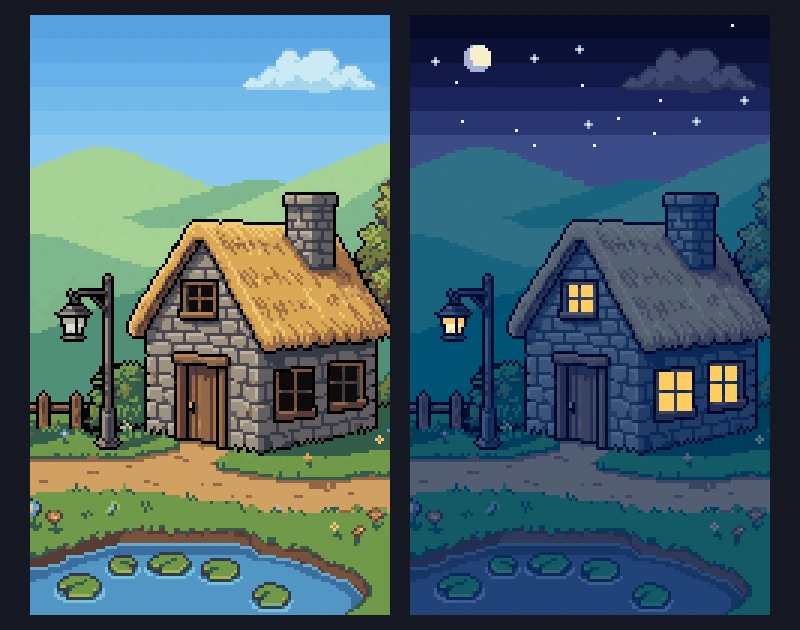
 Pixel art day and night cycle with a color lookup tableA dark overlay turns a pixel art night gray and muddy. Give every color in your palette its own night color in a small lookup table instead, with one row per time of day. How the table works, how I filled it, and tested Godot code.
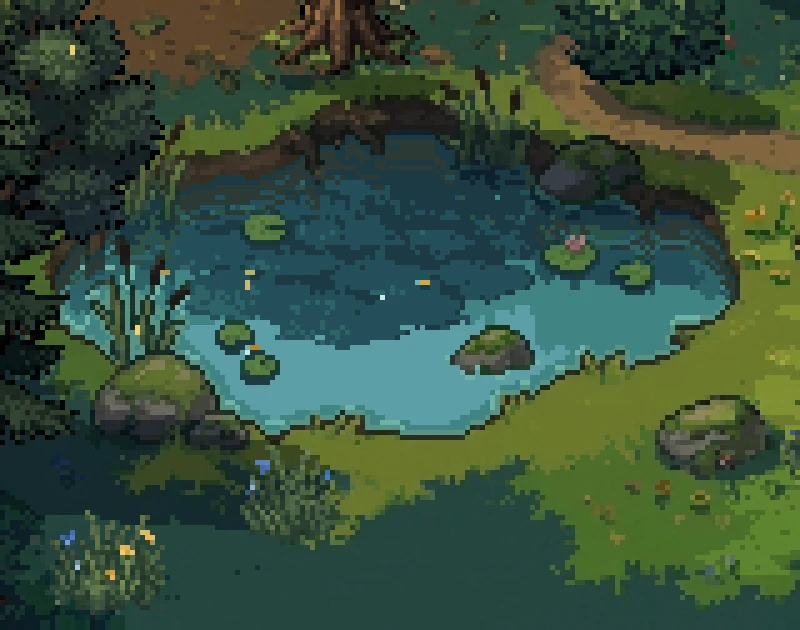
 How to make a pixel art pond with reflections and ripplesTurn a flat water tile into a moving pixel art pond, one layer at a time. Depth, sky light, tree reflections, shore edges, the back bank and ripples, each with its picture and the code for it.
 Eight 2D camera follow techniques, from dead zone to look-aheadA camera that sits on the player works, but it doesn't help them. Eight ways a 2D camera can follow, from smoothing and a dead zone to look-ahead, points of interest and framing two targets, with the numbers, tested Godot code and the Cinemachine setup for Unity.