Pixel art day and night cycle with a color lookup table
A dark overlay turns a pixel art night gray and muddy. Give every color in your palette its own night color in a small lookup table instead, with one row per time of day. How the table works, how I filled it, and tested Godot code.
Paste it into Claude Code, Codex, Cursor or any coding agent.
# Add a day and night cycle with a color lookup table to my game

Night in my 2D pixel art game is a dark layer over the screen, so everything turns the same murky gray and the windows go dark too. Replace it with a color lookup table: every color in my palette gets its own color for each time of day, so shadows can go blue while windows go warm.

Before you write code, look at my project: the engine and language, how the world is drawn (sprites, tilemaps, layers), how night is done today, whether there is a game clock, and how many distinct colors my art uses. Fit this into what is there instead of adding a second system. Keep my art files as they are (in their day colors). If my art has more than 256 colors, or stars or lit windows need their own colors, tell me and ask before changing any art file. Ask me before you invent the night colors for things like windows, lamps or the sky, ask which layers should be affected (UI usually should not), and ask how long a day lasts (while testing, about 6 seconds per row is fine).

## How it works

- The table is a small image. Row 0 is day: every color the art uses, one pixel per color, exactly as in the art. Each row below says what each of those colors becomes at another time of day (for example dusk, blue hour, night, dawn, so 5 rows with day).
- At load, build an index texture for every texture the world draws with (sprites, animated sprite frames, tilesets; one per source texture, shared by every node that uses it): for every pixel, find its color in row 0 and store the column number in the red channel (0 to 255). Keep the alpha.
- A shader draws the index texture: it reads the column, reads that column in two neighboring rows of the table, mixes them by the fraction of `time_of_day`, and multiplies by the sprite's vertex color (modulate), so flashes and fades keep working.
- `time_of_day` 0 is row 0, 1 is row 1, 2.5 is halfway from row 2 to row 3. After the last row it blends back into row 0, so a day loops.
- Night-only things (stars, a moon) are in the art all day, 1 to 4 steps off the color around them, so they get their own column and the night row can make them bright.

## Numbers that matter

- One channel holds up to 256 columns. My tested scene had 56 colors and 5 rows: a 56 x 5 px table.
- A pixel whose color is not in row 0 (a "miss") gets the nearest color in row 0, by distance in RGB, and the misses are counted and reported once.
- Night for the plain ground colors, as a starting point, in OKLab: `L' = 0.13 + 0.47 L`, `a' = 0.5 a - 0.018`, `b' = 0.45 b - 0.08`. Sky, glass, stars and the moon were picked by hand. Only the night formula was tested; propose the other rows the same way, gentler, and show me.
- Use one table for every affected layer and drive `time_of_day` from one place (in Godot, a global shader uniform). It can hold on a row: keep it at 3.0 for the whole night.
- Two far-apart colors mix through gray halfway. Add an in between row (a blue hour between an orange dusk and a navy night).

## Pseudo code

```
# once, at load
table = load_image("palette_lut.png")             # width = colors, height = rows; lossless, no filtering
column_of = {}
for x in 0 .. table.width - 1:
    column_of[rgb(table[x, 0])] = x
index = new_image(art.width, art.height)           # same size as the art
misses = 0
for each pixel (x, y) of art:
    if art[x, y].alpha == 0: continue              # clear stays clear
    c = column_of.get(rgb(art[x, y]))
    if c is none:
        c = nearest_column_in_row_0(art[x, y])
        misses += 1
    index[x, y] = (red = c, alpha = art[x, y].alpha)
if misses > 0: warn(misses, "pixels are not in row 0 of the table")
draw the sprite with index as its texture and the shader below, nearest filtering

# shader, per pixel
column = round(index.red * 255)
rows = table.height
t = time_of_day mod rows
a = floor(t)
b = (a + 1) mod rows
color = mix(table_texel(column, a), table_texel(column, b), t - a)
output (color.rgb, index.alpha) * vertex_color     # the sprite's modulate / tint
```

`table_texel` must read one exact texel with no filtering: `texelFetch` in Godot and GLSL, `Load` or a point sampler at the texel center in Unity (HLSL), `texelFetch` in WebGL2.

## Pitfalls

- Compressed or smoothed textures shift colors by a step, and every pixel stops matching row 0. Import the art, the index and the table lossless, with nearest filtering and no mipmaps.
- Two colors that match by day share a column and change together. Move one a step in any channel.
- Anti-aliased edges add colors that are not in row 0 and snap to the nearest one. Keep the art hard edged.
- A screen-wide color grading LUT can't separate a star from the sky color it matches by day. Use it only for a mood tint on top.
- Read the index and the table as raw data, with no sRGB to linear conversion. Godot's HDR 2D setting converts them and breaks the lookup.
- A night-only color a few steps off its neighbor also catches stray noise pixels of that exact color. Keep the art clean.
- Do not apply it to the UI unless I ask.

## Check that it works

- With `time_of_day` 0 the game looks exactly like the art (row 0 back at every pixel), and the miss count is 0 for my art.
- A test pixel moved 3 steps off its color counts as 1 miss and gets that color's column.
- `time_of_day` equal to the row count shows row 0 again; 2.5 is halfway from row 2 to row 3 per color.
- No frame shows more distinct colors than row 0 has.
- With the sprite's modulate at (0.5, 0.5, 0.5), the output is half the table color.
- Turn it off (draw the original texture without the shader) and the old look is back.

## Art it needs

The table. Start with row 0 made from the art itself (one pixel per distinct color, in a fixed order), then add one row per time of day: hand pick the sky, glass and light colors, and start the rest from the OKLab night formula above, then fix any color that looks off by hand. If the SpriteCook MCP tools are available in this session, they can make a scene or sprites to test with; give stars and lit windows their own colors from the start.

Source: SpriteCook (2D game assets made by your coding agent, for Claude, ChatGPT and Cursor)
Full guide with pictures, video and tested Godot code: https://www.spritecook.ai/blog/pixel-art-day-night-cycle-color-lookup-table
The quick way to make night in a 2D game is a dark rectangle over the screen. It does get darker, but every color slides toward the same gray. The grass, the roof and the sky all turn the same murky color, and the windows go dark with everything else. A color lookup table fixes that. Every color in your palette gets its own night color, so the shadows can go blue while the windows go warm.
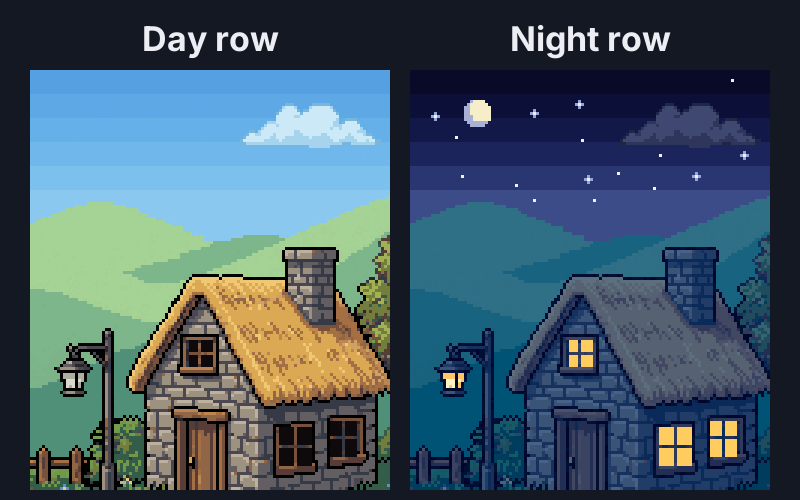
Same art on both sides, and the same average brightness at night. The left is one gray layer at 61%, the right is a table of 56 by 5 pixels. The cottage, lamp and pond were generated by a coding agent with SpriteCook.
Why a dark overlay looks muddy
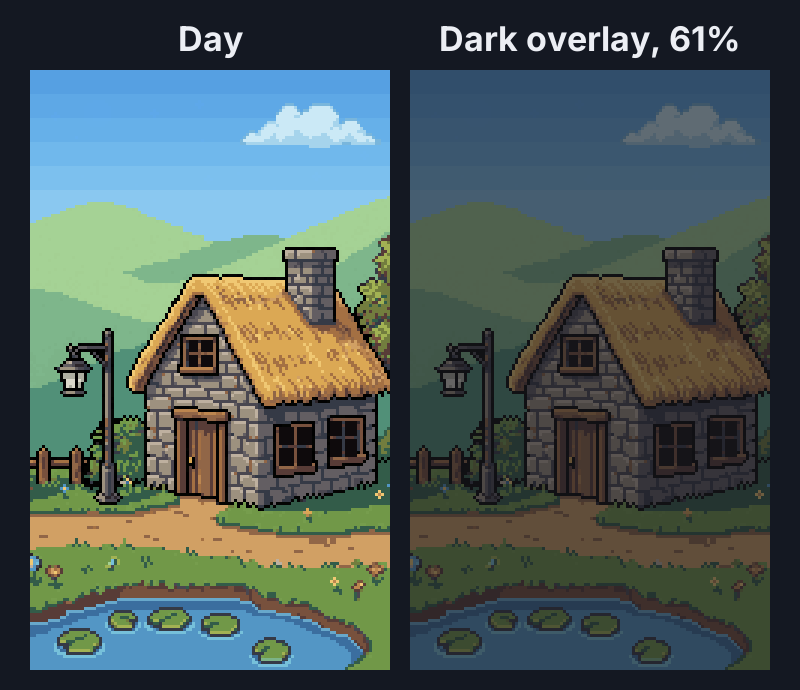
An overlay mixes every pixel with the same gray, so every color moves toward one point, and toward each other.
- The palette loses more than half its color. Average chroma (how colorful a color is, measured in OKLab) goes from 0.081 by day to 0.038 under the overlay.
- The sky stays the day's blue, only darker. No sunset, no stars.
- The windows and the lamp get darker too. The overlay can't tell glass from stone.
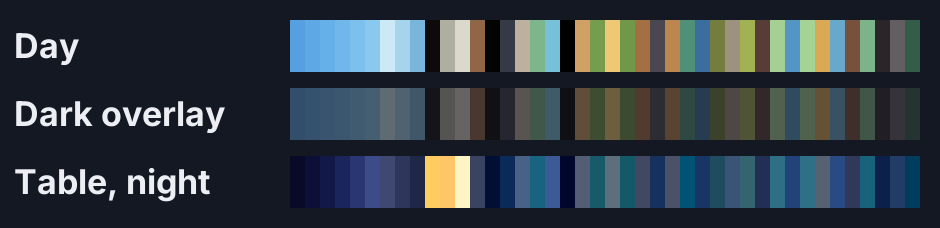
Here is every color of the scene except the stars and the moon (they match the sky by day), by day, under the overlay, and from the table's night row:
One row per time of day
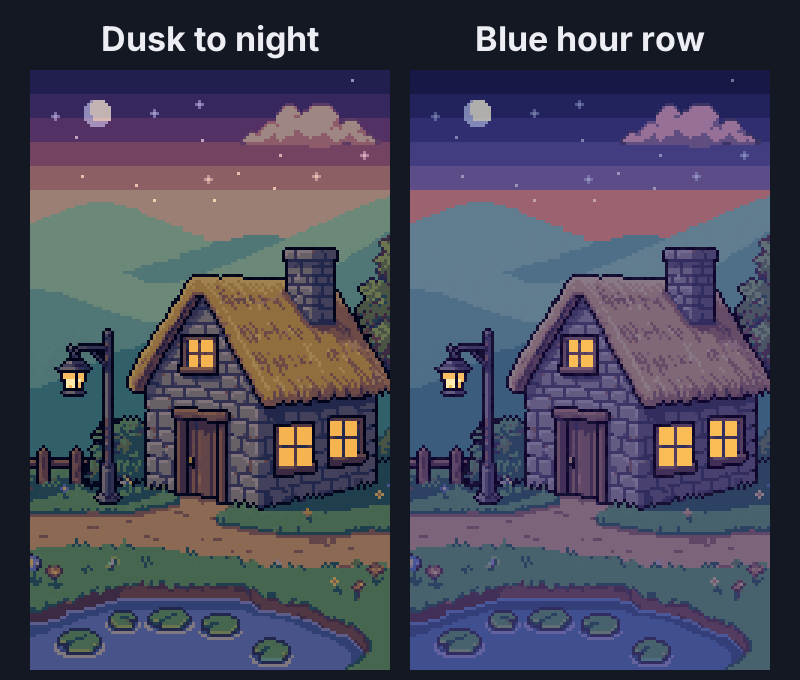
The fix is a small table. Row 0 is the art's own palette, one pixel per color. Each row below says what each of those colors becomes at another time of day. Mine has five rows (day, dusk, blue hour, night and dawn) and 56 colors, so the whole table is a 56 by 5 pixel PNG.
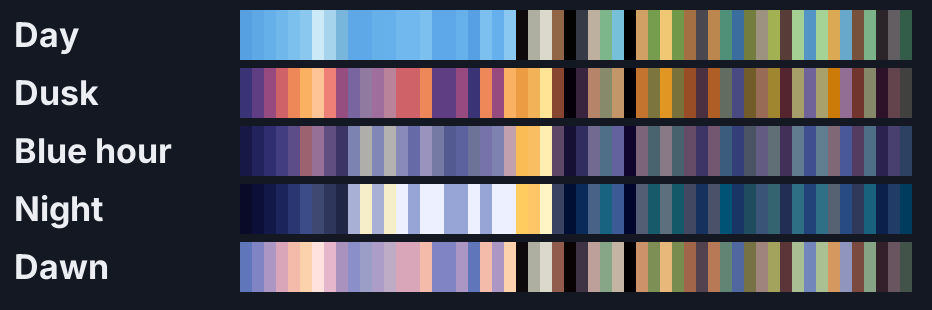
To make row 0, list every distinct color in your art. The art I generated had thousands of colors, so I reduced it to a small palette first.
Each color moves on its own. At night the grass goes teal, the stone goes blue and the window glass goes yellow, all in the same frame. An overlay moves every color the same way, so it can't do that.
Each pixel stores a column
The shader needs to know which column each pixel belongs to. When the scene loads, the script looks up every pixel's color in row 0 and writes the column number into the red channel of a new texture. One channel holds up to 256 columns.
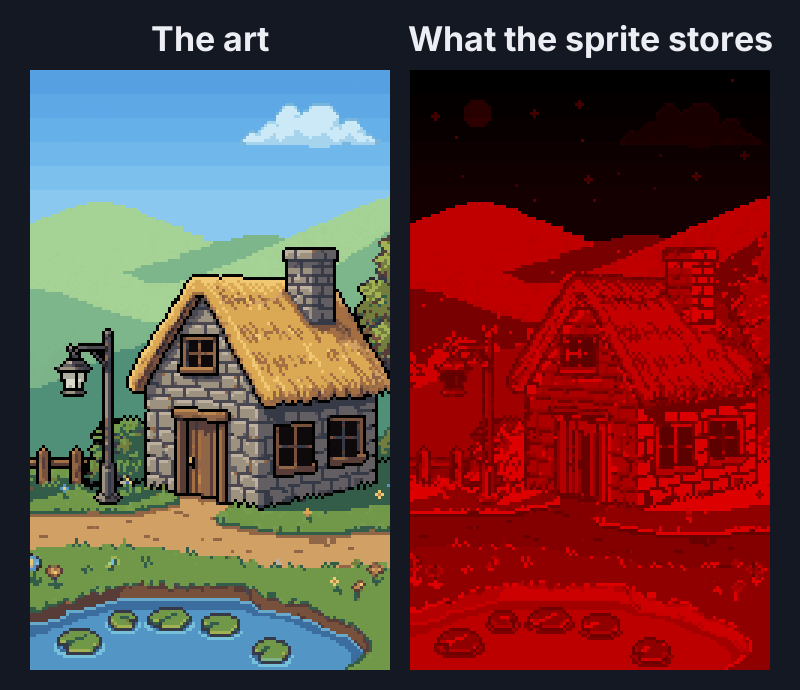
Your art stays a normal PNG in its day colors, so you can keep editing it in any tool. The index is built again every time the scene loads.
Colors that only show up at night
The stars and the moon are in the art all day. Their colors are 1 to 4 steps off the sky band they sit in, so you can't see them, but they get their own columns. The night row makes them white and pale blue. The window glass works the same way, near black by day and (255, 204, 96) at night.
Blending between rows
time_of_day picks the rows. 3.0 is the night row, 2.5 is halfway from blue hour to night, and 5.0 wraps around to day. The shader mixes the two rows per color, so a frame never has more than 56 colors on screen. It doesn't have to move at a steady pace either. To hold the night longer, keep it at 3.0 for that stretch of your clock.
Mixing two far-apart colors goes through gray halfway. My orange sunset faded into navy through mud, so I added the blue hour row in between.
How I filled the rows
I picked the sky bands, clouds, stars, moon and glass by hand. For the 26 ground colors I used one formula per row in OKLab, a color space where lightness (L) and hue (a and b) are separate numbers. Night is L' = 0.13 + 0.47 L, a' = 0.5 a - 0.018 and b' = 0.45 b - 0.08. Everything gets darker and leans blue, and the light and dark steps keep their order, so shading still reads. The other rows work the same way with gentler numbers. The 4 water colors mix in the sky row, so the pond follows the sky. Any color that looks off, you can repaint by hand in the PNG.
For light around a lamp you can add more rows, one per light level, like Doom's COLORMAP. It's the same table with more rows, so I left it out here.
The code
Two files. Put palette_time.gd on a Sprite2D that shows your art in its day colors, keep palette_time.gdshader in the same folder, give it the table, and set time_of_day from your game's clock. It replaces the sprite's texture and material when it loads, and it keeps modulate working, so hit flashes and fades still work.
palette_time.gd:
# Day and night through a color lookup table. Put this on a Sprite2D that shows your art in its day colors; keep
# palette_time.gdshader in the same folder. lut is a small PNG: row 0 holds the art's colors, one pixel each, and every
# row below says what each of those colors becomes at another time of day. Set time_of_day from your clock: 0 is row 0,
# 1.5 is halfway from row 1 to row 2, and after the last row it blends back into row 0.
# On _ready it replaces the sprite's texture with the index texture and sets its material.
extends Sprite2D

const SHADER = preload("palette_time.gdshader")

@export var lut: Texture2D
@export var time_of_day := 0.0:
	set(value):
		time_of_day = value
		if material is ShaderMaterial:
			material.set_shader_parameter("time_of_day", value)

var entries := 0                         # colors in row 0
var misses := 0                          # art pixels whose color is not in row 0; they get the nearest entry


func _ready() -> void:
	texture = ImageTexture.create_from_image(index_image(texture.get_image(), lut.get_image()))
	texture_filter = CanvasItem.TEXTURE_FILTER_NEAREST
	var m := ShaderMaterial.new()
	m.shader = SHADER
	m.set_shader_parameter("lut", lut)
	m.set_shader_parameter("time_of_day", time_of_day)
	material = m


# The art with every pixel's color swapped for its column in row 0, stored in red. Alpha stays as it was.
func index_image(art: Image, table: Image) -> Image:
	art = art.duplicate()
	art.decompress()
	art.convert(Image.FORMAT_RGBA8)
	table = table.duplicate()
	table.decompress()
	table.convert(Image.FORMAT_RGBA8)
	entries = table.get_width()
	assert(entries <= 256, "the red channel holds 256 columns at most")
	var column := {}
	for x in entries:
		column[_rgb(table.get_pixel(x, 0))] = x
	misses = 0
	var out := Image.create(art.get_width(), art.get_height(), false, Image.FORMAT_RGBA8)
	for y in art.get_height():
		for x in art.get_width():
			var c := art.get_pixel(x, y)
			if c.a8 == 0:
				continue
			var i: int = column.get(_rgb(c), -1)
			if i < 0:
				i = _nearest(c, table)
				misses += 1
			out.set_pixel(x, y, Color8(i, 0, 0, c.a8))
	if misses > 0:
		push_warning("%d pixels have a color that is not in row 0 of the table" % misses)
	return out


func _rgb(c: Color) -> int:
	return (c.r8 << 16) | (c.g8 << 8) | c.b8


func _nearest(c: Color, table: Image) -> int:
	var best := 0
	var best_d := INF
	for x in table.get_width():
		var t := table.get_pixel(x, 0)
		var d := Vector3(c.r - t.r, c.g - t.g, c.b - t.b).length_squared()
		if d < best_d:
			best_d = d
			best = x
	return best
palette_time.gdshader:
// Day and night through a color lookup table. palette_time.gd puts this on the sprite.
// TEXTURE holds each pixel's column in the table (in red, 0 to 255). The table has one row per time of day.
shader_type canvas_item;

uniform sampler2D lut : filter_nearest;
uniform float time_of_day = 0.0;     // 0 is row 0, 1 is row 1, 2.5 is halfway from row 2 to row 3; the last row blends back into row 0

varying vec4 tint;

void vertex() {
	tint = COLOR;                    // the sprite's modulate and self_modulate, so flashes and fades still work
}

void fragment() {
	vec4 index = texture(TEXTURE, UV);
	int column = int(round(index.r * 255.0));
	int rows = textureSize(lut, 0).y;
	float t = mod(time_of_day, float(rows));
	int a = int(floor(t));
	int b = (a + 1) % rows;
	vec3 from = texelFetch(lut, ivec2(column, a), 0).rgb;
	vec3 to = texelFetch(lut, ivec2(column, b), 0).rgb;
	COLOR = vec4(mix(from, to, t - float(a)), index.a) * tint;
}
Tested in Godot 4.6. The index lookup ran headless. For the pixels, Godot rendered the cottage at 13 values of time_of_day with the Compatibility renderer and with Forward+, and every frame was compared with a Python version of the shader.
- All 24,000 pixels of the 120 by 200 cottage find their column in the 56 color table, and row 0 at that column gives the art back exactly.
- A pixel moved 3 steps off its color counts as a miss and gets that color's column. Clear pixels stay clear.
- Every rendered frame matches the Python version within 1 of 255, from 0 to 5.0 and at 7.5 and -0.5.
- 5.0 shows row 0 again, 7.5 is halfway from row 2 to row 3, and -0.5 is halfway from the last row back to row 0.
- With
modulateat (0.5, 0.5, 0.5) the colors come out at half, within 1 of 255.
Other engines
- Unity and others: the same two steps work in any sprite shader. Build the index texture once, and import it and the table with point filtering, no compression and no mipmaps. Read the table at exact texel centers.
- A screen-wide color grading LUT maps each color to a new color, so a star and the sky color it matches by day always change together. It can't do the stars or the windows here, but it's fine for a mood tint on top.
Common pitfalls
A compressed or smoothed table. If your engine compresses or filters the PNGs on import, colors shift by a step and stop matching row 0. Import both lossless with nearest filtering, and check the script's miss count once.
HDR 2D. With HDR 2D on in Godot's project settings, the index and the table get converted from sRGB and the columns come out wrong. Keep it off for this.
Two colors that match by day. They end up in one column and change together. Move one of them a step in any channel.
Gray in the middle of a blend. Far-apart colors mix through gray. Add a row in between, like my blue hour.
More than 256 colors. One channel holds 256 columns. Use fewer colors or store the column in two channels.
Soft edges in the art. Anti-aliased edges add colors that aren't in row 0, and they snap to the nearest one. Keep the art hard edged.
Big sprite sheets. The index is built per sprite, pixel by pixel, when it loads. That's quick for a scene this size. For big atlases or many copies of one sprite, build the index once and save it, and drive time_of_day for every sprite from one place, like a global shader uniform.
Where to next
- How to make a pixel art pond with reflections and ripples, for water that reads at any time of day
- 2D shadowcasting for torchlight, fog of war and line of sight, for lights that stop at walls
- How to set up a pixel art game so it renders pixel perfect
- 8 Bit & '8 Bitish' Graphics-Outside the Box by Mark Ferrari, GDC 2016, on palette shifting in his scenes
- Color cycling on Wikipedia
- CanvasItem shaders in the Godot docs
Add this to your game with your coding agent
The prompt has the numbers, pseudo code, pitfalls and checks from this guide, written so your agent can fit it into your own project.
# Add a day and night cycle with a color lookup table to my game

Night in my 2D pixel art game is a dark layer over the screen, so everything turns the same murky gray and the windows go dark too. Replace it with a color lookup table: every color in my palette gets its own color for each time of day, so shadows can go blue while windows go warm.

Before you write code, look at my project: the engine and language, how the world is drawn (sprites, tilemaps, layers), how night is done today, whether there is a game clock, and how many distinct colors my art uses. Fit this into what is there instead of adding a second system. Keep my art files as they are (in their day colors). If my art has more than 256 colors, or stars or lit windows need their own colors, tell me and ask before changing any art file. Ask me before you invent the night colors for things like windows, lamps or the sky, ask which layers should be affected (UI usually should not), and ask how long a day lasts (while testing, about 6 seconds per row is fine).

## How it works

- The table is a small image. Row 0 is day: every color the art uses, one pixel per color, exactly as in the art. Each row below says what each of those colors becomes at another time of day (for example dusk, blue hour, night, dawn, so 5 rows with day).
- At load, build an index texture for every texture the world draws with (sprites, animated sprite frames, tilesets; one per source texture, shared by every node that uses it): for every pixel, find its color in row 0 and store the column number in the red channel (0 to 255). Keep the alpha.
- A shader draws the index texture: it reads the column, reads that column in two neighboring rows of the table, mixes them by the fraction of `time_of_day`, and multiplies by the sprite's vertex color (modulate), so flashes and fades keep working.
- `time_of_day` 0 is row 0, 1 is row 1, 2.5 is halfway from row 2 to row 3. After the last row it blends back into row 0, so a day loops.
- Night-only things (stars, a moon) are in the art all day, 1 to 4 steps off the color around them, so they get their own column and the night row can make them bright.

## Numbers that matter

- One channel holds up to 256 columns. My tested scene had 56 colors and 5 rows: a 56 x 5 px table.
- A pixel whose color is not in row 0 (a "miss") gets the nearest color in row 0, by distance in RGB, and the misses are counted and reported once.
- Night for the plain ground colors, as a starting point, in OKLab: `L' = 0.13 + 0.47 L`, `a' = 0.5 a - 0.018`, `b' = 0.45 b - 0.08`. Sky, glass, stars and the moon were picked by hand. Only the night formula was tested; propose the other rows the same way, gentler, and show me.
- Use one table for every affected layer and drive `time_of_day` from one place (in Godot, a global shader uniform). It can hold on a row: keep it at 3.0 for the whole night.
- Two far-apart colors mix through gray halfway. Add an in between row (a blue hour between an orange dusk and a navy night).

## Pseudo code

```
# once, at load
table = load_image("palette_lut.png")             # width = colors, height = rows; lossless, no filtering
column_of = {}
for x in 0 .. table.width - 1:
    column_of[rgb(table[x, 0])] = x
index = new_image(art.width, art.height)           # same size as the art
misses = 0
for each pixel (x, y) of art:
    if art[x, y].alpha == 0: continue              # clear stays clear
    c = column_of.get(rgb(art[x, y]))
    if c is none:
        c = nearest_column_in_row_0(art[x, y])
        misses += 1
    index[x, y] = (red = c, alpha = art[x, y].alpha)
if misses > 0: warn(misses, "pixels are not in row 0 of the table")
draw the sprite with index as its texture and the shader below, nearest filtering

# shader, per pixel
column = round(index.red * 255)
rows = table.height
t = time_of_day mod rows
a = floor(t)
b = (a + 1) mod rows
color = mix(table_texel(column, a), table_texel(column, b), t - a)
output (color.rgb, index.alpha) * vertex_color     # the sprite's modulate / tint
```

`table_texel` must read one exact texel with no filtering: `texelFetch` in Godot and GLSL, `Load` or a point sampler at the texel center in Unity (HLSL), `texelFetch` in WebGL2.

## Pitfalls

- Compressed or smoothed textures shift colors by a step, and every pixel stops matching row 0. Import the art, the index and the table lossless, with nearest filtering and no mipmaps.
- Two colors that match by day share a column and change together. Move one a step in any channel.
- Anti-aliased edges add colors that are not in row 0 and snap to the nearest one. Keep the art hard edged.
- A screen-wide color grading LUT can't separate a star from the sky color it matches by day. Use it only for a mood tint on top.
- Read the index and the table as raw data, with no sRGB to linear conversion. Godot's HDR 2D setting converts them and breaks the lookup.
- A night-only color a few steps off its neighbor also catches stray noise pixels of that exact color. Keep the art clean.
- Do not apply it to the UI unless I ask.

## Check that it works

- With `time_of_day` 0 the game looks exactly like the art (row 0 back at every pixel), and the miss count is 0 for my art.
- A test pixel moved 3 steps off its color counts as 1 miss and gets that color's column.
- `time_of_day` equal to the row count shows row 0 again; 2.5 is halfway from row 2 to row 3 per color.
- No frame shows more distinct colors than row 0 has.
- With the sprite's modulate at (0.5, 0.5, 0.5), the output is half the table color.
- Turn it off (draw the original texture without the shader) and the old look is back.

## Art it needs

The table. Start with row 0 made from the art itself (one pixel per distinct color, in a fixed order), then add one row per time of day: hand pick the sky, glass and light colors, and start the rest from the OKLab night formula above, then fix any color that looks off by hand. If the SpriteCook MCP tools are available in this session, they can make a scene or sprites to test with; give stars and lit windows their own colors from the start.

Source: SpriteCook (2D game assets made by your coding agent, for Claude, ChatGPT and Cursor)
Full guide with pictures, video and tested Godot code: https://www.spritecook.ai/blog/pixel-art-day-night-cycle-color-lookup-table
More game techniques
All techniques
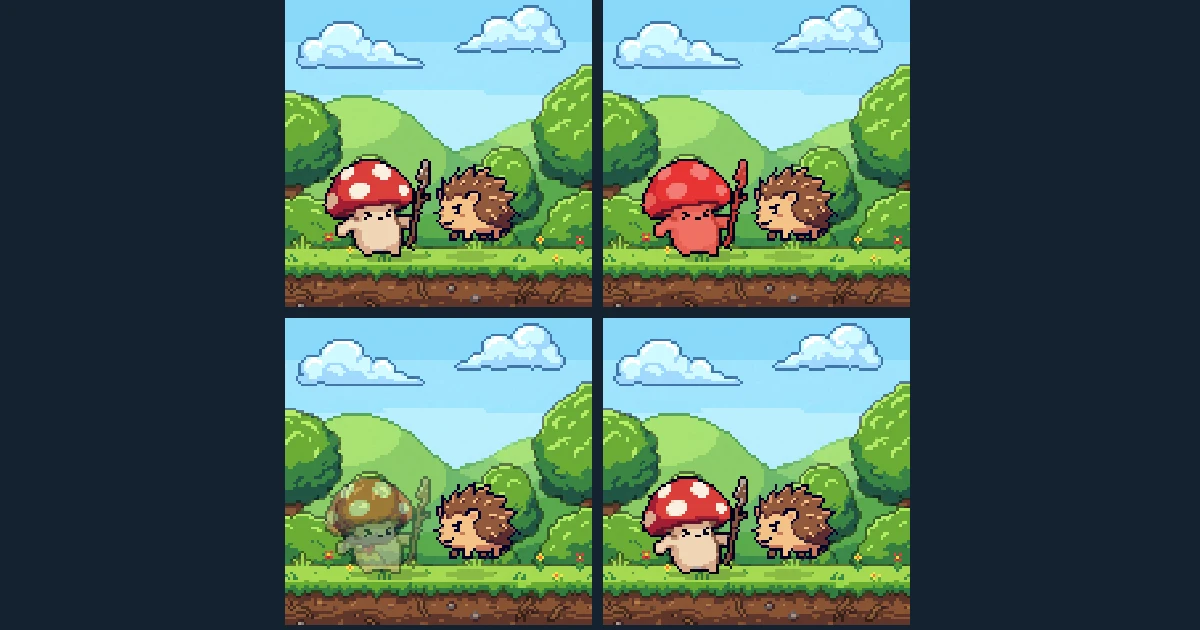 13 ways to show invincibility frames in a 2D gameAfter a hit, the player can't be hurt for a moment, and the game has to show it. Thirteen ways to do that, from blink and flash red to jitter, sparkles and a shield bubble, with the timing numbers, tested Godot code and a Unity version.
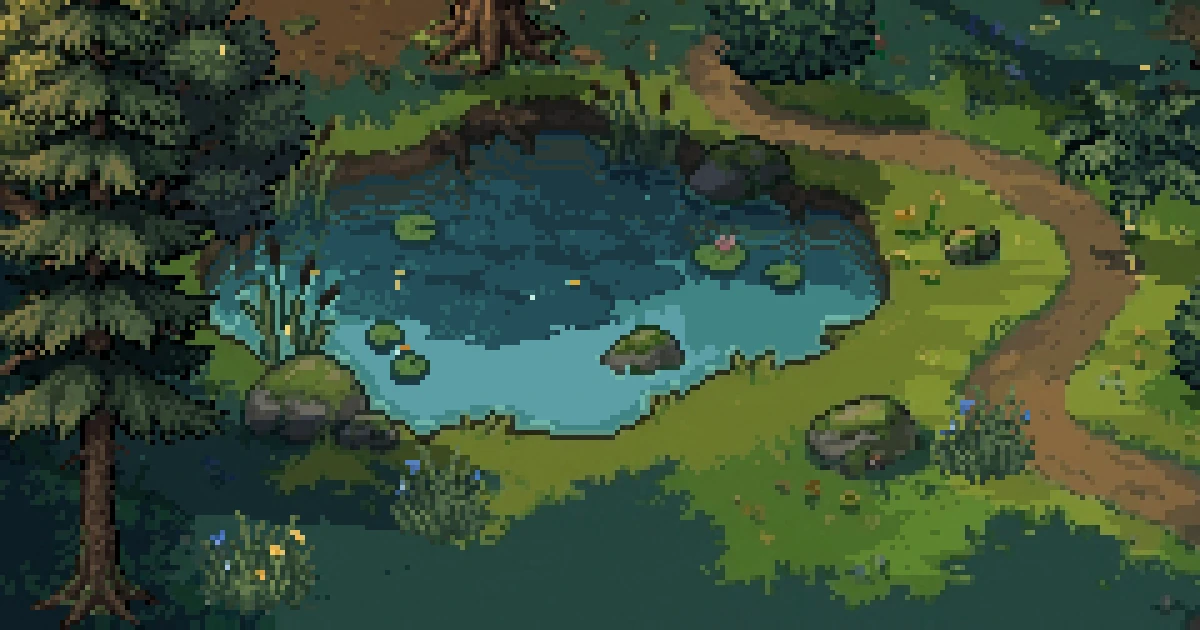 How to make a pixel art pond with reflections and ripplesTurn a flat water tile into a moving pixel art pond, one layer at a time. Depth, sky light, tree reflections, shore edges, the back bank and ripples, each with its picture and the code for it.
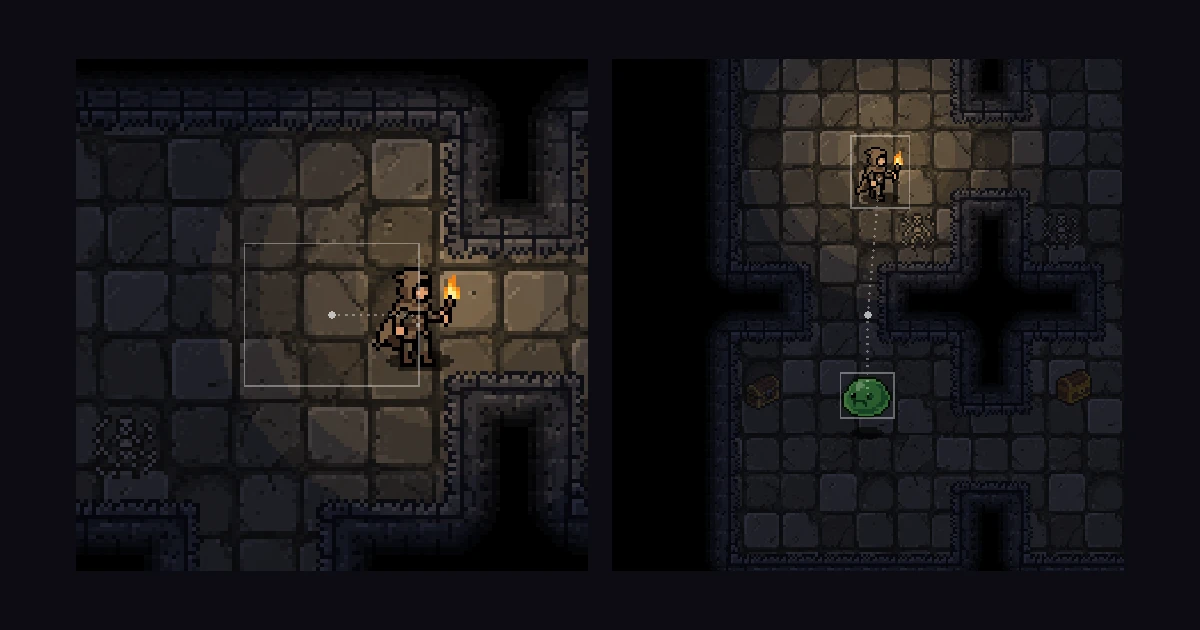 Eight 2D camera follow techniques, from dead zone to look-aheadA camera that sits on the player works, but it doesn't help them. Eight ways a 2D camera can follow, from smoothing and a dead zone to look-ahead, points of interest and framing two targets, with the numbers, tested Godot code and the Cinemachine setup for Unity.