How to make interactive tall grass for a top-down pixel art game
Tall grass the player wades through. Y-sorted tufts, a clean wading line, tufts that lean away on a spring, and trampled grass that grows back. Tested Godot 4.6 code.
Paste it into Claude Code, Codex, Cursor or any coding agent.
# Add interactive tall grass to my game

My top-down game draws tall grass as part of the floor, so the player walks on top of it and nothing reacts. Make it grass he walks through: tufts in front of him hide his lower body, tufts next to him lean away and spring back, and tufts he steps on flatten for a moment and grow back.

Before you write code, look at my project: the engine, how the grass and ground are drawn today, how draw order works (y-sort or not), the player's sprite size and where his feet are in the frame, and the tick rate. Fit this into what is there. Keep my art and sizes. If the grass is one big texture today, ask me before splitting it into tufts.

## How it works

- Every tuft is its own small sprite with its origin at its base, sorted by y with the player and props. The ground under the patch is one flat dark green, so gaps between tufts read as depth.
- The player sorts as if his feet were 1 px higher, so a tuft whose base is level with his feet is in front of him.
- Tufts near him lean away on a damped spring. A lean is drawn by shifting each row of the tuft sideways by whole pixels, the tip most and the base not at all.
- Tufts just behind his feet flatten and darken, then grow back after he leaves.
- Wading cut: per column of his frame, hide him from 2 px below the top of the grass drawn in front of him.
- A tuft he starts pushing shakes briefly and throws a few leaf specks.

## Numbers that matter

For a player about 32 px tall and 16 x 18 px tufts; scale the px values with your sprite size. 60 ticks per second, one tick per fixed update. Round the feet to whole pixels; dx = tuft.x - feet.x, dy = tuft.y - feet.y.

- Tufts: 4 sprites, each also flipped, about 13 px apart in rows 8 px apart. Fill the lower 10 rows of each tuft solid (no holes). Two extra copies of each, one and two shades darker.
- Edge tufts: tufts on the edge of the patch with open ground right behind them (above them on screen) are never flattened. Mark them when you lay out the patch.
- Spring: 2.6 Hz, damping ratio 0.22, lean clamped to +-8 px.
- Trample: press goes 0 to 1 in 0.12 s and back in 0.7 s; drawn height = round(h * (1 - 0.67 * smoothstep(press))), so 18 px becomes 6 px. Two shades darker above press 0.6, one above 0.3.
- Rustle shake: 1.3 * sin(age * 55 + phase * 6) px, fading to 0 over 0.35 s, where phase is a random 0 to 1 per tuft and age = now - tuft.touch. Use a small particle burst for the specks.
- Wading: "in front" means base y > feet.y - 1. Pieces are 8-connected pieces of his own frame after the cut (before any grass is drawn); hide those under 12 pixels. The 13 row limit is on the cut line: no column's cut is higher than his lowest opaque row + 1 - 13.

## Pseudo code

```
init: every tuft has lean = vel = press = cover = 0, side = 0, touch = -9

each tick (dt = 1/60):
    w = 2 * PI * 2.6
    for tuft in tufts:
        dx = tuft.x - feet.x;  dy = tuft.y - feet.y
        target = 0
        if abs(dx) < 12 and -4 < dy < 10:
            if tuft.side == 0: tuft.side = dx > 0 ? 1 : -1      # keep the side until it leaves the zone
            target = tuft.side * 7 * min(1, (12 - abs(dx)) / 6) * min(1, (10 - abs(dy - 3)) / 5)
            if dy > -1 and abs(dx) < 9: target = clamp(target, -2, 2)   # front tufts keep covering him
            if abs(target) > 1.5:
                if now - tuft.touch > 0.7: tuft.touch = now; spawn_leaf_specks(tuft)
                else: tuft.touch = max(tuft.touch, now - 0.5)            # no new rustle while he keeps pushing
        else:
            tuft.side = 0
        if abs(dx) < 7 and -10 < dy <= -1 and not tuft.edge: tuft.press = min(1, tuft.press + dt / 0.12)
        else: tuft.press = max(0, tuft.press - dt / 0.7)
        ddy = dy + 1
        near = ddy > 0 ? clamp((11 - abs(dx)) / 3, 0, 1) * clamp((10 - ddy) / 3, 0, 1) * min(1, ddy / 3) : 0
        tuft.cover += clamp(near - tuft.cover, -dt / 0.35, dt / 0.35)    # covering tufts ease down 10%
        acc = w * w * (target - tuft.lean) - 2 * 0.22 * w * tuft.vel
        tuft.vel += acc * dt
        tuft.lean = clamp(tuft.lean + tuft.vel * dt, -8, 8)

draw tuft:
    art = press > 0.6 ? dark2 : press > 0.3 ? dark1 : normal
    h2 = max(1, round(h * (1 - 0.67 * smoothstep(press)) * (1 - 0.1 * cover)))
    source rows: round(i * (h - 1) / (h2 - 1)) for i in 0 .. h2 - 1   (keeps the base row)
    row r slides round((lean + shake) * ((h2 - 1 - r) / (h2 - 1)) ^ 1.6) px; no shift when abs(lean + shake) < 0.5

wade(frame):     # frame drawn with its bottom center at the rounded feet
    for each column c: cut[c] = top row of tufts drawn in front of him in column c, + 2; no grass = frame height
    cut[c] = min(cut[c - 2 .. c + 2])                   # mirror the index at the frame edges
    cut[c] = max(cut[c], lowest_opaque_row + 1 - 13)
    hide rows >= cut[c]; then hide 8-connected pieces of him under 12 pixels
```

Godot: tufts and player as `Sprite2D` children of one `Node2D` with `y_sort_enabled`, the player added last so he wins a tie at his sort line; rebuild a tuft's `ImageTexture` only when its look changed. Unity: Transparency Sort Mode Custom Axis (0, 1, 0), pivots at the base, Sprite Sort Point set to Pivot. A custom engine: sort by base y each frame.

## Pitfalls

- Y-sort alone shows bits of him between tufts; the wading cut makes it clean.
- A cut at a fixed height looks like the sprite was sliced in half where the grass in front is short. Follow the grass that is drawn.
- Picking the lean side every tick makes a tuft snap sides when he walks straight through it.
- A slow regrowth leaves a dark trail everywhere. Keep it under a second.
- Round every row shift to whole pixels.

## Check that it works

Count ticks from 1: his first tick in the new position is tick 1.

- Spring: one tuft at dx = 7, dy = -3. Lean peaks at 6.9 px on tick 11 and stays within 0.5 px of 4.67 from tick 35 on. Then move him far away: it swings to -2.3 px and stays within 0.5 px of 0 from tick 36 on.
- Trample: stand on a tuft (dx = 0, dy = -3): press is 1 on tick 8 and the tuft is 6 px tall. Move him away: drawn at 18 px again on tick 37, press 0 on tick 42.
- Walk through the patch: no column's cut line is more than 13 rows above his lowest row, and his frame never has a piece under 12 pixels left after the cut.
- Walk up through grass he just trampled: more of his legs show than walking down, with no straight cut across him.
- Turn it off (one flag): nothing leans or flattens, and his frame is drawn whole.

## Art it needs

Tall grass tufts about half the player's height. Cheapest first:

1. Cut 4 tufts from grass art I already have, and make the two darker shades by moving each color one and two steps down its ramp.
2. If the SpriteCook MCP tools are available in this session, generate 16 x 18 px tall grass tufts with them (a pixel art model at an exact size), then recolor them to my ground's greens.

Source: SpriteCook (2D game assets made by your coding agent, for Claude, ChatGPT and Cursor)
Full guide with pictures, video and tested Godot code: https://www.spritecook.ai/blog/interactive-tall-grass-top-down-pixel-art
Most top-down games draw tall grass as part of the floor. The player walks over it like a carpet, and nothing reacts. Here's how to make grass the player walks through instead. The grass in front hides his legs, the tufts next to him lean away and spring back, and the grass he stepped on stays flat for a moment.
Same scene, same walk. Left is grass as floor, right is everything on this page. The fox, his walk cycles, the meadow and the grass tufts are made with SpriteCook, with one style reference so they match. Everything that moves is code.
Every tuft is its own sprite
Tall grass as one big floor tile can't do any of this. Make each tuft its own small sprite with its origin at its base, and sort it by y together with the player, the same way you sort trees and fences.
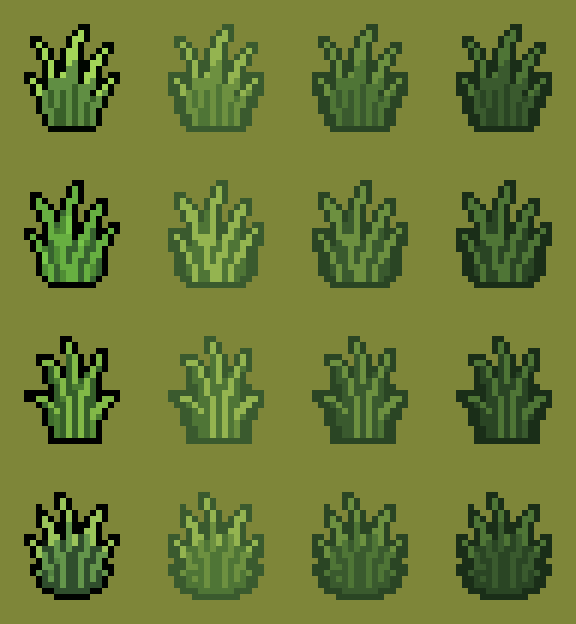
Four tufts of 16 x 18 px, each also flipped, are enough for a whole patch. I recolored them to the greens of the ground under them, and made two darker shades for trampled grass (more on that below). Their lower 10 rows are filled solid, so nothing behind a tuft shows through its base.
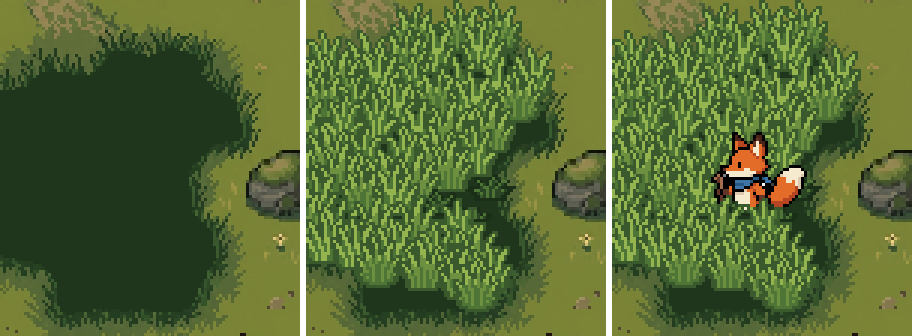
Under the tufts the ground is one flat dark green. That way a gap between tufts reads as depth, and a tuft that leans aside or gets flattened opens a dark spot you can actually see. This patch has 59 tufts, about 13 px apart in rows 8 px apart.
Hide him behind the grass in front
Y-sort alone already puts the tufts whose base is below his feet in front of him. Sort him as if he stood 1 px higher than his feet, so a tuft whose base is level with his feet counts as in front too.
That isn't quite enough. Y-sort hides his legs behind the tufts in front, but bits of him still show through the gaps between those tufts.
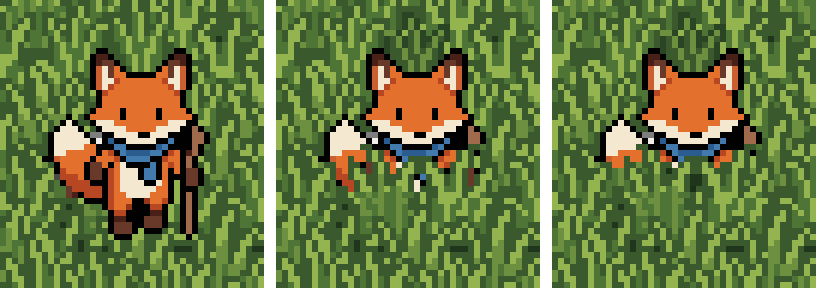
Grass as floor, y-sort only, and y-sort with the wading cut. The cut works per column of his sprite:
- Find the grass in front. For each column, take the highest pixel of any tuft drawn in front of him.
- Cut 2 px below it. He shows through the top 2 rows of the blade tips and is hidden below that. Where nothing is in front of him, nothing is cut.
- Smooth it. Each column takes the highest cut within 2 columns either side, so no thin strips of him stand between two tufts.
- Never more than 13 rows. That keeps his head and scarf above the grass.
- Drop crumbs. Any piece of him under 12 pixels that the cut separated from the rest is hidden too.
Because the cut follows the grass that is actually drawn, it moves when the tufts lean or get flattened. Walking up the screen, the tufts in front of him are the ones he just trampled, so more of his legs show, like in real grass.
Lean away, then spring back
A tuft leans away from him when its base is less than 12 px to his side and between 4 px above and 10 px below his feet. The closer he is, the further it aims to lean, up to 7 px at the tip. Tufts right in front of his legs (less than 9 px to the side) aim for 2 px at most, or they'd uncover what they're meant to hide.

The orange mark is where his feet are. The lean follows a damped spring (2.6 Hz, damping 0.22), so it overshoots a little and wobbles back. With him 7 px to the side of a tuft whose base is 3 px above his feet, the tip aims for 4.7 px, overshoots to 6.9 px and settles within 0.5 px of the target after 0.57 s. When he leaves it swings 2.3 px the other way and settles back to straight within 0.58 s.
The tip moves the most and the base not at all. Each row slides sideways by lean * ((h - 1 - row) / (h - 1)) ^ 1.6 px, rounded to a whole pixel, so the pixel art never blurs.
Trample, then grow back
Tufts he steps on get flattened. That's every tuft less than 7 px to his side with its base 1 to 10 px above his feet (10 itself not included), so the ones just behind him. In 0.12 s (8 ticks at 60 a second) a tuft drops to a third of its height, 18 px to 6 px, and two shades darker. Once he moves on it grows back within 0.7 s.
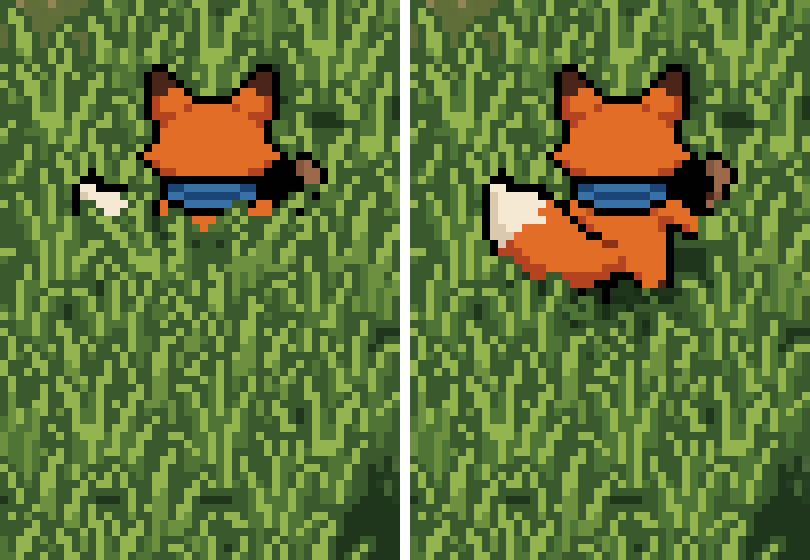
My first version took 1.6 s to grow back, and the flat patch was still there long after he had walked off. 0.7 s keeps a short lane right behind him. Tufts on the edge of the patch, with open meadow behind them, never get flattened, or they'd look like dark smudges on the short grass.
A small rustle
When a tuft is first pushed (its lean target goes past 1.5 px), it shakes 1.3 px for 0.35 s and sends a touched signal. I hook a small burst of pale leaf specks to it. It won't rustle again while he keeps pushing it, or within 0.7 s of its last rustle. It's a small touch, and you notice it most when you play.
The code
Two files for Godot 4.6. tall_grass.gd keeps the state of every tuft (lean, spring speed, how flat it is) and builds each tuft's image. wading.gd cuts the player's frame. The tufts are so small that I rebuild a moving tuft's image on the CPU and only upload it when its look changed.
extends Node2D
## Tall grass that reacts to the player. Each tuft is a Sprite2D in the same y-sorted parent as the player,
## with its origin at its base. Call step() once per physics tick, then update_sprites().

@export var feel_x := 12.0          ## a tuft feels the player when it is less than this far to his side ...
@export var feel_back := 4.0        ## ... and its base is less than this far above his feet ...
@export var feel_front := 10.0      ## ... or less than this far below them
@export var lean_px := 7.0          ## how far the tip leans away at the closest point
@export var front_x := 9.0          ## tufts in front of his legs (closer than this to the side) ...
@export var front_lean_px := 2.0    ## ... lean at most this much, so they keep covering him
@export var max_lean_px := 8.0
@export var spring_hz := 2.6
@export var damping := 0.22
@export var press_x := 7.0          ## tufts he steps on: closer than this to the side ...
@export var press_back := 10.0      ## ... with a base up to this far above his feet
@export var press_time := 0.12      ## seconds to press flat
@export var recover_time := 0.7     ## seconds to grow back
@export var press_squash := 0.67    ## a pressed tuft loses this share of its height
@export var cover_time := 0.35
@export var cover_squash := 0.1     ## a tuft covering him eases down this much, so it stays below his face
@export var shake_px := 1.3
@export var shake_speed := 55.0
@export var shake_time := 0.35
@export var touch_lean := 1.5       ## a lean target above this counts as a touch (shake, leaf specks)
@export var touch_cooldown := 0.7
@export var sort_offset := 1        ## the player sorts as if this many px above his feet
@export var enabled := true

signal touched(tuft: Dictionary)    ## connect a CPUParticles2D burst of leaf specks here

var tufts: Array[Dictionary] = []


## art: [normal, one shade darker, two shades darker], each an Image with the tuft's base on its bottom row.
func add_tuft(base: Vector2i, art: Array, edge: bool, phase: float, flip := false, sprite: Sprite2D = null) -> Dictionary:
	var images: Array[Image] = []
	for a in art:
		var img: Image = a.duplicate()
		if flip:
			img.flip_x()
		images.append(img)
	var f := {"x": base.x, "y": base.y, "art": images, "edge": edge, "phase": phase,
		"lean": 0.0, "vel": 0.0, "press": 0.0, "cover": 0.0, "touch": -9.0, "side": 0,
		"sprite": sprite, "look": ""}
	if sprite:
		sprite.centered = false
		sprite.position = Vector2(base)
	tufts.append(f)
	return f


func step(t: float, feet: Vector2) -> void:
	if not enabled:
		return
	var dt := 1.0 / Engine.physics_ticks_per_second
	var w := TAU * spring_hz
	for f in tufts:
		var dx: float = f.x - feet.x
		var dy: float = f.y - feet.y
		var target := 0.0
		if absf(dx) < feel_x and dy > -feel_back and dy < feel_front:
			if f.side == 0:
				f.side = 1 if dx > 0 or (dx == 0 and f.phase > 0.5) else -1
			target = f.side * lean_px * minf(1.0, (feel_x - absf(dx)) / 6.0) * minf(1.0, (feel_front - absf(dy - 3)) / 5.0)
			if dy > -sort_offset and absf(dx) < front_x:
				target = clampf(target, -front_lean_px, front_lean_px)
			if absf(target) > touch_lean and t - f.touch > touch_cooldown:
				f.touch = t
				touched.emit(f)
			elif absf(target) > touch_lean:
				f.touch = maxf(f.touch, t - 0.5)  # he is still pushing it: no new rustle until he lets go
		else:
			f.side = 0
		if absf(dx) < press_x and dy > -press_back and dy <= -sort_offset and not f.edge:
			f.press = minf(1.0, f.press + dt / press_time)
		else:
			f.press = maxf(0.0, f.press - dt / recover_time)
		var ddy := dy + sort_offset
		var near := 0.0
		if ddy > 0:
			near = clampf((11 - absf(dx)) / 3.0, 0.0, 1.0) * clampf((10 - ddy) / 3.0, 0.0, 1.0) * minf(1.0, ddy / 3.0)
		f.cover += clampf(near - f.cover, -dt / cover_time, dt / cover_time)
		var acc: float = w * w * (target - f.lean) - 2.0 * damping * w * f.vel
		f.vel += acc * dt
		f.lean = clampf(f.lean + f.vel * dt, -max_lean_px, max_lean_px)


## The tuft as drawn at time t: {"image": Image, "offset": x of its left edge relative to the base}.
func tuft_image(f: Dictionary, t: float) -> Dictionary:
	var img: Image = f.art[0]
	var h := img.get_height()
	var w := img.get_width()
	if not enabled:
		return {"image": img, "offset": -(w / 2)}
	var age: float = t - f.touch
	var shake := 0.0
	if age >= 0:
		shake = shake_px * sin(age * shake_speed + f.phase * 6.0) * maxf(0.0, 1.0 - age / shake_time)
	var p: float = f.press
	var src: Image = f.art[2] if p > 0.6 else (f.art[1] if p > 0.3 else img)
	var ease_p := p * p * (3.0 - 2.0 * p)
	var nh := maxi(1, int(floor(h * (1.0 - press_squash * ease_p) * (1.0 - cover_squash * f.cover) + 0.5)))
	if nh < h:
		var squashed := Image.create_empty(w, nh, false, Image.FORMAT_RGBA8)
		for i in nh:
			var row := 0 if nh == 1 else int(floor(i * (h - 1) / float(nh - 1) + 0.5))
			squashed.blit_rect(src, Rect2i(0, row, w, 1), Vector2i(0, i))
		src = squashed
	var lean: float = f.lean + shake
	var sh := src.get_height()
	if absf(lean) < 0.5:
		return {"image": src, "offset": -(w / 2)}
	var pad := int(ceil(absf(lean))) + 1
	var out := Image.create_empty(w + 2 * pad, sh, false, Image.FORMAT_RGBA8)
	for r in sh:
		var k := pow(float(sh - 1 - r) / (sh - 1), 1.6) if sh > 1 else 0.0
		var s := int(floor(lean * k + 0.5))
		out.blit_rect(src, Rect2i(0, r, w, 1), Vector2i(pad + s, r))
	return {"image": out, "offset": -(w / 2) - pad}


## Give each tuft's Sprite2D its current look. Only tufts whose look changed get a new texture.
func update_sprites(t: float) -> void:
	for f in tufts:
		var sprite: Sprite2D = f.sprite
		if sprite == null:
			continue
		var d := tuft_image(f, t)
		var img: Image = d.image
		var look := "%d,%d,%d" % [img.get_width(), img.get_height(), hash(img.get_data())]
		if look != f.look:
			f.look = look
			sprite.texture = ImageTexture.create_from_image(img)
		sprite.offset = Vector2(d.offset, -img.get_height())
extends RefCounted
## Hides the parts of the player that the tall grass in front of him should hide.

const TIP_SHOW := 2        ## he shows through the top 2 rows of the grass in front of him
const MAX_HIDE := 13       ## never hide more than 13 rows of him
const SMOOTH_COLUMNS := 5
const MIN_PIECE := 12      ## pieces of him smaller than this, cut off by the grass, are hidden too


## frame: his current animation frame (square, feet on the bottom row of the art), drawn with its
## bottom-center at the feet (fx, fy). grass: the TallGrass node. Returns {"image": Image, "cuts": Array}.
static func wade(frame: Image, fx: int, fy: int, grass, t: float) -> Dictionary:
	var n := frame.get_width()
	var cuts := []
	if not grass.enabled:
		cuts.resize(n)
		cuts.fill(n)
		return {"image": frame, "cuts": cuts}
	var ox := fx - n / 2
	var oy := fy - n
	# 1. Which of his pixels sit under grass that is drawn in front of him
	var cover := []
	cover.resize(n * n)
	cover.fill(false)
	for f in grass.tufts:
		if f.y <= fy - grass.sort_offset:
			continue  # behind him
		var d: Dictionary = grass.tuft_image(f, t)
		var img: Image = d.image
		var x0: int = f.x + d.offset - ox
		var y0: int = f.y - img.get_height() - oy
		for r in img.get_height():
			var yy := y0 + r
			if yy < 0 or yy >= n:
				continue
			for c in img.get_width():
				var xx := x0 + c
				if xx >= 0 and xx < n and img.get_pixel(c, r).a > 0:
					cover[yy * n + xx] = true
	# 2. Per column, cut him off just below the top of that grass
	for c in n:
		var cut := n
		for y in n:
			if cover[y * n + c]:
				cut = y + TIP_SHOW
				break
		cuts.append(cut)
	# 3. Smooth: each column takes the highest cut within 2 columns either side (mirrored at the edges)
	var half := SMOOTH_COLUMNS / 2
	var smooth := []
	for c in n:
		var best := n
		for k in range(-half, half + 1):
			var j := c + k
			if j < 0:
				j = -j - 1
			elif j >= n:
				j = 2 * n - j - 1
			best = mini(best, cuts[j])
		smooth.append(best)
	# 4. Never deeper than MAX_HIDE rows above his lowest pixel
	var bottom := n - 1
	for y in range(n - 1, -1, -1):
		var any := false
		for x in n:
			if frame.get_pixel(x, y).a > 0:
				any = true
				break
		if any:
			bottom = y
			break
	for c in n:
		smooth[c] = maxi(smooth[c], bottom + 1 - MAX_HIDE)
	var out := frame.duplicate()
	for c in n:
		for y in range(smooth[c], n):
			out.set_pixel(c, y, Color(0, 0, 0, 0))
	# 5. Hide small pieces of him that the cut separated from the rest
	var seen := []
	seen.resize(n * n)
	seen.fill(false)
	for y in n:
		for x in n:
			if seen[y * n + x] or out.get_pixel(x, y).a == 0:
				continue
			var stack := [Vector2i(x, y)]
			var piece := []
			seen[y * n + x] = true
			while not stack.is_empty():
				var p: Vector2i = stack.pop_back()
				piece.append(p)
				for yy in range(p.y - 1, p.y + 2):
					for xx in range(p.x - 1, p.x + 2):
						if yy >= 0 and yy < n and xx >= 0 and xx < n and not seen[yy * n + xx] and out.get_pixel(xx, yy).a > 0:
							seen[yy * n + xx] = true
							stack.append(Vector2i(xx, yy))
			if piece.size() < MIN_PIECE:
				for p in piece:
					out.set_pixel(p.x, p.y, Color(0, 0, 0, 0))
	return {"image": out, "cuts": smooth}
The setup: the tufts and the player share one Node2D with y_sort_enabled, the player added last. phase is a random 0 to 1 per tuft, so neighbors don't shake in step. TallGrass and Wading are the two files above, loaded with preload.
var sorted := Node2D.new()
sorted.y_sort_enabled = true
add_child(sorted)
grass = TallGrass.new()
add_child(grass)
var art := []
for k in 4:
	art.append([img("tuft_%d.png" % k), img("tuft_%d_dark1.png" % k), img("tuft_%d_dark2.png" % k)])
for d in layout.tufts:
	var s := Sprite2D.new()
	sorted.add_child(s)
	grass.add_tuft(Vector2i(d.x, d.y), art[d.tuft], d.edge, d.phase, d.flip, s)
for d in ["down", "up", "right"]:
	sheets[d] = img("fox_walk_%s.png" % d)
player = Sprite2D.new()
player.centered = false
sorted.add_child(player)  # added after the tufts: on a tie in y it draws in front
Then once per physics tick. h is the player's feet (h.x, h.y) and facing (h.dir), and sheets holds his walk sheets:
grass.step(t, Vector2(h.x, h.y))
grass.update_sprites(t)
var fx := int(floor(h.x + 0.5))
var fy := int(floor(h.y + 0.5))
var n: int = layout.frame
var sheet: Image = sheets["right" if h.dir == "left" else h.dir]
var frame := sheet.get_region(Rect2i((int(t * 8) % 8) * n, 0, n, n))
if h.dir == "left":
	frame.flip_x()
var w: Dictionary = Wading.wade(frame, fx, fy, grass, t)
player.texture = ImageTexture.create_from_image(w.image)
# The player's node sits on the sort line (fy - sort_offset). A tuft whose base is on that line ties with him
# and draws behind (he is the later child); a tuft a pixel lower draws in front.
player.position = Vector2(fx, fy - grass.sort_offset)
player.offset = Vector2(-n / 2, -n + grass.sort_offset)
Tested in Godot 4.6:
- On an 8 s route through 59 tufts, sampled every 12 ticks, every tuft's lean, trample and cover, its drawn size, the cut row of every player column and the number of player pixels shown are the same as in a Python version of the same code, which drew the pictures on this page.
- 600 frames rendered with real
Sprite2Dnodes in a y-sorted parent equal the Python pictures pixel for pixel. - At most 13 rows of him are ever hidden.
- A tuft 7 px to his side, base 3 px above his feet, aims for 4.67 px, overshoots to 6.9 px and stays within 0.5 px of that from 0.57 s on. Let go, it swings 2.3 px past straight and stays within 0.5 px of straight from 0.58 s on.
- A tuft he stands on is flat on the 8th tick and drops from 18 px to 6 px. After he leaves it is drawn at full height again on the 37th tick, and fully recovered (press 0) on the 42nd.
- With
enabled = falsenothing leans, nothing is pressed and the player is drawn whole.
Other engines
Not tested, but the same pieces map over. In Unity, sort the tufts and the player with Transparency Sort Mode set to Custom Axis (0, 1, 0), each sprite's pivot at its base, and each SpriteRenderer's Sprite Sort Point set to Pivot. Rebuild a Texture2D for the tufts that moved, or move the row shift into a shader. The wading cut is the same per-column loop over the player's frame.
Common pitfalls
Grass that covers him in bits. Y-sort hides his legs, but every gap between tufts shows a piece of him. Cut him per column at the grass in front, and drop the crumbs.
A straight cut line. Cutting at a fixed height looks like the sprite was sliced in half, most of all where the grass in front is short. Let the grass that is drawn decide where he ends.
Tufts that lean the wrong way. If a tuft picks its side again every tick, it flips when he walks straight through it and snaps from one side to the other. Pick the side on the first touch and keep it until he's gone.
Front tufts that lean too far. The tufts in front of his legs are the ones hiding them. Let them lean only a little.
Trampled grass that never comes back. A long recovery leaves a dark trail all over the patch. Keep it under a second.
Offsets that aren't whole pixels. Round every row shift. Half pixels blur or shimmer, depending on your filter.
Where to next
- 4 ways to keep the player visible behind trees and walls, for when he walks behind something big
- Wang tiles explained, for the ground under the grass
- How to keep your game art consistent with AI, for a hero, grass and ground that match
- Interactive 2D Foliage by prime31, which bends 2D foliage with a spring when the player passes
- Interactive Grass by Alan Zucconi, a round-up of how games bend grass around the player
Add this to your game with your coding agent
The prompt has the numbers, pseudo code, pitfalls and checks from this guide, written so your agent can fit it into your own project.
# Add interactive tall grass to my game

My top-down game draws tall grass as part of the floor, so the player walks on top of it and nothing reacts. Make it grass he walks through: tufts in front of him hide his lower body, tufts next to him lean away and spring back, and tufts he steps on flatten for a moment and grow back.

Before you write code, look at my project: the engine, how the grass and ground are drawn today, how draw order works (y-sort or not), the player's sprite size and where his feet are in the frame, and the tick rate. Fit this into what is there. Keep my art and sizes. If the grass is one big texture today, ask me before splitting it into tufts.

## How it works

- Every tuft is its own small sprite with its origin at its base, sorted by y with the player and props. The ground under the patch is one flat dark green, so gaps between tufts read as depth.
- The player sorts as if his feet were 1 px higher, so a tuft whose base is level with his feet is in front of him.
- Tufts near him lean away on a damped spring. A lean is drawn by shifting each row of the tuft sideways by whole pixels, the tip most and the base not at all.
- Tufts just behind his feet flatten and darken, then grow back after he leaves.
- Wading cut: per column of his frame, hide him from 2 px below the top of the grass drawn in front of him.
- A tuft he starts pushing shakes briefly and throws a few leaf specks.

## Numbers that matter

For a player about 32 px tall and 16 x 18 px tufts; scale the px values with your sprite size. 60 ticks per second, one tick per fixed update. Round the feet to whole pixels; dx = tuft.x - feet.x, dy = tuft.y - feet.y.

- Tufts: 4 sprites, each also flipped, about 13 px apart in rows 8 px apart. Fill the lower 10 rows of each tuft solid (no holes). Two extra copies of each, one and two shades darker.
- Edge tufts: tufts on the edge of the patch with open ground right behind them (above them on screen) are never flattened. Mark them when you lay out the patch.
- Spring: 2.6 Hz, damping ratio 0.22, lean clamped to +-8 px.
- Trample: press goes 0 to 1 in 0.12 s and back in 0.7 s; drawn height = round(h * (1 - 0.67 * smoothstep(press))), so 18 px becomes 6 px. Two shades darker above press 0.6, one above 0.3.
- Rustle shake: 1.3 * sin(age * 55 + phase * 6) px, fading to 0 over 0.35 s, where phase is a random 0 to 1 per tuft and age = now - tuft.touch. Use a small particle burst for the specks.
- Wading: "in front" means base y > feet.y - 1. Pieces are 8-connected pieces of his own frame after the cut (before any grass is drawn); hide those under 12 pixels. The 13 row limit is on the cut line: no column's cut is higher than his lowest opaque row + 1 - 13.

## Pseudo code

```
init: every tuft has lean = vel = press = cover = 0, side = 0, touch = -9

each tick (dt = 1/60):
    w = 2 * PI * 2.6
    for tuft in tufts:
        dx = tuft.x - feet.x;  dy = tuft.y - feet.y
        target = 0
        if abs(dx) < 12 and -4 < dy < 10:
            if tuft.side == 0: tuft.side = dx > 0 ? 1 : -1      # keep the side until it leaves the zone
            target = tuft.side * 7 * min(1, (12 - abs(dx)) / 6) * min(1, (10 - abs(dy - 3)) / 5)
            if dy > -1 and abs(dx) < 9: target = clamp(target, -2, 2)   # front tufts keep covering him
            if abs(target) > 1.5:
                if now - tuft.touch > 0.7: tuft.touch = now; spawn_leaf_specks(tuft)
                else: tuft.touch = max(tuft.touch, now - 0.5)            # no new rustle while he keeps pushing
        else:
            tuft.side = 0
        if abs(dx) < 7 and -10 < dy <= -1 and not tuft.edge: tuft.press = min(1, tuft.press + dt / 0.12)
        else: tuft.press = max(0, tuft.press - dt / 0.7)
        ddy = dy + 1
        near = ddy > 0 ? clamp((11 - abs(dx)) / 3, 0, 1) * clamp((10 - ddy) / 3, 0, 1) * min(1, ddy / 3) : 0
        tuft.cover += clamp(near - tuft.cover, -dt / 0.35, dt / 0.35)    # covering tufts ease down 10%
        acc = w * w * (target - tuft.lean) - 2 * 0.22 * w * tuft.vel
        tuft.vel += acc * dt
        tuft.lean = clamp(tuft.lean + tuft.vel * dt, -8, 8)

draw tuft:
    art = press > 0.6 ? dark2 : press > 0.3 ? dark1 : normal
    h2 = max(1, round(h * (1 - 0.67 * smoothstep(press)) * (1 - 0.1 * cover)))
    source rows: round(i * (h - 1) / (h2 - 1)) for i in 0 .. h2 - 1   (keeps the base row)
    row r slides round((lean + shake) * ((h2 - 1 - r) / (h2 - 1)) ^ 1.6) px; no shift when abs(lean + shake) < 0.5

wade(frame):     # frame drawn with its bottom center at the rounded feet
    for each column c: cut[c] = top row of tufts drawn in front of him in column c, + 2; no grass = frame height
    cut[c] = min(cut[c - 2 .. c + 2])                   # mirror the index at the frame edges
    cut[c] = max(cut[c], lowest_opaque_row + 1 - 13)
    hide rows >= cut[c]; then hide 8-connected pieces of him under 12 pixels
```

Godot: tufts and player as `Sprite2D` children of one `Node2D` with `y_sort_enabled`, the player added last so he wins a tie at his sort line; rebuild a tuft's `ImageTexture` only when its look changed. Unity: Transparency Sort Mode Custom Axis (0, 1, 0), pivots at the base, Sprite Sort Point set to Pivot. A custom engine: sort by base y each frame.

## Pitfalls

- Y-sort alone shows bits of him between tufts; the wading cut makes it clean.
- A cut at a fixed height looks like the sprite was sliced in half where the grass in front is short. Follow the grass that is drawn.
- Picking the lean side every tick makes a tuft snap sides when he walks straight through it.
- A slow regrowth leaves a dark trail everywhere. Keep it under a second.
- Round every row shift to whole pixels.

## Check that it works

Count ticks from 1: his first tick in the new position is tick 1.

- Spring: one tuft at dx = 7, dy = -3. Lean peaks at 6.9 px on tick 11 and stays within 0.5 px of 4.67 from tick 35 on. Then move him far away: it swings to -2.3 px and stays within 0.5 px of 0 from tick 36 on.
- Trample: stand on a tuft (dx = 0, dy = -3): press is 1 on tick 8 and the tuft is 6 px tall. Move him away: drawn at 18 px again on tick 37, press 0 on tick 42.
- Walk through the patch: no column's cut line is more than 13 rows above his lowest row, and his frame never has a piece under 12 pixels left after the cut.
- Walk up through grass he just trampled: more of his legs show than walking down, with no straight cut across him.
- Turn it off (one flag): nothing leans or flattens, and his frame is drawn whole.

## Art it needs

Tall grass tufts about half the player's height. Cheapest first:

1. Cut 4 tufts from grass art I already have, and make the two darker shades by moving each color one and two steps down its ramp.
2. If the SpriteCook MCP tools are available in this session, generate 16 x 18 px tall grass tufts with them (a pixel art model at an exact size), then recolor them to my ground's greens.

Source: SpriteCook (2D game assets made by your coding agent, for Claude, ChatGPT and Cursor)
Full guide with pictures, video and tested Godot code: https://www.spritecook.ai/blog/interactive-tall-grass-top-down-pixel-art
More game techniques
All techniques
 8 screen transitions for pixel art gamesFade, stepped fade, Bayer dither, pixelate, iris, diagonal wipe, diamonds and shutters for switching rooms in a pixel art game. A looping clip and a short Godot shader for each, plus a scene change script that holds the player still while it plays.
 13 ways to show invincibility frames in a 2D gameAfter a hit, the player can't be hurt for a moment, and the game has to show it. Thirteen ways to do that, from blink and flash red to jitter, sparkles and a shield bubble, with the timing numbers, tested Godot code and a Unity version.
 Pixel art day and night cycle with a color lookup tableA dark overlay turns a pixel art night gray and muddy. Give every color in your palette its own night color in a small lookup table instead, with one row per time of day. How the table works, how I filled it, and tested Godot code.