8 screen transitions for pixel art games
Fade, stepped fade, Bayer dither, pixelate, iris, diagonal wipe, diamonds and shutters for switching rooms in a pixel art game. A looping clip and a short Godot shader for each, plus a scene change script that holds the player still while it plays.
Paste it into Claude Code, Codex, Cursor or any coding agent.
# Add screen transitions to my game

When my player walks through a door or into a new area, I want the screen to cover, the room to change while it's black, and the new room to appear, with the player held still the whole time like the game is loading. I'd like a transition that fits pixel art, and the option to switch between a few styles.

Before you write code, look at my project: the engine, how scenes change today, how the game is scaled up, and how player input runs. Route my existing scene changes through this, and ask me before changing how scenes load. If I haven't said which style I want, start with the Bayer dither and tell me where to switch it.

## How it works

- Ticks at 60 a second; the request's tick is tick 0, the transition steps from tick 1 even if the request came before its update that frame. Cover 33 ticks (progress = k / 33), 9 black while the scene loads, uncover 33, 9 more. The player first moves on tick 85.
- Pause the game for all 84 ticks (player on the default process mode), swap the scene only under full black, ignore a second request.
- The cover is a full-screen quad over everything, hidden at progress 0. Use game pixels: g = floor(screen_pixel / pixel_size). With Godot's viewport stretch pixel_size is 1; with canvas_items it's the window scale (not from get_viewport().size).
- Each style is only a function from (progress, game pixel) to black, clear or a screen color. The timing script is shared. Keep the style a setting so I can swap it.
- A plain fade blends every pixel toward black, so the screen shows colors the art never had (751 of them over a 33 tick fade-out of a 25 color room). Stepped fade cuts that to 72. Dither, pixelate, iris, wipe, diamonds and shutters only ever show the art's own colors and black.

## Numbers that matter

- Cover 33 ticks (0.55 s), black 9 (0.15 s), uncover 33, then 9 more before the player moves: 84 ticks paused.
- Fade: alpha = progress. Stepped fade: alpha = floor(progress * 4) / 4.
- Dither: 2 x 2 game pixel blocks, black when progress > (BAYER8[by % 8][bx % 8] + 0.5) / 64. Matrix rows: 0 32 8 40 2 34 10 42 / 48 16 56 24 50 18 58 26 / 12 44 4 36 14 46 6 38 / 60 28 52 20 62 30 54 22 / 3 35 11 43 1 33 9 41 / 51 19 59 27 49 17 57 25 / 15 47 7 39 13 45 5 37 / 63 31 55 23 61 29 53 21.
- Pixelate: k = floor(progress * 6); blocks of 2^k game pixels for k 0 to 4, each copying its middle pixel; black for k 5 and 6.
- Iris: centered on the player (old room, then new room); black outside radius (1 - progress) * distance to the farthest corner.
- Wipe: 6 pixel stairs, w = (step.x + step.y + 6) / (width + height); black when w < progress, or when w > 1 - progress while uncovering.
- Diamonds: 12 pixel tiles, black when |f.x| + |f.y| < progress * 2 - delay, delay 0 at the top left tile to 1 at the bottom right.
- Shutters: bands of 8 rows, black when y mod 8 < progress * 8.

## Pseudo code

```
change_scene(path):
    if t >= 0: return false               # already running
    t = 0; pause_game(); return true

tick():                                   # once per physics tick, also while paused
    if t < 0: return
    t += 1
    if t <= 33:          show(t / 33, reverse=false)
    elif t <= 42:        show(1, false); if t == 34: load_scene(path)
    elif t <= 75:        show(1 - (t - 42) / 33, reverse=true)   # reverse: only the wipe uses it
    elif t == 84:        t = -1; show(0, false); unpause_game()
                                          # ticks 76 to 83: room shown, still paused

show(p, reverse):                       # sets the cover shader's uniforms
    cover.progress = p; cover.reverse = reverse; cover.visible = p > 0

cover(p, pixel):                        # one style, here the Bayer dither
    b = floor(pixel / (pixel_size * 2))
    t = (BAYER8[b.y % 8][b.x % 8] + 0.5) / 64
    return black if p > t else clear
```

Godot: a ColorRect on a CanvasLayer (layer 100), a canvas_item shader on `FRAGCOORD.xy`, the tick in `_physics_process` with process mode Always. Unity: a full-screen quad, `SV_POSITION` (flip y if it starts at the bottom), `Time.timeScale = 0`.

## Pitfalls

- Averaging blocks when pixelating makes new colors. Copy one pixel per block.
- Working in window pixels on a scaled-up game makes the dither checker and the wipe stairs smaller than a game pixel. Divide by pixel_size first.
- If the game keeps running, the player can walk back out or get hit while the screen is black. Pause it.
- Loading during the fade-out can freeze it halfway. Load only while it's all black.
- Running a wipe backwards on the way in looks like the screen bounced. Keep it moving the same way (reverse).
- The cover has to draw over the UI too, or the HUD floats over a black screen.

## Check that it works

- The player can't move from the change request until 84 ticks later; the new scene appears only while the screen is all black.
- A second change request during a transition does nothing.
- For dither, pixelate, iris, wipe, diamonds and shutters, every pixel on every frame is the game's own color or pure black.
- With progress 0 the screen looks exactly as without the transition, and switching the transition off brings the old instant room change back.

Source: SpriteCook (2D game assets made by your coding agent, for Claude, ChatGPT and Cursor)
Full guide with all eight transitions, clips and tested Godot shaders: https://www.spritecook.ai/blog/pixel-art-screen-transitions
When the player walks through a door, the game covers the screen, swaps the room and shows the new one. Most games fade to black. In pixel art that fade has a catch. Every frame in between blends your colors toward black, so the screen fills with colors your palette never had. Here are eight ways to switch rooms, from the plain fade to ones that only ever show your own colors and black. Each has a clip and a short shader to copy.
All eight on the same walk into a dungeon and back out. The courtyard, the dungeon and the hero were made with Pixel Engine Image in SpriteCook.
The problem with a plain fade
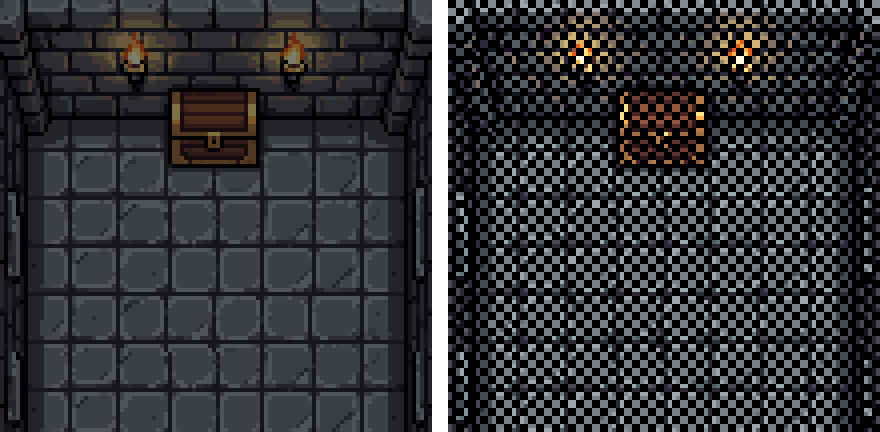
The dungeon has 25 colors. Halfway through a fade (left) it shows 24 new ones, and over the whole 0.55 s fade-out it shows 751 colors the art never had. Halfway through a dither (right) it's the same 25 colors plus black. Plenty of good pixel art games fade, and that's fine. Just know it's the one transition that leaves your palette, and in a game where every pixel was placed on purpose, some players see it.
How a transition runs
All eight use the same timing. The game is paused the whole time, so the player stands still like the game is loading:
- 0.55 s (33 ticks at 60 a second) to cover the screen. The shader's
progressgoes from 0 to 1. - 0.15 s (9 ticks) of black. The new scene loads here, out of sight.
- 0.55 s to uncover the next room.
progressgoes back from 1 to 0, withreverseon for the wipe. - 0.15 s more before the player can move, so nobody walks off the moment the room appears.
Each shader only turns progress into pixels. One script, further down, runs the timing for all of them.
Fades
1. Fade
Every pixel blends toward black over the fade-out, then the dungeon blends in from black. It's the one everybody knows, it works with any art, and it's one line of shader. It's also where the extra colors in the picture above come from.
shader_type canvas_item;
// Fade: every pixel blends toward black. On a ColorRect that covers the screen.
uniform float progress : hint_range(0.0, 1.0) = 0.0;   // 0 shows the game, 1 is all black

void fragment() {
	COLOR = vec4(0.0, 0.0, 0.0, progress);
}
2. Stepped fade
The same fade in 4 hard steps: 25%, 50% and 75% black, then all black. Each step holds for about 8 frames. It reads like an older console fade, and the screen shows 3 in-between versions of your colors instead of a new one every frame (72 new colors in the dungeon instead of 751).
shader_type canvas_item;
// Stepped fade: the same blend to black, in a few hard steps instead of a smooth ramp.
uniform float progress : hint_range(0.0, 1.0) = 0.0;
uniform int steps = 4;                                   // 4: 25%, 50%, 75% black, then all black

void fragment() {
	COLOR = vec4(0.0, 0.0, 0.0, floor(progress * float(steps)) / float(steps));
}
3. Bayer dither
Whole 2 x 2 pixel blocks switch to black one at a time, in the order of an 8 x 8 Bayer matrix. Halfway, every other block is black. Each pixel is either your art or black, so no new colors appear, and the pattern spreads evenly over the screen, so it still reads as a fade.
shader_type canvas_item;
// Bayer dither: whole blocks switch to black one by one, in the order of an 8 x 8 Bayer matrix.
uniform float progress : hint_range(0.0, 1.0) = 0.0;
uniform float pixel_size = 1.0;   // screen pixels per game pixel (1 with stretch mode "viewport")
uniform float block = 2.0;        // game pixels per dither block

const int BAYER[64] = int[64](
	 0, 32,  8, 40,  2, 34, 10, 42,
	48, 16, 56, 24, 50, 18, 58, 26,
	12, 44,  4, 36, 14, 46,  6, 38,
	60, 28, 52, 20, 62, 30, 54, 22,
	 3, 35, 11, 43,  1, 33,  9, 41,
	51, 19, 59, 27, 49, 17, 57, 25,
	15, 47,  7, 39, 13, 45,  5, 37,
	63, 31, 55, 23, 61, 29, 53, 21);

void fragment() {
	ivec2 b = ivec2(floor(FRAGCOORD.xy / (pixel_size * block)));
	float threshold = (float(BAYER[(b.y % 8) * 8 + b.x % 8]) + 0.5) / 64.0;
	COLOR = vec4(0.0, 0.0, 0.0, progress > threshold ? 1.0 : 0.0);
}
4. Pixelate
The picture turns into blocks of 2, 4, 8 and then 16 pixels, then goes black, and the next room comes back the same way. Each block copies its middle pixel instead of averaging, so the blocks keep your exact colors. The shader reads the screen, so the cover has to draw after everything else (it does, on a CanvasLayer at layer 100).
shader_type canvas_item;
// Pixelate: the picture turns into ever bigger blocks (2, 4, 8, 16 game pixels), then black.
// Each block copies one pixel instead of averaging, so no new colors appear.
uniform float progress : hint_range(0.0, 1.0) = 0.0;
uniform float pixel_size = 1.0;
uniform sampler2D screen : hint_screen_texture, filter_nearest;

void fragment() {
	float k = floor(progress * 6.0);                                // 0 to 4: blocks of 1 to 16, 5 and up: black
	if (k >= 5.0) {
		COLOR = vec4(0.0, 0.0, 0.0, 1.0);
	} else {
		vec2 size = 1.0 / SCREEN_PIXEL_SIZE / pixel_size;
		float b = exp2(k);
		vec2 p = floor(FRAGCOORD.xy / pixel_size);
		vec2 src = min(floor(p / b) * b + floor(b * 0.5), size - 1.0) + 0.5;   // the block's middle pixel
		COLOR = vec4(texture(screen, src * pixel_size * SCREEN_PIXEL_SIZE).rgb, 1.0);
	}
}
Shapes
5. Iris
A circle of whole pixels closes on the player and opens around them in the next room. The script sets the center to the player's spot on screen each time, so it closes on the doorway and opens where the player stands in the dungeon. The circle starts at the farthest screen corner, so the last corner goes black right as it closes.
shader_type canvas_item;
// Iris: a circle of game pixels closes on a point (the player) and opens again around it in the next room.
uniform float progress : hint_range(0.0, 1.0) = 0.0;
uniform float pixel_size = 1.0;
uniform vec2 center = vec2(0.5);   // where it closes, 0 to 1 across the screen

void fragment() {
	vec2 size = 1.0 / SCREEN_PIXEL_SIZE / pixel_size;              // the screen in game pixels
	vec2 p = floor(FRAGCOORD.xy / pixel_size) + 0.5;              // this game pixel's centre
	vec2 c = center * size;
	float r_max = max(max(length(c), length(c - vec2(size.x, 0.0))),
			max(length(c - vec2(0.0, size.y)), length(c - size)));  // the farthest corner
	COLOR = vec4(0.0, 0.0, 0.0, length(p - c) > (1.0 - progress) * r_max ? 1.0 : 0.0);
}
6. Diagonal wipe
A black edge sweeps from the top left corner to the bottom right in stairs of 6 pixels, so the edge stays on the pixel grid. On the way back in it keeps going the same way, and the black leaves through the bottom right corner. Running the same wipe backwards looks like the screen bounced.
shader_type canvas_item;
// Diagonal wipe: a black edge sweeps from the top left corner in stairs of step_size game pixels.
uniform float progress : hint_range(0.0, 1.0) = 0.0;
uniform float pixel_size = 1.0;
uniform float step_size = 6.0;
uniform bool reverse = false;   // true while the next room comes in, so the black leaves the way it came

void fragment() {
	vec2 size = 1.0 / SCREEN_PIXEL_SIZE / pixel_size;
	vec2 p = floor(floor(FRAGCOORD.xy / pixel_size) / step_size) * step_size;
	float w = (p.x + p.y + step_size) / (size.x + size.y);         // 0 to 1, top left to bottom right
	bool covered = reverse ? w > 1.0 - progress : w < progress;
	COLOR = vec4(0.0, 0.0, 0.0, covered ? 1.0 : 0.0);
}
7. Diamonds
The screen is cut into 12 pixel tiles, and a black diamond grows in each one, starting in the top left tile and rolling across to the bottom right. The tiles finish at different times, which gives it a wave. Change tile for bigger or smaller diamonds.
shader_type canvas_item;
// Diamonds: the screen is cut into tiles, and a black diamond grows in each one, top left tiles first.
uniform float progress : hint_range(0.0, 1.0) = 0.0;
uniform float pixel_size = 1.0;
uniform float tile = 12.0;      // game pixels per tile

void fragment() {
	vec2 size = 1.0 / SCREEN_PIXEL_SIZE / pixel_size;
	vec2 p = floor(FRAGCOORD.xy / pixel_size) + 0.5;
	vec2 cell = floor(p / tile);
	vec2 f = (p - cell * tile) / tile - 0.5;                        // -0.5 to 0.5 inside the tile
	vec2 cells = ceil(size / tile);
	float delay = (cell.x + cell.y) / max(cells.x + cells.y - 2.0, 1.0);
	COLOR = vec4(0.0, 0.0, 0.0, abs(f.x) + abs(f.y) < progress * 2.0 - delay ? 1.0 : 0.0);
}
8. Shutters
The screen is split into bands 8 pixels tall, and each band fills with black one pixel row at a time, like blinds closing. It's quick to read even on a tiny screen. Make bar bigger for fewer, thicker bands.
shader_type canvas_item;
// Shutters: horizontal bars close from the top of each band, one game pixel row at a time.
uniform float progress : hint_range(0.0, 1.0) = 0.0;
uniform float pixel_size = 1.0;
uniform float bar = 8.0;        // game pixels per band

void fragment() {
	float y = floor(FRAGCOORD.y / pixel_size);
	COLOR = vec4(0.0, 0.0, 0.0, mod(y, bar) < progress * bar ? 1.0 : 0.0);
}
The code
Each shader goes on a ColorRect that covers the screen, under a CanvasLayer at layer 100 so it draws over everything. Save that as a scene with the script below, add it as an autoload called Transition, and change rooms with:
Transition.change_scene("res://dungeon.tscn")
It returns false if a transition is already running, so touching a door twice doesn't start a second one. Put the player in a group called player and the iris finds them on its own.
transition.gd:
# Screen transition. Put it on a CanvasLayer (layer 100) with a full-screen ColorRect child named Cover that has one
# of the transition shaders, and make the scene an autoload. Then call Transition.change_scene("res://dungeon.tscn").
# The game is paused from the call until wait_ticks after the new room is in, so the player can't move meanwhile.
extends CanvasLayer

@export var out_ticks := 33        # 0.55 s at 60 ticks a second to cover the screen
@export var hold_ticks := 9        # all black; the new scene loads here
@export var in_ticks := 33         # to uncover the new room
@export var wait_ticks := 9        # input stays blocked a moment after it is in
@export var player_group := &"player"   # the iris closes on the first node in this group

@onready var cover: ColorRect = $Cover
var _t := -1
var _path := ""
var _start := -1                   # physics frame of the request: the count starts on the next one


func _ready() -> void:
	process_mode = Node.PROCESS_MODE_ALWAYS        # keeps running while the game is paused
	_show(0.0, false)


func change_scene(path: String) -> bool:
	if _t >= 0:
		return false                                # already changing
	_path = path
	_t = 0
	_start = Engine.get_physics_frames()
	_aim()
	get_tree().paused = true
	return true


func _physics_process(_delta: float) -> void:
	if _t < 0 or Engine.get_physics_frames() == _start:
		return                                      # (a door may call this before or after our tick, same frame)
	_t += 1
	var t_in := _t - out_ticks - hold_ticks         # ticks into the fade-in
	if _t <= out_ticks:
		_show(float(_t) / out_ticks, false)
	elif t_in <= 0:
		_show(1.0, false)
		if _t == out_ticks + 1:
			get_tree().change_scene_to_file(_path)
	elif t_in <= in_ticks:
		if t_in == 1:
			_aim()                                  # the new room's player
		_show(1.0 - float(t_in) / in_ticks, true)
	elif t_in == in_ticks + wait_ticks:
		_t = -1
		_show(0.0, false)
		get_tree().paused = false


func _show(progress: float, reverse: bool) -> void:
	var m := cover.material as ShaderMaterial
	m.set_shader_parameter("progress", progress)
	m.set_shader_parameter("reverse", reverse)
	cover.visible = progress > 0.0


func _aim() -> void:
	var player := get_tree().get_first_node_in_group(player_group) as CanvasItem
	if player:
		var on_screen := player.get_global_transform_with_canvas().origin
		(cover.material as ShaderMaterial).set_shader_parameter("center", on_screen / get_viewport().get_visible_rect().size)
pixel_size is how many screen pixels make one game pixel. With the stretch mode set to viewport (the setup from pixel perfect settings) it's 1. With canvas_items, set it to your scale, or the dither blocks and wipe stairs come out smaller than a game pixel.
Tested in Godot 4.6.1, headless and in both the Forward+ and Compatibility renderers:
- All eight shaders match a Python version of the same math on every pixel, at
pixel_size1 and 2, for 40 steps ofprogressclosing and 40 opening (within 1 per channel). On diamonds, pixels that sit exactly on a diamond's edge can round either way. change_scene()pauses the game on the tick it's called and keeps it paused for 84 ticks: 33 to cover, 9 black, 33 to uncover and 9 more. The player gets no ticks in that time.progressis k / 33 on the k-th tick, the new scene is in during the black, andprogressgoes back to 0 over 33 ticks withreverseon. After that the cover is hidden andreverseis off.- The iris centers on the player in the old room, then on the player in the new room.
- A second
change_scene()during a transition returns false and changes nothing. - In the dungeon, a fade-out draws 751 colors the art never had and a stepped fade draws 72. The other six draw none.
Other engines
The shaders port line by line. Draw a full-screen quad over the game, feed it progress, and use the pixel position where the Godot code uses FRAGCOORD. In Unity's HLSL that's SV_POSITION, which starts at the bottom left on some platforms, so flip y there or the wipe and shutters run upward. Pixelate needs a copy of the screen, like a grab pass or the camera's render texture. I only tested the Godot versions.
Common pitfalls
Averaging when you pixelate. A mosaic that averages each block makes new colors, the same problem as the fade. Copy one pixel per block.
Working in screen pixels. If the game is scaled up 4x and the shader works in window pixels, the dither checker and the wipe stairs shrink to a quarter of a game pixel and look like noise. Divide by pixel_size first.
Letting the player move. If the game keeps running during the fade-out, the player can walk back out of the door or get hit while the screen is black. Pause the game, or at least the player, until the next room is in.
Loading while it's on screen. Swap the scene while the screen is fully black. Loading during the fade-out can freeze it halfway, which looks worse than no transition.
Reversing the shape on the way in. A wipe played backwards pulls the edge back the way it came, like the screen bounced. Keep it moving the same way, which is what reverse does.
Where to next
- Four ways to see the player behind walls: the same Bayer dither, used to fade out a wall.
- Pixel perfect settings: the stretch mode that makes
pixel_size1. - 2D camera follow: what the camera does once the player is in the new room.
- Ordered dithering: where the Bayer matrix comes from.
- Screen-reading shaders in Godot: how the pixelate shader reads what's on screen.
Add this to your game with your coding agent
The prompt has the numbers, pseudo code, pitfalls and checks from this guide, written so your agent can fit it into your own project.
# Add screen transitions to my game

When my player walks through a door or into a new area, I want the screen to cover, the room to change while it's black, and the new room to appear, with the player held still the whole time like the game is loading. I'd like a transition that fits pixel art, and the option to switch between a few styles.

Before you write code, look at my project: the engine, how scenes change today, how the game is scaled up, and how player input runs. Route my existing scene changes through this, and ask me before changing how scenes load. If I haven't said which style I want, start with the Bayer dither and tell me where to switch it.

## How it works

- Ticks at 60 a second; the request's tick is tick 0, the transition steps from tick 1 even if the request came before its update that frame. Cover 33 ticks (progress = k / 33), 9 black while the scene loads, uncover 33, 9 more. The player first moves on tick 85.
- Pause the game for all 84 ticks (player on the default process mode), swap the scene only under full black, ignore a second request.
- The cover is a full-screen quad over everything, hidden at progress 0. Use game pixels: g = floor(screen_pixel / pixel_size). With Godot's viewport stretch pixel_size is 1; with canvas_items it's the window scale (not from get_viewport().size).
- Each style is only a function from (progress, game pixel) to black, clear or a screen color. The timing script is shared. Keep the style a setting so I can swap it.
- A plain fade blends every pixel toward black, so the screen shows colors the art never had (751 of them over a 33 tick fade-out of a 25 color room). Stepped fade cuts that to 72. Dither, pixelate, iris, wipe, diamonds and shutters only ever show the art's own colors and black.

## Numbers that matter

- Cover 33 ticks (0.55 s), black 9 (0.15 s), uncover 33, then 9 more before the player moves: 84 ticks paused.
- Fade: alpha = progress. Stepped fade: alpha = floor(progress * 4) / 4.
- Dither: 2 x 2 game pixel blocks, black when progress > (BAYER8[by % 8][bx % 8] + 0.5) / 64. Matrix rows: 0 32 8 40 2 34 10 42 / 48 16 56 24 50 18 58 26 / 12 44 4 36 14 46 6 38 / 60 28 52 20 62 30 54 22 / 3 35 11 43 1 33 9 41 / 51 19 59 27 49 17 57 25 / 15 47 7 39 13 45 5 37 / 63 31 55 23 61 29 53 21.
- Pixelate: k = floor(progress * 6); blocks of 2^k game pixels for k 0 to 4, each copying its middle pixel; black for k 5 and 6.
- Iris: centered on the player (old room, then new room); black outside radius (1 - progress) * distance to the farthest corner.
- Wipe: 6 pixel stairs, w = (step.x + step.y + 6) / (width + height); black when w < progress, or when w > 1 - progress while uncovering.
- Diamonds: 12 pixel tiles, black when |f.x| + |f.y| < progress * 2 - delay, delay 0 at the top left tile to 1 at the bottom right.
- Shutters: bands of 8 rows, black when y mod 8 < progress * 8.

## Pseudo code

```
change_scene(path):
    if t >= 0: return false               # already running
    t = 0; pause_game(); return true

tick():                                   # once per physics tick, also while paused
    if t < 0: return
    t += 1
    if t <= 33:          show(t / 33, reverse=false)
    elif t <= 42:        show(1, false); if t == 34: load_scene(path)
    elif t <= 75:        show(1 - (t - 42) / 33, reverse=true)   # reverse: only the wipe uses it
    elif t == 84:        t = -1; show(0, false); unpause_game()
                                          # ticks 76 to 83: room shown, still paused

show(p, reverse):                       # sets the cover shader's uniforms
    cover.progress = p; cover.reverse = reverse; cover.visible = p > 0

cover(p, pixel):                        # one style, here the Bayer dither
    b = floor(pixel / (pixel_size * 2))
    t = (BAYER8[b.y % 8][b.x % 8] + 0.5) / 64
    return black if p > t else clear
```

Godot: a ColorRect on a CanvasLayer (layer 100), a canvas_item shader on `FRAGCOORD.xy`, the tick in `_physics_process` with process mode Always. Unity: a full-screen quad, `SV_POSITION` (flip y if it starts at the bottom), `Time.timeScale = 0`.

## Pitfalls

- Averaging blocks when pixelating makes new colors. Copy one pixel per block.
- Working in window pixels on a scaled-up game makes the dither checker and the wipe stairs smaller than a game pixel. Divide by pixel_size first.
- If the game keeps running, the player can walk back out or get hit while the screen is black. Pause it.
- Loading during the fade-out can freeze it halfway. Load only while it's all black.
- Running a wipe backwards on the way in looks like the screen bounced. Keep it moving the same way (reverse).
- The cover has to draw over the UI too, or the HUD floats over a black screen.

## Check that it works

- The player can't move from the change request until 84 ticks later; the new scene appears only while the screen is all black.
- A second change request during a transition does nothing.
- For dither, pixelate, iris, wipe, diamonds and shutters, every pixel on every frame is the game's own color or pure black.
- With progress 0 the screen looks exactly as without the transition, and switching the transition off brings the old instant room change back.

Source: SpriteCook (2D game assets made by your coding agent, for Claude, ChatGPT and Cursor)
Full guide with all eight transitions, clips and tested Godot shaders: https://www.spritecook.ai/blog/pixel-art-screen-transitions
More game techniques
All techniques
 How to make interactive tall grass for a top-down pixel art gameTall grass the player wades through. Y-sorted tufts, a clean wading line, tufts that lean away on a spring, and trampled grass that grows back. Tested Godot 4.6 code.
 13 ways to show invincibility frames in a 2D gameAfter a hit, the player can't be hurt for a moment, and the game has to show it. Thirteen ways to do that, from blink and flash red to jitter, sparkles and a shield bubble, with the timing numbers, tested Godot code and a Unity version.
 Pixel art day and night cycle with a color lookup tableA dark overlay turns a pixel art night gray and muddy. Give every color in your palette its own night color in a small lookup table instead, with one row per time of day. How the table works, how I filled it, and tested Godot code.