Footprints, trampled grass and ripples from one trail texture in 2D
One black render texture follows the player and a soft brush paints where he steps. Snow reads it as footprints, tall grass as pressure, water as rings. Tested Godot 4.6 code.
Paste it into Claude Code, Codex, Cursor or any coding agent.
# Add a trail texture to my game

I want the ground in my 2D game to remember where the player walked: footprints in snow that fill back in, tall grass that stays pressed for a moment, rings in shallow water. Build it as one trail texture that follows the player, read by each ground effect.

Before you write code, look at my project: engine and renderer, resolution and camera, frame rate, how the ground is drawn and where snow is (an image, a tilemap, a mask), which ground types I have, and the player's walk animation (frames, speed, where the feet are). Fit this into what is there and keep my art. Start with the canvas and one reader for the ground type I have most; ask me before adding the others or the snow-on-boots extra.

## How it works

- The canvas is a single-channel texture following the player, one pixel per world pixel, black where nothing happened.
- Every frame: read last frame's canvas shifted by the whole pixels it moved, subtract a fixed fade, paint this frame's soft dots keeping the brighter value. A shader can't read the texture it draws into, so use two and swap them every frame (ping-pong).
- The brush paints a faint dab under the body every frame, and a strong dot on the walk frames where a boot touches down.
- Snow: canvas above two thresholds is a dent or a deeper dent, lit from the top left. As the canvas fades, prints fill in.
- Tall grass: each tuft reads the canvas around its base as pressure, flattens, leans along the canvas slope, and springs back up.
- Water: where the canvas jumped a lot this frame (a boot landing) it pushes a small wave sim. Only crests and troughs are drawn, as 1 px lines.

## Numbers that matter

Tested at 30 fps, a player about 33 px tall walking right 1 px a frame (walking left: mirror the x offsets). Levels are out of 255 (8-bit); frame counts start at the paint frame (frame 0). Scale dot sizes and offsets with your sprite.

- Canvas: 160 x 104 px, top-left at (feet.x - 120, 0), so 120 px behind him and 40 ahead; follow y too if the level scrolls vertically, and keep it wider than the view behind him. Fade 3 levels per frame: white is black after 85 frames (2.83 s). Start both textures black.
- Dot shape: value = min(1, peak * exp(-(dx / sx)^2 - (dy / sy)^2)).
- Body dab every frame at feet + (1, 3): sx 4.5, sy 4.2, peak 0.30 (level 76, under the snow's 90, so no trench).
- Boot dot when the walk animation first reaches a contact frame, at feet + (3, 0) for the near boot and (3, -1) for the far one: sx 2.7, sy 1.8, peak 1.3 (a flat white middle). In my 8-frame walk at 12 frames a second these are frames 2 and 5 (from 0); measure yours from the sprite's bottom rows.
- Snow: dent from level 90, deep from 166. Compare with half a level of margin (value * 255 > level - 0.5). Colors for a snow base near #dff1ff: inside #bad0f4, deep inside and left wall #92ace0, top wall #647cba, lip #fafdff. A full dot is a dent until frame 55, deep until 29.
- Grass: sample the max over 11 px wide and 8 rows (base row - 6 to base row + 1). Press = smoothstep((value - 0.02) / 0.15): flat from level 44, standing at 5 or less. Flat = 55% height, one shade darker above press 0.5, rows shifted up to 5 px forward at full press. Lean target = clamp(slope * 140, -7, 7), slope = (canvas(x+2) - canvas(x-2)) / 4 on a canvas blurred 3 rows by 7 columns. Press drops in 0.08 s and returns on a spring (1.6 Hz, damping ratio 0.28, overshoot to -0.18).
- Water: source = this frame's new paint where it is 64 levels or more. h -= source. Two substeps per frame: v += 0.30 * laplacian_x(h) + 0.12 * laplacian_y(h); v *= 0.982 * soak; h = (h + 0.5 * v) * soak; then blend 5% of a 3 x 3 box blur into h. Soak is 0.92 at the shore rising to 1.0 at 4 px in. Crest line where h > 0.035 and h is a local max across x or y; trough line, one shade darker, where h < -0.035 and a local min. Drop pieces under 3 px. A ring is about 40 px wide after a second and gone after two.
- Wading: sink at most 4 px, below the waterline one shade darker in water colors, two foam pixels each side.
- Snow on boots (optional): leaving snow, the next 5 steps on bare ground drop clumps (sizes 3, 3, 2, 2, 1), each losing one size every 3.2 / (size + 1) s. Never on tall grass.

## Pseudo code

```
canvas_a, canvas_b = new_texture(160, 104, single_channel_8bit, black)
read, write = canvas_a, canvas_b
last_origin = (feet.x - 120, 0)
prev_walk_frame = -1

each frame:
    dots = [(feet + (1, 3), (4.5, 4.2), 0.30)]
    if walk_frame != prev_walk_frame and walk_frame in CONTACT:
        dots.append((feet + CONTACT[walk_frame], (2.7, 1.8), 1.3))
    prev_walk_frame = walk_frame
    origin = (feet.x - 120, 0)
    scroll = origin - last_origin
    draw into write, for every pixel px:                 # one fullscreen pass in a shader
        src = px + scroll
        c = inside(src) ? read[src] : 0
        c = max(c - 3 / 255, 0)
        for (pos, size, peak) in dots:
            d = (px - (pos - origin)) / size
            c = max(c, min(1, peak * exp(-dot(d, d))))
        write[px] = c
    new_paint[px] = write[px] - faded[px]               # faded: c before the dots; only water uses it
    swap(read, write); last_origin = origin
    give every ground material: read (the fresh canvas), origin, size

snow shader, per ground pixel at world p:
    dent(q, level) = canvas(q) * 255 > level - 0.5 and is_snow(q)
    if dent(p, 90):
        color = dent(p, 166) ? DEEP : INSIDE
        if not dent(p - (0, 1), 90): color = WALL
        elif not dent(p - (1, 0), 90): color = DEEP
        if dent(p, 166) and not dent(p - (0, 1), 166) and dent(p - (0, 1), 90): color = WALL
    elif dent(p - (0, 1), 90) and is_snow(p): color = LIP
```

Godot: two SubViewports (RGBA8, read .r, use_hdr_2d off) with a full-size ColorRect running the pass, each reading the other's ViewportTexture, switched with render_target_update_mode = UPDATE_ONCE; no source_color hint on the color uniforms. Unity: two RenderTextures and Graphics.Blit. A custom engine: two render targets, or two byte arrays on the CPU for a small canvas.

## Pitfalls

- Thresholds exactly on a level (0.35 is level 89.25) flip pixels between renderers. Keep half a level of margin.
- Moving the canvas without shifting its pixels drags the whole trail along with the player.
- Rings drawn from the fading value shrink inward. Use the new paint.

## Check that it works

- A debug view of the canvas: one dot per landed boot, a faint smear under the body (it stays at level 76 under him while he stands), and black 85 frames after he walks away.
- Walking, each dot stays at one world position while the canvas scrolls with him.
- In snow, a single print is a dent until frame 55 and deep until 29, untouched from 56.
- In grass, a tuft he walked over is flat right behind him and stands back up within about a second.
- In water, one step makes one ring that is wider than tall and gone within 2 s.
- With the fade at 255 per frame and no dots, every effect looks like it did before.

Source: SpriteCook (2D game assets made by your coding agent, for Claude, ChatGPT and Cursor)
Full guide with pictures, video and tested Godot code: https://www.spritecook.ai/blog/2d-trail-render-texture-snow-grass-water
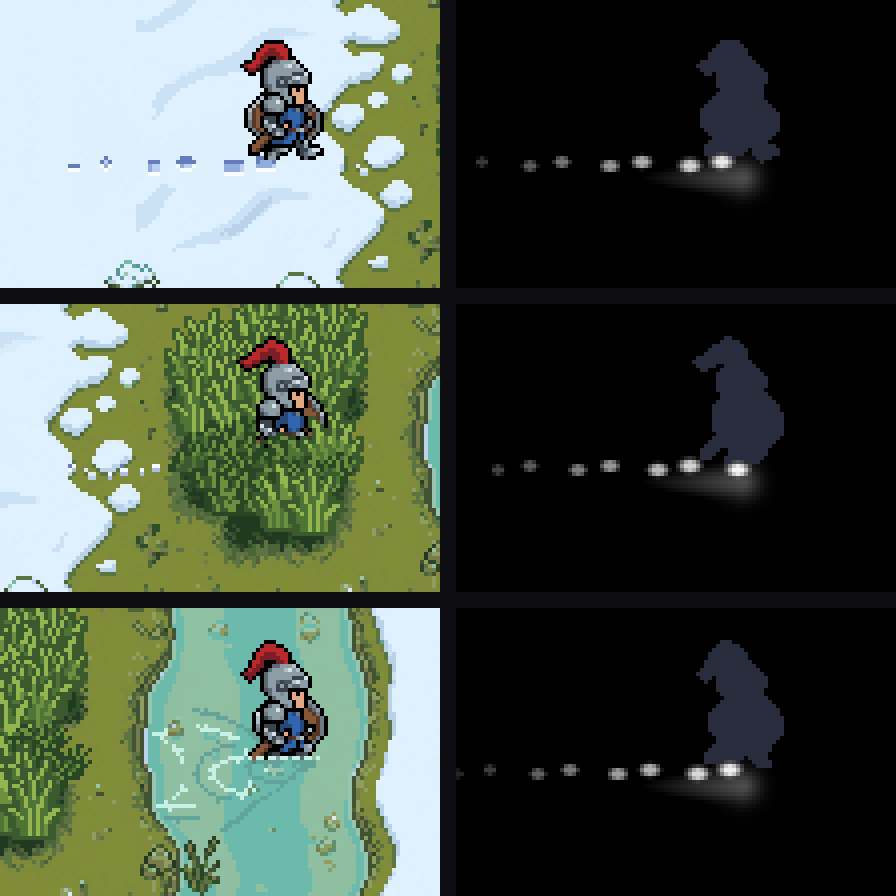
Footprints in snow, grass that stays flat where you walked, rings in shallow water. It sounds like three systems with three sets of state. In a lot of games it's one: a black texture that follows the player, a soft brush that paints white where he steps, and a fade that slowly turns it black again. Every ground effect just reads that texture.
Left is the game, right is the texture it reads. Nothing on the left keeps its own memory of where the knight walked. The knight, the ground and the grass tufts are made with SpriteCook.
One black canvas
The canvas is a render texture with one pixel per world pixel, black where nothing happened. Every frame two things happen to it:
- It fades. Every pixel loses 3 of its 255 levels, so a full white dot is black again after 85 frames (2.83 s at 30 fps).
- The brush paints. A soft dot is a small gaussian blob, and the canvas keeps the brighter of what it had and the new dot.
The brush paints two kinds of dots:
- A dot where a boot lands, 2.7 x 1.8 px with a peak of 1.3, so its middle is a flat full white.
- A faint dab under the body every frame, 4.5 x 4.2 px, peak 0.30. That's what the grass and water feel between steps.
All three rows above have the same canvas. Only the shader reading it changes.
Make it follow the player
A canvas the size of your whole level wastes memory. Mine is 160 x 104 px and follows the knight, 120 px behind him and 40 ahead, which is more trail than the fade lets live. The catch is that a render texture doesn't move its pixels when you move it. So each frame the new canvas reads the old one shifted by however many pixels it moved, in whole pixels, and anything that falls off the back edge is gone.
A shader can't read the texture it's drawing into, so I use two and swap them every frame. One draws, reading what the other drew last frame. People call this ping-pong.
Snow reads it as dents
Snow turns the canvas into dents with two thresholds. From level 90 of 255 it's a dent, from 166 a deeper one. Light comes from the top left, so:
- the first row of a dent is its wall, in shadow
- the left edge is a shade darker
- the row right under it is a white lip
As the dot fades the dent shrinks back in whole pixels, and the footprint fills in by itself. A full dot stays a dent for 1.8 s, and deep for 1 s.
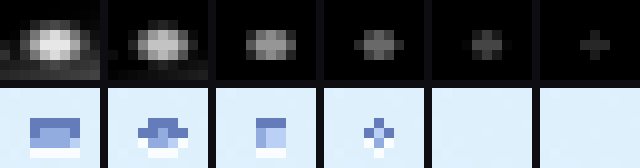
The body dab peaks at 0.30, which is level 76 and under the snow's 90. So the body never dents the snow, only the boots do.
Put the dots where the boots land
My first try painted a dot every half step at a fixed spot, and the prints ended up next to his feet instead of under them. The fix is to read it off the walk cycle. In this walk the front boot touches down on the 3rd and 6th frame, about 3 px ahead of the sprite's center, and the far boot sits 1 px higher than the near one. Paint the dot on those frames only, when the animation first reaches them.

The spacing ends up uneven, 8 px then 12 px, because his gait is. That's fine. Prints that follow the feet look right even when the rhythm isn't perfect.
Grass reads it as pressure
The tall grass is the same as in my tall grass post. Every tuft is a sprite, sorted by y with the player. What changes is where the push comes from. Each tuft looks at the brightest canvas pixel around its base (11 px wide, 8 rows tall) and treats it as pressure:
- From level 44 it's flat. 55% of its height, one shade darker, laid 5 px over in the walk direction. At 5 or less it stands. In between it eases.
- It leans with the trail. The canvas is brighter where he walked last, so its left to right slope says which way he went.
- It springs back up. When the canvas fades below the press, a spring (1.6 Hz, damping 0.28) stands it back up, and it overshoots a bit taller first.

The body dab does most of the work here. It fades out in under a second, so the lane closes right behind him. Only the spots where a boot landed stay pressed a little longer.
Water reads what is new
Water can't read the canvas the same way. A fading dot shrinks, and rings have to grow. So the creek only looks at what got painted this frame, and only where the canvas jumped by 64 levels or more in one frame. That's a boot landing. The jump pushes a small wave sim down, and the waves spread on their own:
- Rings are wider than tall. Waves travel sideways about 1.6 times as fast as up and down, since the ground is seen from slightly above. After a second a ring is about 40 px wide, and after two it's gone.
- The shore soaks them up. Close to the bank the waves lose a bit more each step, so they don't bounce back.
- Draw only the crests. A pixel is a light line where the wave peaks above 0.035, and one shade darker where it dips below -0.035. Bits smaller than 3 px are dropped. That keeps every ring a crisp 1 px line.

The creek is shallow everywhere, so he sinks 4 px at most. Below the waterline he's drawn one shade darker in the water's own colors, with two light foam pixels on each side.
If you want the water itself to look better than flat turquoise, my pond post has the layers.
Snow on the boots
A small thing that sells it. While he's in the snow, his boots carry snow. The next 5 steps on bare ground each drop a white clump, the first two big, then smaller, and each one melts away one size at a time over 3.2 s. They only land on bare ground, never in the tall grass.
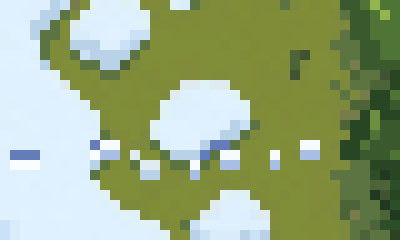
This one isn't on the canvas. It's a handful of small decals with a timer, which is all it needs.
The code
The canvas and the snow dents are four Godot 4 files. Get them in one zip: trail-texture-godot.zip (5 KB).
trail_canvas.gdsets up the two SubViewports, takes dots and draws a frame.trail.gdshaderis one frame of the canvas: scroll, fade, paint.snow_dents.gdshadergoes on the snow ground and reads the canvas.render.gdis the test scene, a walk across a snow strip with everything wired up.
One frame of the canvas:
shader_type canvas_item;
// One frame of the trail canvas. It reads last frame's canvas (prev), moves it by how far the canvas
// followed the player, fades it, and paints this frame's dots on top. Two of these take turns (trail_canvas.gd).

uniform sampler2D prev : filter_nearest, repeat_disable;
uniform vec2 size;                  // the canvas in pixels
uniform vec2 scroll;                // pixels the canvas moved since last frame (whole pixels)
uniform float fade = 0.0;           // taken off every pixel every frame, 3.0 / 255.0 on the page
uniform int count = 0;              // dots this frame
uniform vec4 dots[16];              // x, y in canvas pixels, then the dot's width and height (sx, sy)
uniform float peaks[16];            // the dot's brightness at its center, clamped to 1

void fragment() {
	vec2 px = floor(UV * size);     // this pixel
	vec2 src = px + scroll;         // the same spot in the world, last frame
	float c = 0.0;
	if (src.x >= 0.0 && src.y >= 0.0 && src.x < size.x && src.y < size.y) {
		c = texture(prev, (src + 0.5) / size).r;
	}
	c = max(c - fade, 0.0);
	for (int i = 0; i < count; i++) {
		vec2 d = (px - dots[i].xy) / dots[i].zw;
		c = max(c, min(1.0, peaks[i] * exp(-dot(d, d))));
	}
	COLOR = vec4(c, c, c, 1.0);
}
Per frame, you hand it the dots and where it is now, then give the ground the texture:
trail.add_dot(feet + Vector2(1, 3), Vector2(4.5, 4.2), 0.30)       # the body, every frame
if walk != prev_walk and CONTACT.has(walk):                     # a boot lands
	trail.add_dot(feet + CONTACT[walk], Vector2(2.7, 1.8), 1.3)
trail.draw(Vector2i(int(feet.x) - 120, 0))                    # the canvas follows the player
ground.material.set_shader_parameter("trail", trail.canvas_texture())
ground.material.set_shader_parameter("trail_origin", Vector2(trail.origin))
And the snow's dent rule:
bool dent(vec2 world, int level, vec2 ground_size) {
	// half a level of margin, so the rounding of an 8-bit texture never flips a pixel
	return canvas_at(world) * 255.0 > float(level) - 0.5 && snow_at(world, ground_size);
}

void fragment() {
	vec2 ground_size = vec2(textureSize(TEXTURE, 0));
	vec2 world = ground_origin + floor(UV * ground_size);
	vec2 up = world - vec2(0.0, 1.0);
	bool d1 = dent(world, shallow, ground_size);
	bool d2 = dent(world, deep, ground_size);
	bool up1 = dent(up, shallow, ground_size);
	bool up2 = dent(up, deep, ground_size);
	bool left1 = dent(world - vec2(1.0, 0.0), shallow, ground_size);
	COLOR = texture(TEXTURE, UV);
	if (d1) {
		COLOR.rgb = d2 ? inside_deep : inside;
		if (!up1) {
			COLOR.rgb = wall;
		} else if (!left1) {
			COLOR.rgb = inside_deep;
		}
		if (d2 && !up2 && up1) {
			COLOR.rgb = wall;
		}
	} else if (up1 && snow_at(world, ground_size)) {
		COLOR.rgb = lip;
	}
}
Tested in Godot 4.6, a walk of 200 frames across the snow strip from the clip, every frame compared with the Python version that drew every picture on this page:
- The canvas equals it on all 200 frames, every pixel within 1/255 (99.4% exact in Compatibility, 99.9% in Forward+).
- The snow shader's output equals the same dent rule run on Godot's own canvas, on every pixel of every frame.
- End to end, at least 99.998% of the snow pixels are exact. The rest are pixels where the two canvases differ by 1/255 right at a threshold.
- A full white dot fades out in 85 frames, stays a dent for 55 (1.8 s) and a deep dent for 29 (1 s).
Other engines
- Unity. Two
RenderTextures andGraphics.Blitwith the trail shader, swapping each frame. Ground shaders sample the current one with the canvas' world rect. - On the CPU. For a small canvas you can do the same on a byte array: subtract, clamp, paint. The grass in this post reads it on the CPU anyway, one sample per tuft.
- Store whole levels. Keep the fade a whole number of levels per frame. A fade of 2.83 levels gets rounded to 3 by an 8-bit texture anyway, and your timing drifts.
Common pitfalls
Thresholds right on a level. An 8-bit texture can't hold 0.35. Put thresholds half a level away from any value it can store, or one renderer will flip pixels the other doesn't.
A canvas that doesn't scroll. Moving the texture with the player without shifting its pixels drags the whole trail along with him. Read last frame at the offset he moved.
Dots in the wrong place. Dots on a timer land between the feet. Paint on the frames where a boot touches down.
Rings from the fading value. A fading dot shrinks, so rings drawn from it shrink too. Start waves from what's new this frame.
The body denting the snow. A dab bright enough to press the grass will also dig a trench in the snow. Keep it under the snow's threshold.
One fade for everything. Snow wants prints to last, grass wants the lane to close fast. Give each reader its own threshold on the same canvas instead of a second canvas.
Where to next
- How to make interactive tall grass for a top-down pixel art game, the y-sorted tufts, the wading line and the spring
- How to make a pixel art pond with reflections and ripples, the water layers under the rings
- How to add snow and ice to a 2D pixel art scene, the snow that settles before he walks through it
- Creating snow trails in Unreal Engine 4 on Kodeco, the same idea in 3D, with two render targets writing to each other
- Car tracks on snow or sand on Godot Shaders, a viewport texture driving tracks in Godot
Add this to your game with your coding agent
The prompt has the numbers, pseudo code, pitfalls and checks from this guide, written so your agent can fit it into your own project.
# Add a trail texture to my game

I want the ground in my 2D game to remember where the player walked: footprints in snow that fill back in, tall grass that stays pressed for a moment, rings in shallow water. Build it as one trail texture that follows the player, read by each ground effect.

Before you write code, look at my project: engine and renderer, resolution and camera, frame rate, how the ground is drawn and where snow is (an image, a tilemap, a mask), which ground types I have, and the player's walk animation (frames, speed, where the feet are). Fit this into what is there and keep my art. Start with the canvas and one reader for the ground type I have most; ask me before adding the others or the snow-on-boots extra.

## How it works

- The canvas is a single-channel texture following the player, one pixel per world pixel, black where nothing happened.
- Every frame: read last frame's canvas shifted by the whole pixels it moved, subtract a fixed fade, paint this frame's soft dots keeping the brighter value. A shader can't read the texture it draws into, so use two and swap them every frame (ping-pong).
- The brush paints a faint dab under the body every frame, and a strong dot on the walk frames where a boot touches down.
- Snow: canvas above two thresholds is a dent or a deeper dent, lit from the top left. As the canvas fades, prints fill in.
- Tall grass: each tuft reads the canvas around its base as pressure, flattens, leans along the canvas slope, and springs back up.
- Water: where the canvas jumped a lot this frame (a boot landing) it pushes a small wave sim. Only crests and troughs are drawn, as 1 px lines.

## Numbers that matter

Tested at 30 fps, a player about 33 px tall walking right 1 px a frame (walking left: mirror the x offsets). Levels are out of 255 (8-bit); frame counts start at the paint frame (frame 0). Scale dot sizes and offsets with your sprite.

- Canvas: 160 x 104 px, top-left at (feet.x - 120, 0), so 120 px behind him and 40 ahead; follow y too if the level scrolls vertically, and keep it wider than the view behind him. Fade 3 levels per frame: white is black after 85 frames (2.83 s). Start both textures black.
- Dot shape: value = min(1, peak * exp(-(dx / sx)^2 - (dy / sy)^2)).
- Body dab every frame at feet + (1, 3): sx 4.5, sy 4.2, peak 0.30 (level 76, under the snow's 90, so no trench).
- Boot dot when the walk animation first reaches a contact frame, at feet + (3, 0) for the near boot and (3, -1) for the far one: sx 2.7, sy 1.8, peak 1.3 (a flat white middle). In my 8-frame walk at 12 frames a second these are frames 2 and 5 (from 0); measure yours from the sprite's bottom rows.
- Snow: dent from level 90, deep from 166. Compare with half a level of margin (value * 255 > level - 0.5). Colors for a snow base near #dff1ff: inside #bad0f4, deep inside and left wall #92ace0, top wall #647cba, lip #fafdff. A full dot is a dent until frame 55, deep until 29.
- Grass: sample the max over 11 px wide and 8 rows (base row - 6 to base row + 1). Press = smoothstep((value - 0.02) / 0.15): flat from level 44, standing at 5 or less. Flat = 55% height, one shade darker above press 0.5, rows shifted up to 5 px forward at full press. Lean target = clamp(slope * 140, -7, 7), slope = (canvas(x+2) - canvas(x-2)) / 4 on a canvas blurred 3 rows by 7 columns. Press drops in 0.08 s and returns on a spring (1.6 Hz, damping ratio 0.28, overshoot to -0.18).
- Water: source = this frame's new paint where it is 64 levels or more. h -= source. Two substeps per frame: v += 0.30 * laplacian_x(h) + 0.12 * laplacian_y(h); v *= 0.982 * soak; h = (h + 0.5 * v) * soak; then blend 5% of a 3 x 3 box blur into h. Soak is 0.92 at the shore rising to 1.0 at 4 px in. Crest line where h > 0.035 and h is a local max across x or y; trough line, one shade darker, where h < -0.035 and a local min. Drop pieces under 3 px. A ring is about 40 px wide after a second and gone after two.
- Wading: sink at most 4 px, below the waterline one shade darker in water colors, two foam pixels each side.
- Snow on boots (optional): leaving snow, the next 5 steps on bare ground drop clumps (sizes 3, 3, 2, 2, 1), each losing one size every 3.2 / (size + 1) s. Never on tall grass.

## Pseudo code

```
canvas_a, canvas_b = new_texture(160, 104, single_channel_8bit, black)
read, write = canvas_a, canvas_b
last_origin = (feet.x - 120, 0)
prev_walk_frame = -1

each frame:
    dots = [(feet + (1, 3), (4.5, 4.2), 0.30)]
    if walk_frame != prev_walk_frame and walk_frame in CONTACT:
        dots.append((feet + CONTACT[walk_frame], (2.7, 1.8), 1.3))
    prev_walk_frame = walk_frame
    origin = (feet.x - 120, 0)
    scroll = origin - last_origin
    draw into write, for every pixel px:                 # one fullscreen pass in a shader
        src = px + scroll
        c = inside(src) ? read[src] : 0
        c = max(c - 3 / 255, 0)
        for (pos, size, peak) in dots:
            d = (px - (pos - origin)) / size
            c = max(c, min(1, peak * exp(-dot(d, d))))
        write[px] = c
    new_paint[px] = write[px] - faded[px]               # faded: c before the dots; only water uses it
    swap(read, write); last_origin = origin
    give every ground material: read (the fresh canvas), origin, size

snow shader, per ground pixel at world p:
    dent(q, level) = canvas(q) * 255 > level - 0.5 and is_snow(q)
    if dent(p, 90):
        color = dent(p, 166) ? DEEP : INSIDE
        if not dent(p - (0, 1), 90): color = WALL
        elif not dent(p - (1, 0), 90): color = DEEP
        if dent(p, 166) and not dent(p - (0, 1), 166) and dent(p - (0, 1), 90): color = WALL
    elif dent(p - (0, 1), 90) and is_snow(p): color = LIP
```

Godot: two SubViewports (RGBA8, read .r, use_hdr_2d off) with a full-size ColorRect running the pass, each reading the other's ViewportTexture, switched with render_target_update_mode = UPDATE_ONCE; no source_color hint on the color uniforms. Unity: two RenderTextures and Graphics.Blit. A custom engine: two render targets, or two byte arrays on the CPU for a small canvas.

## Pitfalls

- Thresholds exactly on a level (0.35 is level 89.25) flip pixels between renderers. Keep half a level of margin.
- Moving the canvas without shifting its pixels drags the whole trail along with the player.
- Rings drawn from the fading value shrink inward. Use the new paint.

## Check that it works

- A debug view of the canvas: one dot per landed boot, a faint smear under the body (it stays at level 76 under him while he stands), and black 85 frames after he walks away.
- Walking, each dot stays at one world position while the canvas scrolls with him.
- In snow, a single print is a dent until frame 55 and deep until 29, untouched from 56.
- In grass, a tuft he walked over is flat right behind him and stands back up within about a second.
- In water, one step makes one ring that is wider than tall and gone within 2 s.
- With the fade at 255 per frame and no dots, every effect looks like it did before.

Source: SpriteCook (2D game assets made by your coding agent, for Claude, ChatGPT and Cursor)
Full guide with pictures, video and tested Godot code: https://www.spritecook.ai/blog/2d-trail-render-texture-snow-grass-water
More game techniques
All techniques
 How to add flocks of birds and schools of fish to a 2D game with boidsA flock of swallows and a school of fish that move on their own, from three rules and a goal that swings like a pendulum. Every number, tested Godot 4.6 code and a project to download.
 Wave function collapse for pixel art maps, explainedWave function collapse fills a grid from rules about what may touch what. How it works, a pixel art village built in two passes, and tested Godot code.
 How to make interactive tall grass for a top-down pixel art gameTall grass the player wades through. Y-sorted tufts, a clean wading line, tufts that lean away on a spring, and trampled grass that grows back. Tested Godot 4.6 code.