How to make the liquid in pixel art potions slosh
Pixel art potions whose liquid tilts, sloshes and settles when you drag them. An interior mask, a tilted fill line that keeps the amount, a damped spring and whole-pixel shading. Tested Godot 4.6 code.
Paste it into Claude Code, Codex, Cursor or any coding agent.
# Add sloshing liquid to the potions in my game

The potions in my game have their liquid painted into the sprite, so when I drag one around it moves like a solid block. Make the liquid act like liquid: it leans away when the bottle speeds up, swings back past level when it stops, settles, bounces a little when the bottle is set down, and stays crisp pixel art the whole time.

Before you write code, look at my project: the engine and language, how potions are drawn and moved today (inventory slots, drag and drop, world items), their sprite sizes and the tick rate. Fit this into what is there instead of adding a second system. Keep my art, sizes and colors. If my potion sprites have the liquid painted in, ask me before redrawing them empty or masking the liquid out.

## How it works

- Each bottle has an empty sprite and an interior mask: every pixel inside the outline where liquid can be, minus the cork, shrunk by 1 px (4-neighbour erosion: a pixel stays only if up, down, left and right are inside too) so the glass wall stays visible. The bottle sprite never rotates.
- The liquid is every mask pixel whose center is below one line. The line's slope is the lean; its height is searched every frame so the number of liquid pixels stays the same.
- The lean is a damped spring whose target comes from the bottle's sideways acceleration, worked out from its position each tick. A second spring bounces the middle of the surface from vertical acceleration.
- Leans and bounces under about half a pixel are drawn flat, so settled potions don't flicker.
- Six colors shade the liquid: body, dark wall band, light wall band, back face, surface line, bubbles. The glass highlight from the sprite is drawn back on top.
- When something lands on a shelf, the other potions get a small kick to their springs.

## Numbers that matter

Measured on bottles about 27 x 46 px with a 466 px mask, 60 ticks per second. The lean numbers are in pixels per second squared of the bottle's movement, so scale LEAN_ACCEL with your pixel size if your sprites are much bigger or smaller.

- Fill: a fraction of the mask, rounded. 0.60 of 466 px is 280 px.
- Lean spring: 1.55 Hz, damping ratio 0.11. Target lean = sideways acceleration / 2600 px/s^2 (radians, used as the slope's tan after the soft limit). Soft limit: lean = 0.85 * tanh(lean / 0.85).
- Bounce spring: 3.1 Hz, damping ratio 0.10, pushed by -vertical acceleration * 0.2 (y down). The bounce is a cosine bump across the mask's width.
- 4 substeps per tick for both springs.
- Draw flat when |tan(lean)| * half the mask width < 0.55 px, and drop the bounce when |bounce| < 0.5 px.
- Height search: 24 halvings between -2 and +3 times the bottle height. Then take whichever of the two ends gives the count closer to the target (a flat surface can only sit on whole rows).
- Shading, later rules win: body on every liquid pixel; dark where there is no mask 1 or 2 px to the right or 1 px below; light where there is no mask 1 px to the left; surface line on liquid pixels with open glass right above. The back face goes on the open glass pixel right above a surface line pixel.
- Bubbles: 6 per potion, single pixels rising 7 to 12 px/s from the bottom, each on its own loop of 2.5 to 5.5 s, drawn only on body pixels.
- Neighbour kick on landing: about 2 rad/s of lean speed with a random sign and 20 px/s of bounce speed, less for potions on another shelf.

## Pseudo code

```
setup(bottle, mask, colors, fill):
    pixels = centers (x + 0.5, y + 0.5) of every mask pixel
    amount = round(fill * len(pixels)); mid_x = mean x of mask + 0.5; half_w = mask width / 2

each tick (dt), pos = bottle position in art pixels:
    vel = (pos - last_pos) / dt;  acc = (vel - last_vel) / dt
    kt = (2 * PI * 1.55)^2;  ct = 2 * 0.11 * sqrt(kt)
    kb = (2 * PI * 3.1)^2;   cb = 2 * 0.10 * sqrt(kb)
    repeat 4 times with h = dt / 4:
        lean_speed += (kt * (acc.x / 2600 - lean) - ct * lean_speed) * h
        lean += lean_speed * h
        bob_speed += (-kb * bob - cb * bob_speed - acc.y * 0.2) * h
        bob += bob_speed * h

liquid():
    k = tan(0.85 * tanh(lean / 0.85)); if abs(k) * half_w < 0.55: k = 0
    b = bob if abs(bob) >= 0.5 else 0
    shape(p) = k * (p.x - mid_x) + b * cos(PI * (p.x - mid_x) / (half_w + 0.5))
    count(y0) = number of pixels p with p.y > y0 + shape(p)
    lo = -2 * height; hi = 3 * height
    repeat 24: y0 = (lo + hi) / 2; if count(y0) > amount: lo = y0 else hi = y0
    if count(lo) - amount < amount - count(hi): hi = lo
    return pixels with p.y > hi + shape(p)

paint(): bottle sprite, then the six-color shading rules above, bubbles, then the glass highlight on top
kick(lean_add, bob_add): lean_speed += lean_add; bob_speed += bob_add
```

Godot: a `Sprite2D` that paints an `Image` and updates its `ImageTexture` in `_physics_process`; keep positions in 64-bit floats for the differences. Unity: same update in `FixedUpdate`, a point-filtered `Texture2D` and `Apply()`. A custom engine: write into the sprite's pixel buffer.

## Pitfalls

- Lean with acceleration, not speed. At a steady drag speed the surface should be flat.
- Search the height every frame, or the potion looks fuller at some leans.
- Decide liquid per whole pixel. An anti-aliased surface line blurs the pixel art.
- Without the flat zone a nearly settled potion flickers a 1 px step for seconds.
- Damping much under 0.1 wobbles far too long.
- A glow around a magic potion is light on the shelf: keep it where the potion stands and fade it when the potion is picked up, or it looks stuck to the bottle.

## Check that it works

- Count liquid pixels every tick of a drag: never more than 1 px off the target while the surface moves (a couple of pixels when flat, one row at most).
- The test drag, offsets in px from the rest spot, smootherstep (6u^5 - 15u^4 + 10u^3) between keys: rest until 0.30 s, (-23, -17) at 0.58 s, (12, -20) at 0.94 s, (5, -19) at 1.10 s, hold until 1.95 s, then down to (0, 0) at 2.20 s with ease-in (u^2, so it lands at about 150 px/s). Expect: the surface leans 40 degrees or more. After landing the middle bounces at least 1 px and the surface is flat for good within about 1.5 s.
- The same drag, but held at (5, -19) instead of set down: after 1.10 s the surface changes side about 10 times and is flat for good about 3 s later (2.95 s measured).
- kick(2, 20) on a resting bottle of this size leans it about 10 degrees, flat again in about 1.2 s.
- Turn it off (an enabled flag): the fill never moves and looks like the old painted sprite.

## Art it needs

An empty version of each bottle and its interior mask. If my bottles have liquid painted in, the cheapest fix is to repaint the liquid area with the empty glass tone, then build the mask from that area shrunk by 1 px. If the SpriteCook MCP tools are available in this session, generate empty glass bottles with them (ask for empty bottles on a flat background, nothing inside), and make the masks from those.

Source: SpriteCook (2D game assets made by your coding agent, for Claude, ChatGPT and Cursor)
Full guide with pictures, video and tested Godot code: https://www.spritecook.ai/blog/pixel-art-potion-liquid-slosh
Potions in most games are one sprite with the liquid painted in. Drag one around your inventory and the liquid moves with the glass like a solid block. Here's how to make it act like liquid instead. It leans when you move the bottle, swings back past level when you stop, and settles. All of it in whole pixels, from one empty bottle sprite.
The bottles and the shelf are made with SpriteCook, as empty glass so the code can own the liquid. The liquid, the bubbles and the glow are code.
Give every bottle an interior mask
Draw the bottle empty. Then make a mask of where liquid can be: everything inside the outline, minus the cork and the glass wall.
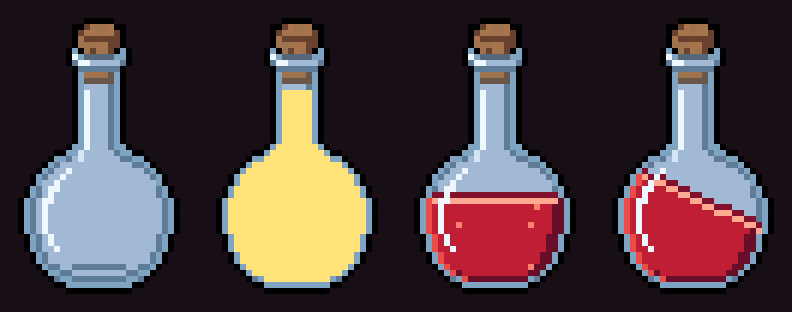
I made the masks with a script: take the bottle's pixels that aren't outline or cork, and shrink that by 1 px so the glass wall stays visible. The red flask's mask is 466 px and I fill 60% of it, 280 px. Keep the bottle sprite upright. The bottle never rotates, only the liquid inside it moves.
Fill it below a tilted line
The liquid is every mask pixel below one line. That line has a slope (the lean) and a height. The slope comes from the spring below. The height is searched every frame, so the liquid stays 280 px whatever the lean.
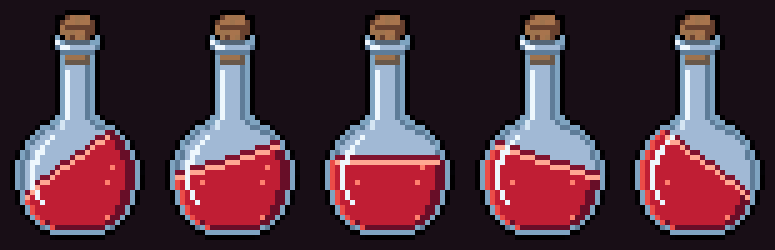
The test is per pixel: a mask pixel is liquid when its center is below the line. That's what keeps it in whole pixels. The surface steps from column to column like hand-drawn pixel art, and nothing blurs.
The search is a plain binary search: 24 halvings between well above and well below the bottle, counting the pixels under the line each time. While the liquid moves it stays within 1 px of 280. A flat surface can only sit on whole rows, so then it can be a couple of pixels off (2 px in this flask, 7 px in the wide conical one). I take whichever row is closer.
Drive the lean with a spring
Liquid in a bottle you speed up piles up at the back. The surface leans away from the acceleration, then rocks back and forth and settles. A damped spring does exactly that.
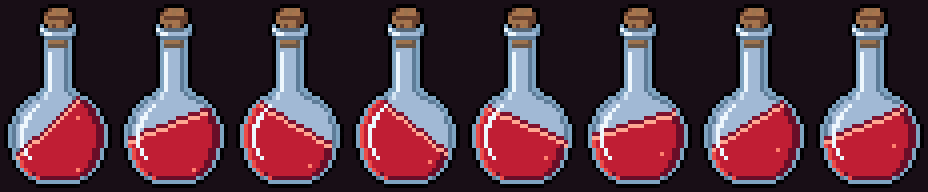
Every physics tick:
- Acceleration from the position. The bottle's speed is how far it moved this tick, its acceleration how much the speed changed. Your inventory or drag code doesn't need to know about the potion.
- The spring's target is the sideways acceleration divided by 2600 px/s². That much acceleration leans the surface 45 degrees.
- The spring pulls the lean toward the target at 1.55 Hz with damping 0.11, in 4 small steps per tick so it stays stable. Low damping is what makes it swing a few times before it stops.
- A soft limit keeps the lean under 0.85 radians (49 degrees), so a hard yank doesn't turn the liquid on its side.
In the test drag (up and left, then back right) the surface leans up to 44 degrees, 14 px from one side of the flask to the other. Held still after that, it rocks from side to side 10 times and is flat for good 2.95 s later. In the clip I set it down before then, so it's still moving when it lands.
Draw tiny leans flat. When the lean moves the surface less than 0.55 px across half the bottle, draw it flat. Without that, a potion that has almost settled flickers a 1 px step on and off for seconds.
A bounce when it lands
A second spring (3.1 Hz, damping 0.10) bounces the middle of the surface up and down. It takes the vertical acceleration, so setting a potion down with some speed makes the middle jump. In the test the drop bounces it up to 1.44 px, and the surface is flat for good 1.50 s after landing. Under 0.5 px it's drawn flat, for the same reason as above.
For the other potions on the shelf, give each a small kick when something lands: some lean speed with a random sign, some bounce speed. kick(2, 20) leans a resting flask up to 9.9 degrees, flat again after 1.18 s. Add a 1 px hop and a 1 px rattle to their positions for the same few frames, and the whole shelf feels hit.
Shade it in whole pixels
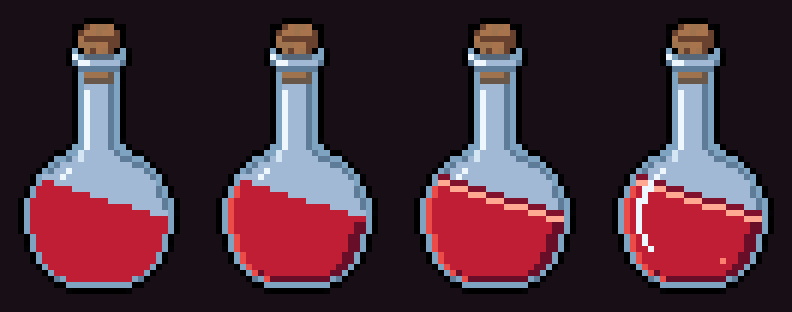
Six colors per potion, in this order:
- Mid for the body.
- Dark for a 2 px band on the right wall and 1 px at the bottom, so the liquid reads round.
- Light for 1 px on the left wall, where the light comes from.
- The surface line, the brightest color, on the top liquid pixel of every column that has open glass above it. This is the line people notice.
- The back face, a darker color, on the row just above that line. It reads as the far side of the surface.
- Bubbles, single pixels that rise from the bottom at 7 to 12 px/s and vanish at the surface. Six per potion, each on its own loop of 2.5 to 5.5 s.
Last, the bottle's own white glass highlight goes back on top, so the glass still looks like glass over the liquid.
The glow. The gold and violet potions in the clip glow with two flat steps of color around them. The glow is light on the shelf, so it stays where the potion stands. When you pick the potion up, the glow shrinks away in steps, and it comes back when you set the potion down. My first version moved the glow with the potion, and it looked stuck to the bottle.
The code
One Godot 4.6 script does all of it: potion_liquid.gd (221 lines). Put it on a Sprite2D, call setup(bottle, mask, colors, fill) once with the empty bottle, the mask, the six colors and how full it is (0 to 1), and move the node like any sprite. It updates itself in _physics_process and redraws its own texture. A potion is so small that drawing it on the CPU every tick is cheap.
The spring, called every physics tick with the bottle's position:
func update(pos: Vector2, dt: float) -> void:
	if not _started:
		_last_x = pos.x
		_last_y = pos.y
		_started = true
	var vx := (pos.x - _last_x) / dt
	var vy := (pos.y - _last_y) / dt
	var ax := (vx - _vel_x) / dt
	var ay := (vy - _vel_y) / dt
	_last_x = pos.x
	_last_y = pos.y
	_vel_x = vx
	_vel_y = vy
	time += dt
	if not enabled:
		tilt = 0.0
		tilt_speed = 0.0
		bob = 0.0
		bob_speed = 0.0
		return
	var kt := pow(TAU * TILT_HZ, 2)
	var ct := 2.0 * TILT_DAMP * sqrt(kt)
	var kb := pow(TAU * BOB_HZ, 2)
	var cb := 2.0 * BOB_DAMP * sqrt(kb)
	var h := dt / SUBSTEPS
	for i in SUBSTEPS:
		tilt_speed += (kt * (ax / LEAN_ACCEL - tilt) - ct * tilt_speed) * h
		tilt += tilt_speed * h
		bob_speed += (-kb * bob - cb * bob_speed - ay * BOB_PUSH) * h
		bob += bob_speed * h


func kick(add_tilt_speed: float, add_bob_speed: float) -> void:
	if enabled:
		tilt_speed += add_tilt_speed
		bob_speed += add_bob_speed
The fill line, searched so the amount stays the same:
func liquid() -> PackedByteArray:
	var t := MAX_TILT * tanh(tilt / MAX_TILT)
	var k := tan(t)
	if absf(k) * _half_w < FLAT_LEAN_PX:
		k = 0.0
	var b := bob if absf(bob) >= FLAT_BOB_PX else 0.0
	var n := _px.size()
	var shape := PackedFloat64Array()
	shape.resize(n)
	for i in n:
		var dx := _px[i] - _mid_x
		shape[i] = k * dx + b * cos(PI * dx / (_half_w + 0.5))
	# search the height that keeps the amount of liquid the same
	var lo := -2.0 * _h
	var hi := 3.0 * _h
	for step in SEARCH_STEPS:
		var y0 := 0.5 * (lo + hi)
		if _count_below(y0, shape) > _amount:
			lo = y0
		else:
			hi = y0
	# a flat surface can only sit on whole rows: take the closer of the two
	if _count_below(lo, shape) - _amount < _amount - _count_below(hi, shape):
		hi = lo
	var out := PackedByteArray()
	out.resize(_w * _h)
	for i in n:
		if _py[i] > hi + shape[i]:
			out[int(_py[i] - 0.5) * _w + int(_px[i] - 0.5)] = 1
	return out
Tested in Godot 4.6:
- Two potions (the red round flask and the violet conical flask) dragged along the same 6 s path, and the red one held still after the drag: the spring state, the liquid pixels and the finished sprite are the same as in a Python version of the same code, which drew the pictures on this page, on all 360 ticks.
- The red flask holds 280 px of liquid and is never more than 1 px off while it moves, 2 px when flat. The violet one holds 269 px and is off by at most 1 px while it moves, 7 px when flat.
- The drag leans the surface up to 44 degrees (14 px across). Held still after it, the surface rocks from side to side 10 times and is flat for good 2.95 s later. Set down at 2.20 s instead, the drop bounces the middle up to 1.44 px and it's flat for good 1.50 s after landing.
kick(2, 20)on a resting flask leans it up to 9.9 degrees, flat again 1.18 s later.- With
enabled = falsethe fill never moves.
Other engines
Not tested, but nothing here is Godot specific. In Unity, keep the same update in FixedUpdate, paint into a small Texture2D with point filtering and call Apply(). If you'd rather do it in a shader, pass the lean, the bounce and the searched height as uniforms and run the per-pixel test and the shading in the fragment shader; the search itself stays on the CPU, since it needs to count pixels.
Common pitfalls
Leaning with speed instead of acceleration. A bottle moving at a steady speed has a flat surface. Drive the lean with how the speed changes, or the liquid stays tilted the whole time you drag.
Liquid that grows and shrinks. Tilting the line around a fixed height makes the potion look fuller in some frames. Search the height every frame.
A smooth surface. Drawing the surface as an anti-aliased line on top of the sprite blurs it. Decide liquid or not per whole pixel.
Flicker when it's almost still. A lean of a fraction of a pixel still flips a 1 px step on and off. Draw anything under about half a pixel flat.
A spring that never stops. Very low damping looks great for one swing and then wobbles for seconds. At 0.11 a bump of 10 degrees is flat again after 1.18 s.
Where to next
- How to make a pixel art inventory UI, for the inventory these potions sit in
- How to make interactive tall grass, the same damped spring on grass that leans away from the player
- Hit stop, hit flash, knockback and 5 more ways to make hits feel heavy, for more ways to make a bump feel hit
- How to keep your game art consistent with AI, for six bottles and a shelf that match
- Simulating Liquids in Bottles with a Shader, Gil Damoiseaux's 3D version with a spring per surface vertex
- Fake interactive water surfaces, a realtimevfx thread on driving a fake liquid plane with a pendulum
Add this to your game with your coding agent
The prompt has the numbers, pseudo code, pitfalls and checks from this guide, written so your agent can fit it into your own project.
# Add sloshing liquid to the potions in my game

The potions in my game have their liquid painted into the sprite, so when I drag one around it moves like a solid block. Make the liquid act like liquid: it leans away when the bottle speeds up, swings back past level when it stops, settles, bounces a little when the bottle is set down, and stays crisp pixel art the whole time.

Before you write code, look at my project: the engine and language, how potions are drawn and moved today (inventory slots, drag and drop, world items), their sprite sizes and the tick rate. Fit this into what is there instead of adding a second system. Keep my art, sizes and colors. If my potion sprites have the liquid painted in, ask me before redrawing them empty or masking the liquid out.

## How it works

- Each bottle has an empty sprite and an interior mask: every pixel inside the outline where liquid can be, minus the cork, shrunk by 1 px (4-neighbour erosion: a pixel stays only if up, down, left and right are inside too) so the glass wall stays visible. The bottle sprite never rotates.
- The liquid is every mask pixel whose center is below one line. The line's slope is the lean; its height is searched every frame so the number of liquid pixels stays the same.
- The lean is a damped spring whose target comes from the bottle's sideways acceleration, worked out from its position each tick. A second spring bounces the middle of the surface from vertical acceleration.
- Leans and bounces under about half a pixel are drawn flat, so settled potions don't flicker.
- Six colors shade the liquid: body, dark wall band, light wall band, back face, surface line, bubbles. The glass highlight from the sprite is drawn back on top.
- When something lands on a shelf, the other potions get a small kick to their springs.

## Numbers that matter

Measured on bottles about 27 x 46 px with a 466 px mask, 60 ticks per second. The lean numbers are in pixels per second squared of the bottle's movement, so scale LEAN_ACCEL with your pixel size if your sprites are much bigger or smaller.

- Fill: a fraction of the mask, rounded. 0.60 of 466 px is 280 px.
- Lean spring: 1.55 Hz, damping ratio 0.11. Target lean = sideways acceleration / 2600 px/s^2 (radians, used as the slope's tan after the soft limit). Soft limit: lean = 0.85 * tanh(lean / 0.85).
- Bounce spring: 3.1 Hz, damping ratio 0.10, pushed by -vertical acceleration * 0.2 (y down). The bounce is a cosine bump across the mask's width.
- 4 substeps per tick for both springs.
- Draw flat when |tan(lean)| * half the mask width < 0.55 px, and drop the bounce when |bounce| < 0.5 px.
- Height search: 24 halvings between -2 and +3 times the bottle height. Then take whichever of the two ends gives the count closer to the target (a flat surface can only sit on whole rows).
- Shading, later rules win: body on every liquid pixel; dark where there is no mask 1 or 2 px to the right or 1 px below; light where there is no mask 1 px to the left; surface line on liquid pixels with open glass right above. The back face goes on the open glass pixel right above a surface line pixel.
- Bubbles: 6 per potion, single pixels rising 7 to 12 px/s from the bottom, each on its own loop of 2.5 to 5.5 s, drawn only on body pixels.
- Neighbour kick on landing: about 2 rad/s of lean speed with a random sign and 20 px/s of bounce speed, less for potions on another shelf.

## Pseudo code

```
setup(bottle, mask, colors, fill):
    pixels = centers (x + 0.5, y + 0.5) of every mask pixel
    amount = round(fill * len(pixels)); mid_x = mean x of mask + 0.5; half_w = mask width / 2

each tick (dt), pos = bottle position in art pixels:
    vel = (pos - last_pos) / dt;  acc = (vel - last_vel) / dt
    kt = (2 * PI * 1.55)^2;  ct = 2 * 0.11 * sqrt(kt)
    kb = (2 * PI * 3.1)^2;   cb = 2 * 0.10 * sqrt(kb)
    repeat 4 times with h = dt / 4:
        lean_speed += (kt * (acc.x / 2600 - lean) - ct * lean_speed) * h
        lean += lean_speed * h
        bob_speed += (-kb * bob - cb * bob_speed - acc.y * 0.2) * h
        bob += bob_speed * h

liquid():
    k = tan(0.85 * tanh(lean / 0.85)); if abs(k) * half_w < 0.55: k = 0
    b = bob if abs(bob) >= 0.5 else 0
    shape(p) = k * (p.x - mid_x) + b * cos(PI * (p.x - mid_x) / (half_w + 0.5))
    count(y0) = number of pixels p with p.y > y0 + shape(p)
    lo = -2 * height; hi = 3 * height
    repeat 24: y0 = (lo + hi) / 2; if count(y0) > amount: lo = y0 else hi = y0
    if count(lo) - amount < amount - count(hi): hi = lo
    return pixels with p.y > hi + shape(p)

paint(): bottle sprite, then the six-color shading rules above, bubbles, then the glass highlight on top
kick(lean_add, bob_add): lean_speed += lean_add; bob_speed += bob_add
```

Godot: a `Sprite2D` that paints an `Image` and updates its `ImageTexture` in `_physics_process`; keep positions in 64-bit floats for the differences. Unity: same update in `FixedUpdate`, a point-filtered `Texture2D` and `Apply()`. A custom engine: write into the sprite's pixel buffer.

## Pitfalls

- Lean with acceleration, not speed. At a steady drag speed the surface should be flat.
- Search the height every frame, or the potion looks fuller at some leans.
- Decide liquid per whole pixel. An anti-aliased surface line blurs the pixel art.
- Without the flat zone a nearly settled potion flickers a 1 px step for seconds.
- Damping much under 0.1 wobbles far too long.
- A glow around a magic potion is light on the shelf: keep it where the potion stands and fade it when the potion is picked up, or it looks stuck to the bottle.

## Check that it works

- Count liquid pixels every tick of a drag: never more than 1 px off the target while the surface moves (a couple of pixels when flat, one row at most).
- The test drag, offsets in px from the rest spot, smootherstep (6u^5 - 15u^4 + 10u^3) between keys: rest until 0.30 s, (-23, -17) at 0.58 s, (12, -20) at 0.94 s, (5, -19) at 1.10 s, hold until 1.95 s, then down to (0, 0) at 2.20 s with ease-in (u^2, so it lands at about 150 px/s). Expect: the surface leans 40 degrees or more. After landing the middle bounces at least 1 px and the surface is flat for good within about 1.5 s.
- The same drag, but held at (5, -19) instead of set down: after 1.10 s the surface changes side about 10 times and is flat for good about 3 s later (2.95 s measured).
- kick(2, 20) on a resting bottle of this size leans it about 10 degrees, flat again in about 1.2 s.
- Turn it off (an enabled flag): the fill never moves and looks like the old painted sprite.

## Art it needs

An empty version of each bottle and its interior mask. If my bottles have liquid painted in, the cheapest fix is to repaint the liquid area with the empty glass tone, then build the mask from that area shrunk by 1 px. If the SpriteCook MCP tools are available in this session, generate empty glass bottles with them (ask for empty bottles on a flat background, nothing inside), and make the masks from those.

Source: SpriteCook (2D game assets made by your coding agent, for Claude, ChatGPT and Cursor)
Full guide with pictures, video and tested Godot code: https://www.spritecook.ai/blog/pixel-art-potion-liquid-slosh
More game techniques
All techniques
 How to add snow and ice to a 2D pixel art sceneTurn a summer pixel art scene to winter with the art you already have. Snow that settles in stages on the ground and on every tree, a pond that freezes from the shore, and snowfall that lands. Tested Godot 4.6 code.
 Footprints, trampled grass and ripples from one trail texture in 2DOne black render texture follows the player and a soft brush paints where he steps. Snow reads it as footprints, tall grass as pressure, water as rings. Tested Godot 4.6 code.
 How to add flocks of birds and schools of fish to a 2D game with boidsA flock of swallows and a school of fish that move on their own, from three rules and a goal that swings like a pendulum. Every number, tested Godot 4.6 code and a project to download.